
In Part 1 of this blog series, we provided a high-level overview of the solution. Now, in this blog post, we will focus on Data Collection – enabling OCI Flow Logs for all subnets and streaming them to an OCI Object Storage bucket using Service Connector Hub.
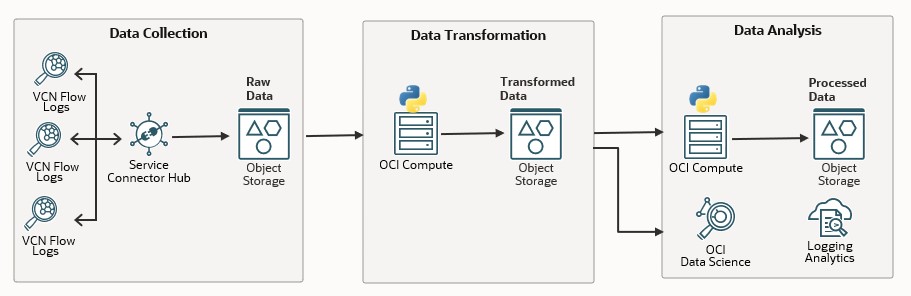
Why Flow Logs?
OCI Flow Logs capture metadata about network traffic within your Virtual Cloud Network (VCN). They are essential for monitoring, analyzing, and troubleshooting network activity in Oracle Cloud Infrastructure (OCI) environments. For a deeper understanding of Flow Logs, you can check out this detailed blog post.
Note: If you are already streaming Flow Logs to OCI Object Storage or external SIEM services like Splunk, you do not need to configure this again.
OCI streams Flow Logs to the OCI Logging service, where they are retained for 30 days by default. However, many customers require longer retention periods for logs. In this post, we will guide you on how to stream logs to OCI Object Storage for long-term storage.
Enabling Flow Logs and Streaming to Object Storage
Step 1: Enable Flow Logs for All Subnets
Enabling Flow Logs manually across all subnets is time-consuming. To simplify the process, we have created a Python script that automates creation of a new log group and enables Flow Logs across all subnets in the tenancy.
The script:
– Creates a new log group called `subnet_flow_log_group` in the root compartment
– Iterates through each compartment, VCN and enables Flow Logs for each subnet with log names formatted as `CompartmentName_VCNName_FlowLog`.
Here is a sample Python script:
import oci, sys
import random, string

# Initialize OCI config and clients
config = oci.config.from_file()
virtual_network_client = oci.core.VirtualNetworkClient(config)
identity_client = oci.identity.IdentityClient(config)
logging_client = oci.logging.LoggingManagementClient(config)

# Get the tenancy's OCID from the config
tenancy_id = config["tenancy"]

# Function to list all compartments in the tenancy
def list_compartments(identity_client, tenancy_id):
    compartments = []
    compartment_response = identity_client.list_compartments(
        tenancy_id,
        compartment_id_in_subtree=True,
        access_level="ACCESSIBLE"
    )
    compartments = compartment_response.data
    compartments.append(identity_client.get_compartment(tenancy_id).data)  # Add root compartment
    return compartments

# Function to fetch log groups and logs once and store them in a dict for lookup
def fetch_log_groups_and_logs(tenancy_id):
    log_dict = {}
    log_groups = oci.pagination.list_call_get_all_results(
        logging_client.list_log_groups,
        tenancy_id,
        is_compartment_id_in_subtree=True
    ).data
    for log_group in log_groups:
        logs = logging_client.list_logs(
            log_group_id=log_group.id,
            log_type="SERVICE"
        ).data
        for log in logs:
            log_dict[log.configuration.source.resource] = {
                "log_group_id": log_group.id,
                "log_group_display_name": log_group.display_name,
                "log_id": log.id,
                "log_display_name": log.display_name
            }
    return log_dict

# Function to create a new log group if not exists
def create_log_group_if_missing(tenancy_id, log_group_name="subnet_flow_log_group"):
    existing_log_groups = logging_client.list_log_groups(tenancy_id).data
    check_log_group = False
    if existing_log_groups:
        for log_group in existing_log_groups:
            if log_group.display_name == log_group_name:
                check_log_group = True
                return log_group.id, log_group.display_name
    if check_log_group == False:
        log_group_details = oci.logging.models.CreateLogGroupDetails(
            compartment_id=tenancy_id,
            display_name=log_group_name
        )
        log_group = logging_client.create_log_group(log_group_details)
        existing_log_groups = logging_client.list_log_groups(tenancy_id).data
        for log_group in existing_log_groups:
            if log_group.display_name == log_group_name:
                check_log_group = True
                return log_group.id, log_group.display_name

def create_flow_log_for_subnet(subnet, log_group_id, compartment_name, vcn_name):
    try:
        random_letters = ''.join(random.choices(string.ascii_lowercase, k=2))
        display_name = f"{compartment_name}_{vcn_name}_flow_log_{random_letters}".replace(' ', '_')
        print(f"Creating flow log for subnet {subnet.display_name} with display name {display_name}")
        log_details = oci.logging.models.CreateLogDetails(
            display_name=display_name,
            log_type="SERVICE",
            configuration=oci.logging.models.Configuration(
                source=oci.logging.models.OciService(
                    source_type="OCISERVICE",
                    service="flowlogs",
                    resource=subnet.id,
                    category="all"
                )
            )
        )
        logging_client.create_log(log_group_id, log_details)
        print(f"Created flow log for subnet {subnet.display_name} with display name {display_name}")
    except oci.exceptions.ServiceError as e:
        print(f"Failed to create flow log for subnet {subnet.display_name}: {e}")
    except Exception as e:
        print(f"An unexpected error occurred: {e}")

def check_and_enable_flow_logs_in_subnets(virtual_network_client, compartment_id, log_dict, log_group_id):
    subnets = virtual_network_client.list_subnets(compartment_id).data
    compartment_name = identity_client.get_compartment(compartment_id).data.name
    for subnet in subnets:
        print(f"Checking subnet: {subnet.display_name} in VCN {subnet.vcn_id} and compartment {compartment_id}")
        if subnet.id in log_dict:
            log_info = log_dict[subnet.id]
            print(f"Flow logs already enabled for subnet {subnet.display_name}: "
                  f"Log Group: {log_info['log_group_display_name']}, Log: {log_info['log_display_name']}")
        else:
            print(f"Flow logs not enabled for subnet: {subnet.display_name} in VCN {subnet.vcn_id}. Creating new flow log.")
            vcn_name = virtual_network_client.get_vcn(subnet.vcn_id).data.display_name
            create_flow_log_for_subnet(subnet, log_group_id, compartment_name, vcn_name)

# Main script execution
def main():
    log_group_id, log_group_name = create_log_group_if_missing(tenancy_id)
    compartments = list_compartments(identity_client, tenancy_id)
    log_dict = fetch_log_groups_and_logs(tenancy_id)
    for compartment in compartments:
        if compartment.lifecycle_state == 'ACTIVE':
            print(f"Processing compartment: {compartment.name}")
            check_and_enable_flow_logs_in_subnets(virtual_network_client, compartment.id, log_dict, log_group_id)

if __name__ == "__main__":
    main()
Once executed, this script enables Flow Logs and streams them to the OCI Logging service. The next step configures long-term storage in Object Storage.
Step 3: Create an Object Storage Bucket for Log Storage
If you don’t have an Object Storage bucket for storing flow logs, follow these steps:
1. In the OCI Console, navigate to Storage → Object Storage → Buckets.
2. Click Create Bucket.
3. Name the bucket (e.g., `flow-log-archive-bucket`).
4. Select the root compartment and leave the default settings.
5. Click Create.
Step 4: Set Up Dynamic Groups and Policies
To allow the Service Connector Hub to access Object Storage and Logging, set up fine-grained access control:
1. Go to Identity & Security → Domains → Your Identity Domain → Dynamic Groups.
2. If you don’t have a dynamic group for Connector Hub, create one with this rule:
ALL { resource.type='serviceconnector', resource.compartment.id='ocid1.compartment.oc1..<your_compartment_ocid' }
3. Navigate to Domains → Policies, and create a new policy:
                  ALLOW dynamic-group <your_dynamic_group TO manage objects IN TENANCY
                  ALLOW dynamic-group <your_dynamic_group TO read logging-family IN TENANCY
Step 5: Configure Service Connector Hub to Stream Logs to Object Storage
To stream logs from the Logging service to Object Storage:
1. In the OCI Console, go to Analytics & AI → Messaging → Connector Hub.
2. Click Create Connector.
3. Name the connector (e.g., `flow-log-to-object-storage-connector`).
4. Select the root compartment where your log group and bucket reside.
5. Under Configure Connector:
– Source: Select Logging
– Destination: Select Object Storage.
6. Under Configure Source, select the root compartment and choose the Log Group (`subnet_flow_log_group`)
7. Under Configure Target, select the root compartment and the Bucket where Flow Logs will be saved (e.g., `flow-log-archive-bucket`)
8. Review the details and click Create.
Verify the setup, by navigating to the flow-log-archive-bucket and review the log files created.
Conclusion
By following these steps, you can automate the process of enabling Flow Logs for all subnets and stream them to OCI Object Storage for long-term retention. In the next post, we’ll cover how to enrich and analyze Flow Log data using OCI services.