
Introduction
Lately I have run into multiple scenarios where a customer is looking to take advantage of OCI Generative AI services without traversing the internet. This blog will focus on privately connecting Gen AI workloads located outside of the Gen AI regions. This solution will allow existing Oracle Cloud tenancies, datacenters and 3rd party CSP’s to securely connect to Oracle Gen AI services.
Architecture
This architecture covers the necessary configuration to privately connect Gen AI to existing Oracle Cloud tenancies, datacenters and 3rd party CSP’s.
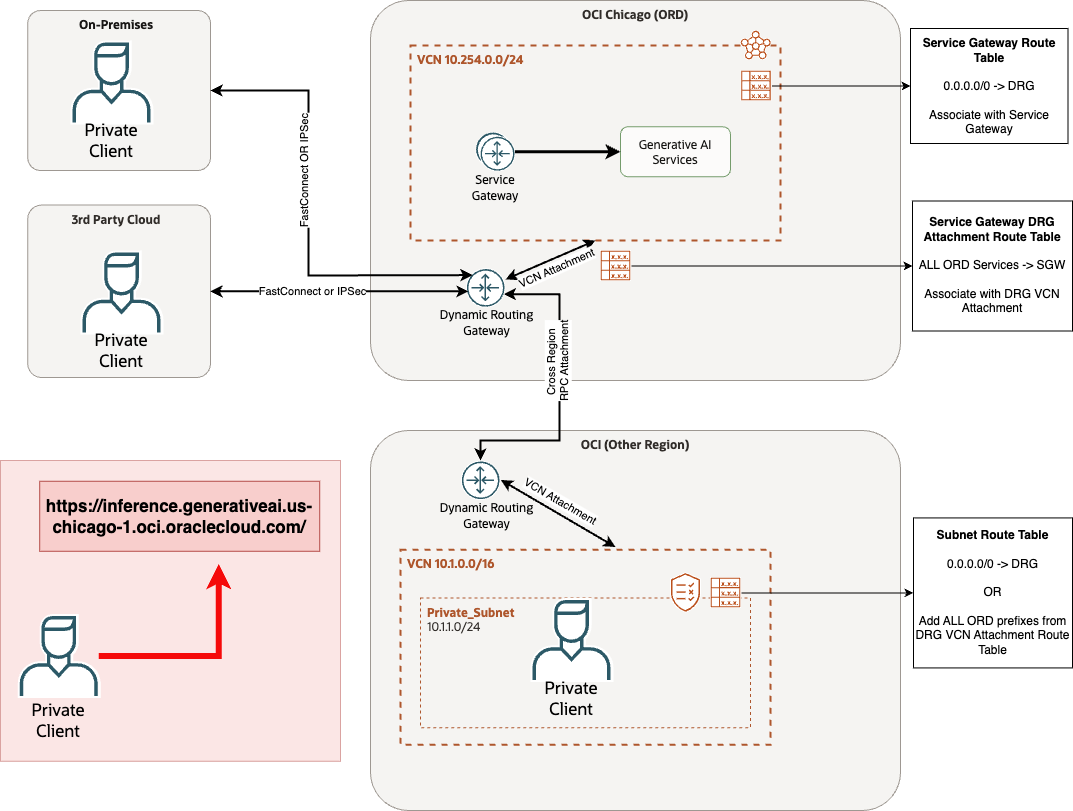
Configuration Steps
Generative AI region:
- A VCN with a Service Gateway
- (new) Service Gateway Route Table
- 0.0.0.0/0 route to the DRG.
- Associate this route table with the service gateway.
- (new) VCN attachment Route Table.
- Route all (3 letter region code) Services to VCN Service Gateway
- Associate VCN attachment route table to VCN attachment.
External Infrastructure:
- External infrastructure (non-OCI)
- For IPSec over BGP or FastConnect connections, the CIDR prefixes for Gen AI services will automatically be advertised through these links.
- If there is a desire to firewall OCI traffic to whitelist Gen AI services, it is recommended to build a firewall rule based on the FQDN of the service and not the CIDR block.
- External OCI regions
- (Option 1) Search for the generative AI region (e.g. us-chicago-1) and add the prefixes associated with this region. The resolved IP address is dynamic and can change at any time so it is recommended to add all CIDRs for the region into the route table.
- (Option 2) Alternatively you can specify a default route to the DRG which will route traffic properly to the Gen AI region.
Video Walkthrough
You can follow along on this video to see the step by step process in action. After completing the necessary steps, you will have extended Gen AI services to all OCI regions and to any other external infrastructure you desire!