

Introduction:
As part of our ongoing blog series on securing Oracle Fusion Cloud Applications, Part 1 and Part 2 explored foundational methods to limit exposure to the public internet. The articles demonstrated how organizations can restrict direct public access to Fusion environments while still enabling controlled connectivity to OCI resources using IPSec VPN and FastConnect Private Peering.
In this next installment, we expand on those principles and address similar requirement leveraging Oracle FastConnect Public Peering in combination with Equinix Fabric. This allows enterprises to establish a private, dedicated, and deterministic path from on-premises networks to Fusion SaaS endpoints. This approach strengthens security, improves performance, and avoids the unpredictability of internet routing, while still satisfying strict compliance or isolation needs.
Use Case:
A customer wants to:
- Completely block public internet access to their Fusion Cloud Applications (ERP, HCM, SCM, CX, etc.).
- Enable secure access from on-premises networks using FastConnect public peering through Equinix.
Oracle Fusion Cloud Applications support various connectivity patterns as outlined in MOS Note 3060221.1 – Network Connectivity Patterns for Oracle Fusion Cloud Applications.
Prerequisites:
To implement this setup, ensure the following:
- An OCI tenancy hosting the Fusion Cloud Application environment.
- IAM credentials with required permissions to manage network resources.
- Access to the OCI Console or OCI CLI.
- A dedicated compartment for organizing network resources.
- A signed LOA (Letter of Authorization) for FastConnect public peering, coordinated with your ISP or provider.
- Established connectivity between your on-premises network and the Equinix Fabric Cloud Router (FCR) through cross-connects, carrier links, or Fabric virtual connections.
- BGP peering configured between your on-premises router and the FCR, ensuring that on-prem prefixes are advertised to OCI over the FastConnect public peering circuit.
High-Level Architecture:
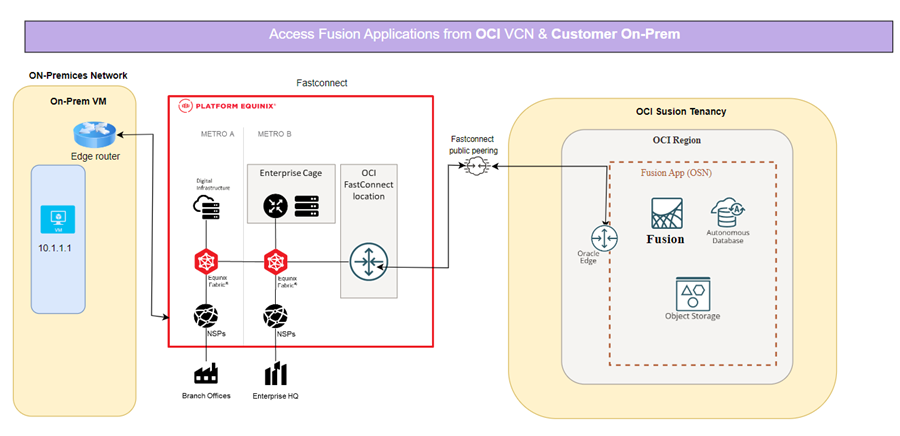
The architecture integrates:
• FastConnect public peering
• Equinix Fabric Cloud Router (FCR)
• Secure access path from on-premises → Equinix Fabric → FastConnect → Fusion Cloud Applications
Setup:
The end-to-end setup is divided into the following major steps:
- Fast Connect Public Peering Setup
- Equinix Fabric Cloud Router Configuration
- Letter of Authorization Handling
- Fusion Applications Network Settings
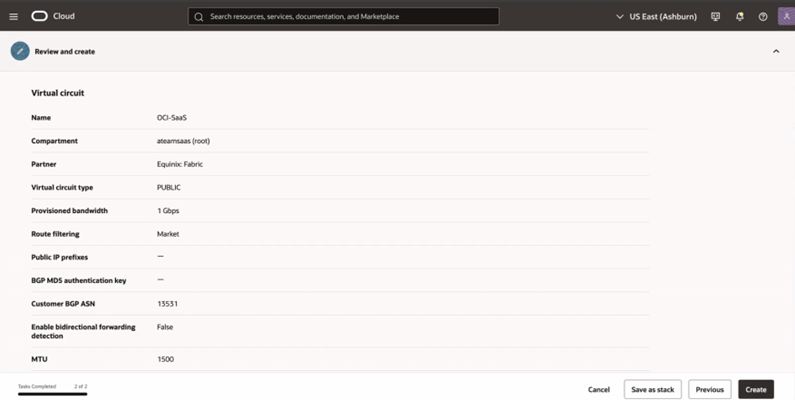
Part 1: Configure OCI Fast Connect Public Peering
- Navigate to Networking → FastConnect → Create Connection.
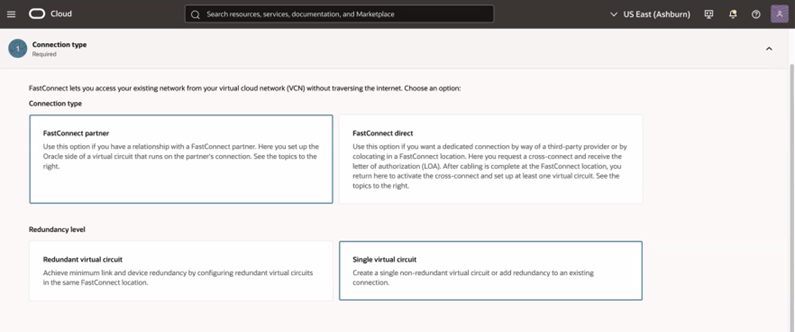
2. Select Public Virtual Circuit and partner as Equinix Fabric
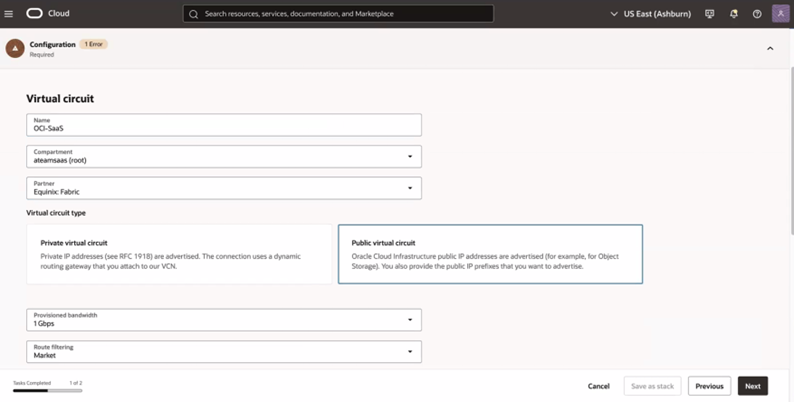
3. Choose All Traffic, Select bandwidth, route filtering type and provider ASN (Equinix ASN 13531).
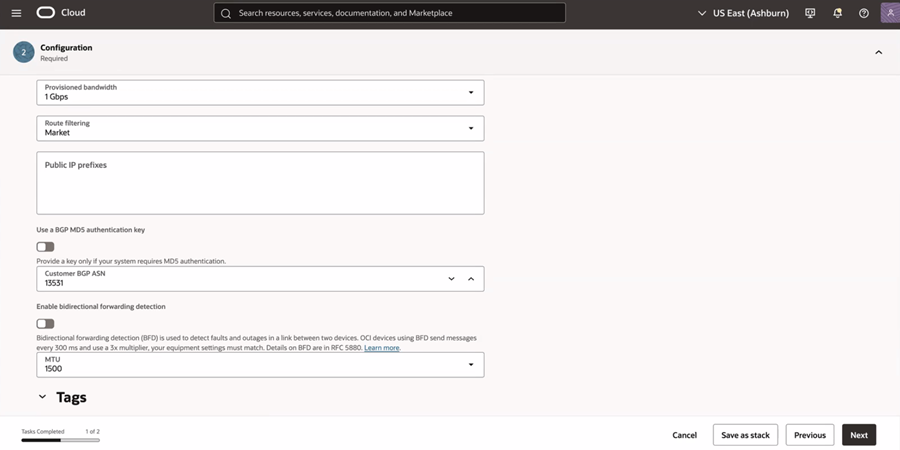
For FastConnect public-peering circuits, the routing behaviour to your on-premises network can be controlled using different route-filtering types. These determine which sets of public IP ranges from Oracle Cloud Infrastructure (OCI) are advertised over the BGP session
Here are the public peering route filtering types you can choose from:
| Route Filtering Type | What routes are advertised to on-premises |
| Regional | Only the public IP ranges (ephemeral, reserved, and service-network) for the same OCI region as the virtual circuit are advertised. |
| Market (default) | Public IP ranges for the local region plus all other OCI regions that fall in the same “market” (i.e. same geographic market group) are advertised. |
| Global | Public IP ranges for all OCI regions across all markets are advertised to on-premises—effectively giving full global reach to OCI public services via FastConnect. |
| Oracle Services Network (OSN only) | Only the public IP ranges belonging to the OCI Services Network (e.g. APIs, console endpoints, public services) in the local region are advertised—not general public IP ranges such as ephemeral/reserved IPs used by other customers. |
FastConnect public peering route filtering can be changed anytime without recreating the circuit. Updating it simply causes BGP to re-advertise the new prefix set, with minimal impact and no downtime.
Part 2: Equinix Fabric Cloud Router Setup
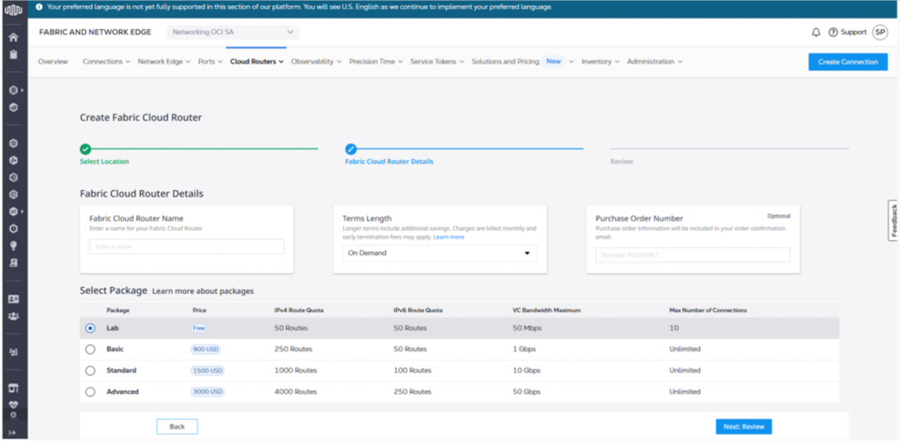
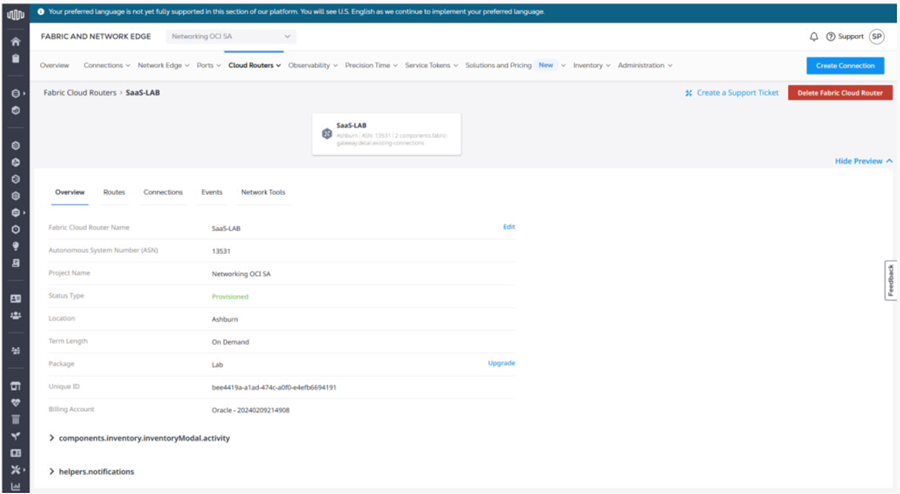
- In Equinix Fabric console, navigate to Network Edge → Fabric Router
- Select region, router size, and create the Cloud Router.
3. Create Equinix Connections to OCI in Equinix Console
- Select connection type (redundant/primary)
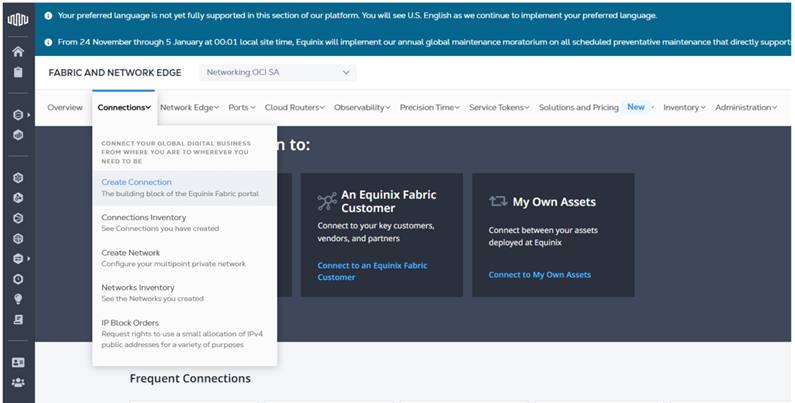
Provide OCID and region for FastConnect circuit
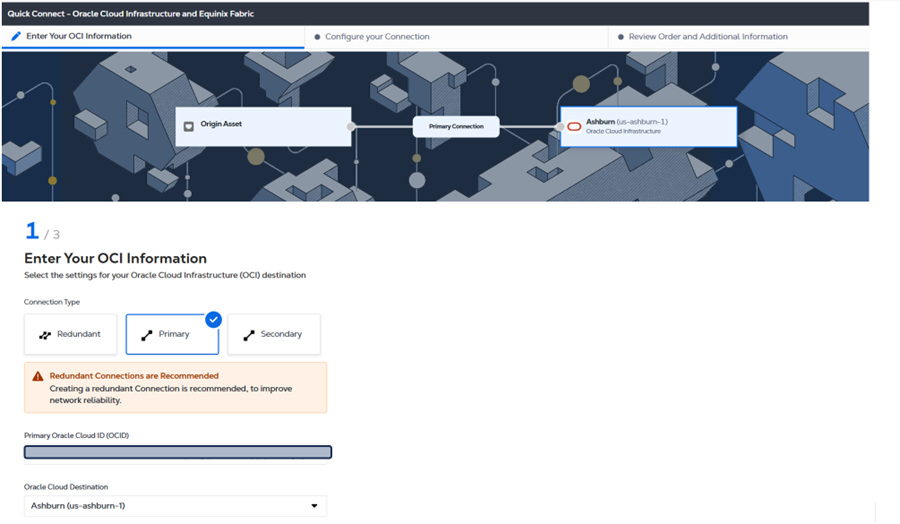
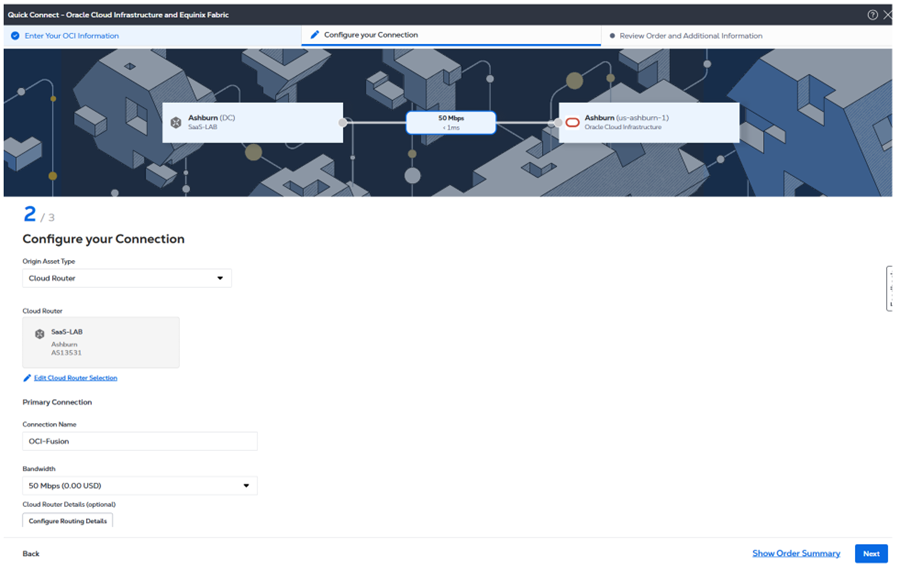
Select the FCR created earlier, Set bandwidth & BGP details.
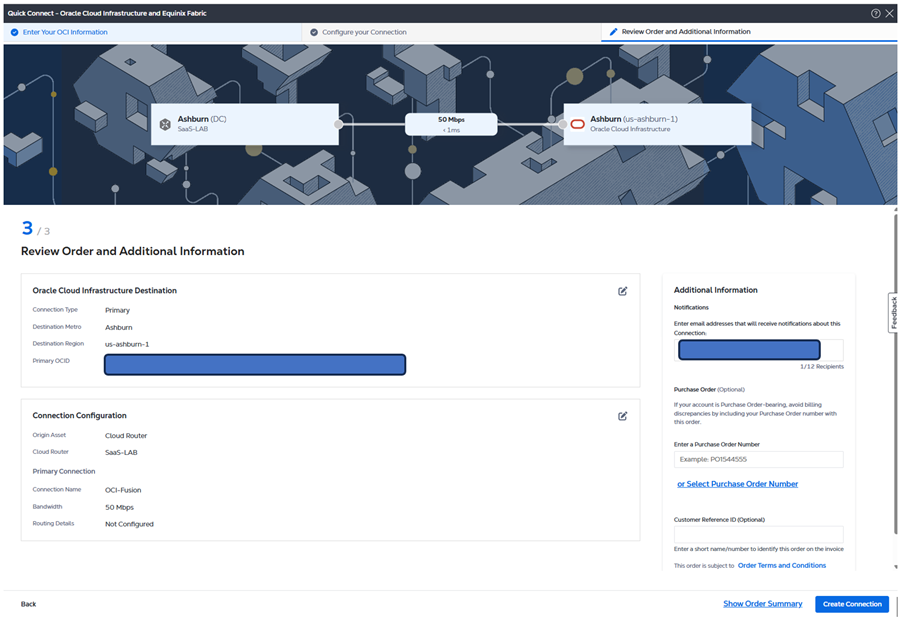
review order and create the connection:
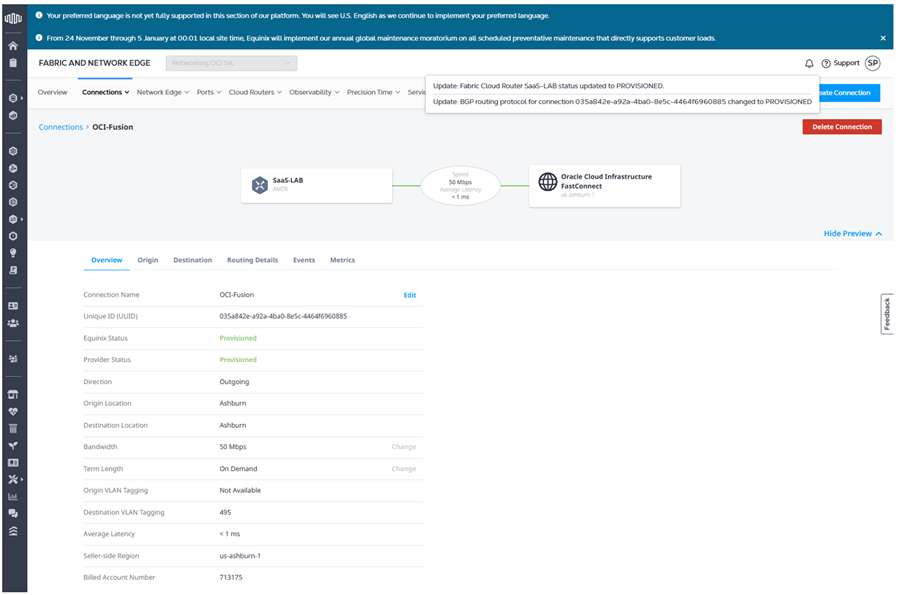
Configure the routing details:
- Configure Equinix end IP and Peer IP (We can get these public IP from fastconnect status page at OCI)
- Configure Peer ASN 31898 (OCI ASN).
Apply changes.
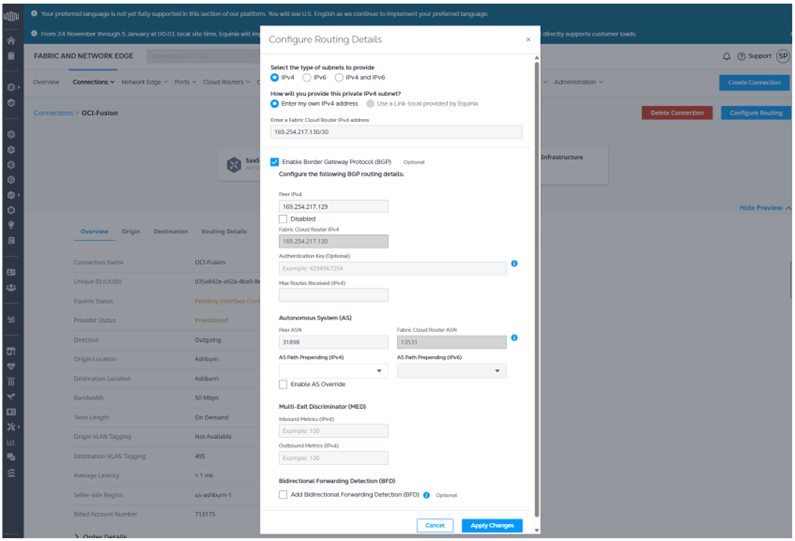
Equinix end status will change to Provisioned.
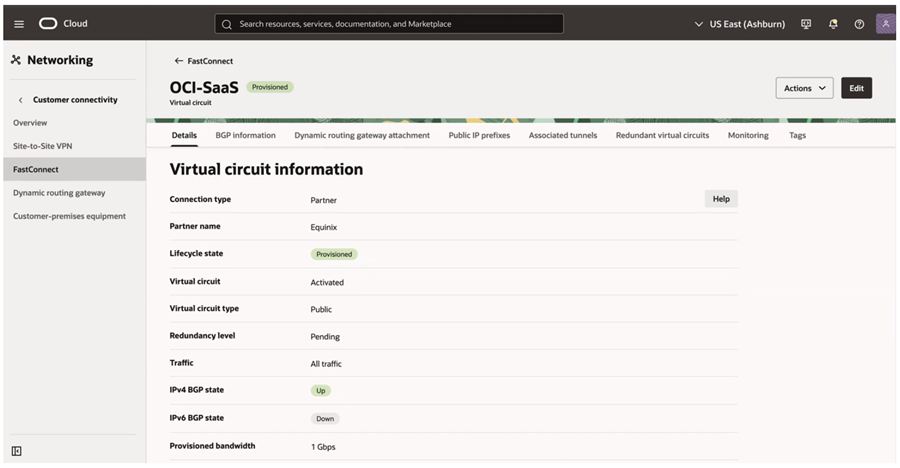
Verify the BGP status at OCI end. BGP should be “Up”
Part 3: Letter of Authorization (LOA) Handling:
When setting up FastConnect public peering, one of the key steps is selecting the public IP prefixes that your organization wants to advertise over the virtual circuit. These prefixes represent the on-premises networks that Oracle Cloud Infrastructure (OCI) will use to return traffic through FastConnect.
You can choose any prefix size, and OCI will validate ownership of each public prefix before allowing traffic to flow. This validation ensures that only legitimately owned and registered public IP ranges are used on the connection, preserving routing integrity and preventing hijacked or spoofed prefixes from being accepted.
The validation process typically takes up to three business days, during which OCI verifies the prefix against global Internet Routing Registries (IRRs) and Regional Internet Registries (RIRs). You can monitor the status of each prefix directly in the OCI Console or via API.
OCI will begin advertising its public service IP ranges over FastConnect only after at least one of your public prefixes has been successfully verified. This means the LOA workflow and prefix validation are essential prerequisites before end-to-end routing becomes operational.
For more detail, see Oracle’s official documentation on public peering and IP prefix validation:
https://docs.oracle.com/en-us/iaas/Content/Network/Concepts/fastconnectoverview.htm#public_asn_ip
Part 4: Configure Fusion Applications Network Settings
Note: You’ll need Fusion Applications Environment Administrator access for this step. Refer to Fusion Access Management Docs.
- Go to Applications > My Applications in OCI
- Select your Fusion POD
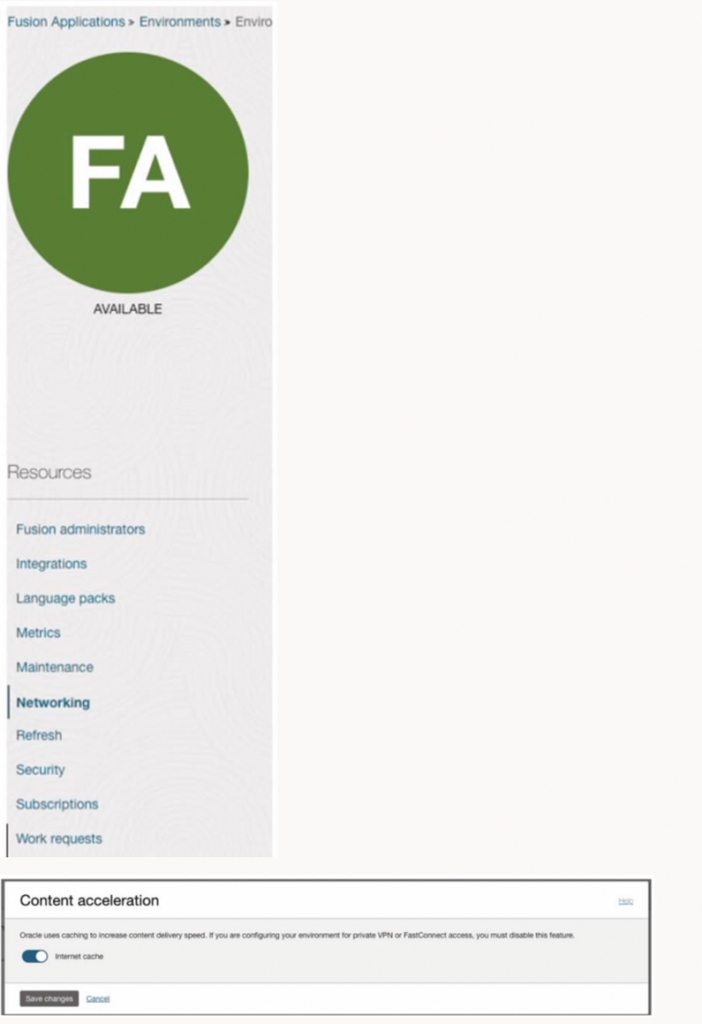
- In the Networking section:
- Disable Content Acceleration (wait for lifecycle state to return to Active)
Edit the access control rule to allow the public CIDR from On-Prem
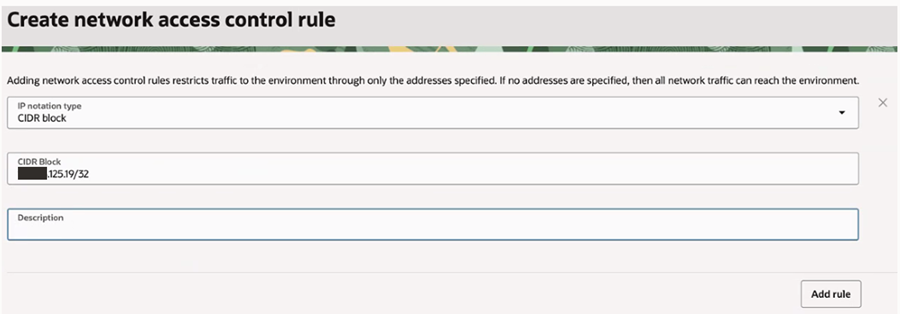
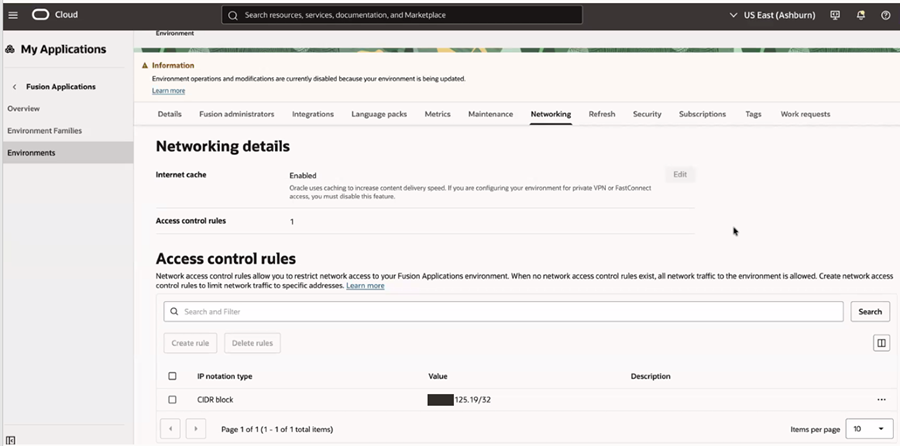
Apply and wait for state update to Active again.
Test Connectivity
- Access the URL from the allowed CIDR.
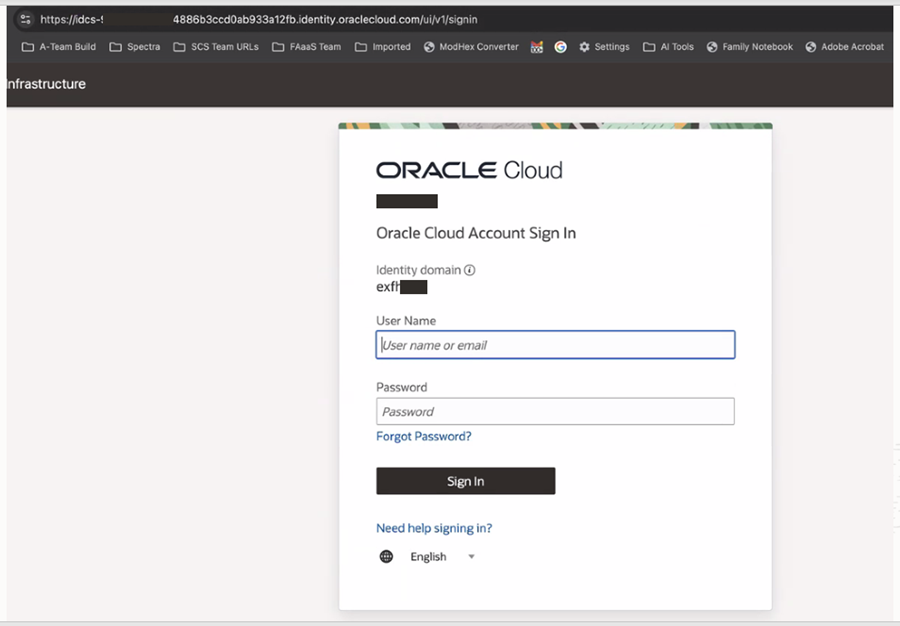
When I try to access the URL from Public Internet:

Conclusion
By integrating Oracle FastConnect public peering with Equinix Fabric, organizations can:
- Enforce strict no-internet-access policies for Fusion Applications.
- Provide a predictable, and secure access path from corporate networks.
- Maintain compliance while improving performance and reliability.
This approach is ideal for enterprises requiring controlled access to mission-critical Oracle Fusion SaaS applications without exposing them to the public internet.