
This is a true story, only the names have been changed to protect the “guilty”.
Sending OCI audit logs (via OCI Stream) to a Security Information and Event Management (SIEM) platform is a common use case and recommended. So what happens if the connection is lost to your SIEM for a period of weeks? In this post, I discuss the crime scene, how to recover lost audit data and how to prevent it from happening again
The Crime Scene
A Virtual Machine (VM) in OCI running SIEM software was “Terminated”. Since the audit records are sent to the same VM via OCI Stream, we do not know who terminated the instance…yet. More importantly, no administrator was notified for weeks! Sending audit data to an OCI Stream requires configuring a Service Connector to a stream target. By default the stream can only store 24 hours of historical data; however, this can be configured to 7 days. How can I retrieve weeks of lost data?
The Fix
OCI retains 365 days of audit logs. You can download some of the logs from the OCI Console; however the OCI Console only allows for up to two weeks of audit records. For large data sets, the best way to obtain the logs is via REST/SDK or OCI CLI. I have created a script using the Python SDK to recover the audit logs for a configurable time period.
This script requires the Python OCI module to be installed locally on your computer or you can use the OCI CloudShell.
What this code does
Read the README.md file for full details on the prerequisites and how to run the script. When the script completes, a report file is generated. This report provides the status of each log file and the number of events in each log.
Note: Keep in mind that there are a lot of event records within the audit logs. This script may take some time to complete. Especially if you have many regions and compartments with audit events.
Now that we have the audit logs, we need to backfill or replay the data into the stream so that the SIEM can parse through the missing events.
You have two choices when it comes to replaying the stream:
- Most SIEMs can pull data from files so you can upload the files (from the AuditRecovery script) to Object Storage or any file system where your SIEM can “pull” from. This option is recommended for large data sets.
- I have created another script that will upload the audit data to your stream. It is to be used in conjunction with the AuditRecovery script above. The script can upload relatively large data sets however it may be slower than option 1 above. This is due to a 1MB max data upload (per call) for the OCI Stream API.
What this code does:
- Reads the files from a directory and decompresses each file. See the AuditRecovery script above.
- Calculates and sends (base64-encoded) a batch of events <= 1MB.
- Creates a ‘report.log’ and ‘report.state’ file. If the script fails before completion, you can rerun the script and it will continue where you left off. To start a new job, remove the ‘report.log’ and ‘report.state’ files.
Now let’s find out who really terminated the VM instance…
Prevention
There are some steps you can take to prevent this from happening or at the very least your administrator should be notified immediately when an instance is being terminated.
Policy Enforcement
In every tenancy, there is a default policy called ‘Tenant Admin Policy’. This policy cannot be modified and only has one statement:
ALLOW GROUP Administrators to manage all-resources IN TENANCYIf you belong to the ‘Administrators’ group, you have super-user access. There is no policy statement you can add to prevent the termination of an instance.
For other administrators who have ‘manage’ rights for instances; you can prevent any termination of instances by using a ‘where’ clause in the policy statement. There are two options:
Option 1
Allow group to manage instance-family in compartment where request.permission != 'INSTANCE_DELETE'Option 2
Deny any-user to manage instance-family in tenancy
where request.permission = 'INSTANCE_DELETE'
In this option, the deny policy does not allow anyone to delete the instance (INSTANCE_DELETE).
See documentation for more details.
Cloud Guard
Enable Cloud Guard; this is our native Cloud Security Posture Management (CSPM) platform and can notify you when an instance is down/terminated. Cloud Guard allows you to act on these events and/or notify administrators when this event occurs. More details can be found in our documentation and blogs posts on setting this up.
Cloud Guard Tips – Detectors vs. Responders
OCI Events
For near-real-time event notification, you can setup a rule to notify administrators when an instance is being terminated. There are many flavors to create an event for termination, depending upon how the compute node is configured and what type.
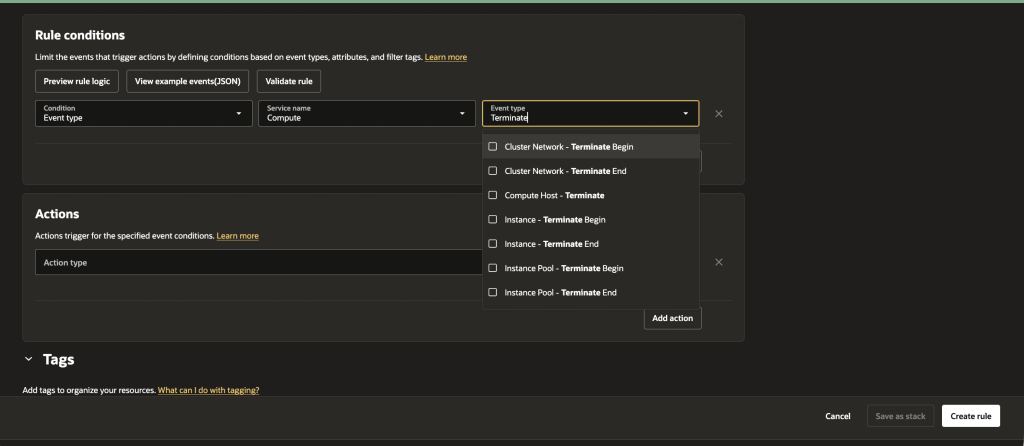
For more information check out the documentation.
High-Availability (HA)
Prevent a single point of failure with a single instance. Use a load balancer for an Active-Passive setup. Here is a great post that describes how OCI can make your compute nodes more robust.
Backup Audit Data
Another mitigating step is to store the latest audit logs in Object Storage. Create another Service Connector to store the last 90 days of audit logs. The Service Connector cannot send historical data to the stream; this is why we used the Python script above to obtain the audit logs for a specific time period.
Recap
Losing connection to your Instance is bad, not knowing about it for weeks is worse. In our story, an OCI instance was deployed with SIEM software. The SIEM platform was consuming audit data from an OCI Stream; until the instance was terminated. Even after the SIEM has been down for weeks, the OCI Logging Service can still be accessed to retrieve the missing audit logs. The script I provided will download all the missing audit data for a specific time period. Once recovered, your SIEM should be able to pull data from OCI Object Storage/disk; if not you can use the second script I created to upload the audit logs to the stream for your SIEM to consume.
Thanks for reading!
Now let’s see who terminated the VM…..To be continued?