

Introduction
Oracle Cloud’s FastConnect service allows customers to privately and reliably connect their OCI VCNs with the rest of their enterprise networks including on-premises sites, other cloud providers, co-lo facilities etc. Customers can deploy FastConnects through connectivity partners such as Megaport.
A common problem when connecting separated networks owned by the same organizations via a provider such as Megaport is that the networks may have the same BGP Autonomous System Number (ASN). During BGP route exchange, prefixes from site-A advertised to site-B through Megaport will contain the same AS number as that of network-B in the AS_PATH attribute, resulting in the prefix being rejected due to BGP loop-control mechanisms. For example, if a customer connects OCI VCNs in two regions through Megaport as part of a broader hybrid or multi-cloud strategy, the two sites may fail to exchange prefixes if both routes are advertised with ASN 31898.
AS Override solves this by having the connectivity provider replace the relevant ASN in BGP advertisements with its own ASN. This blog demonstrates how to use AS Override when connecting multiple OCI VCNs through FastConnect partner Megaport.
Scenario
- There are 2 VCNs –
- vcn-iad in OCI Ashburn with a CIDR of 10.100.0.0/24
- vcn-phx in OCI Phoenix with a CIDR of 10.200.0.0/24.
- Each VCN is connected to a DRG in its respective region.
- Each VCN’s route-table has a route pointing 10.0.0.0/8 to the respective DRG.
- Each DRG terminates a partner Fastconnect circuit to Megaport in their respective regions.
- Each FastConnect circuit terminates on a Megaport Cloud Router (MCR)
- The two MCRs are connected to each other within Megaport via a private virtual circuit.
- ** Note that both FastConnect circuits could have also terminated on a single Megaport MCR. However, since we are emulating a larger enterprise network which may have multiple MCRs, we have chosen to use two separate MCRs.
- BGP peering is enabled between endpoints of each link.
- ASN for both Oracle regions is 31898
- ASN for Megaport is 133937
- There are 2 compute instances for testing
- vm-iad in Ashburn with an IP of 10.100.0.32
- vm-phx in Phoenix with an IP of 10.200.0.79
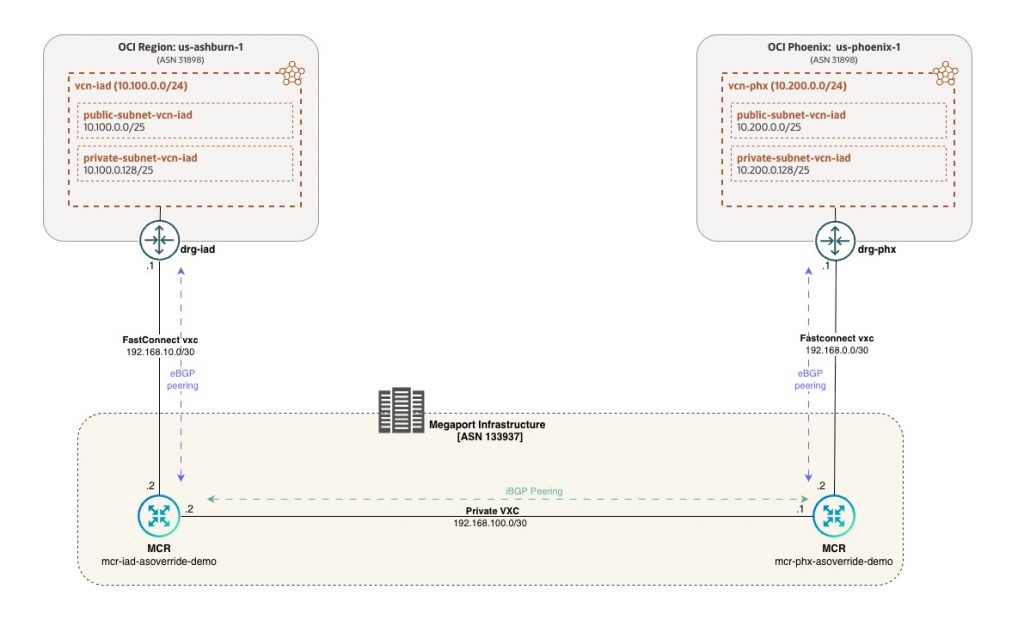
Note: If we only needed to connect these 2 VCNs we could have easily done this using RPCs on the DRGs. However, in this scenario, these VCNs are a subset of an organization’s multicloud footprint with several other clouds and on-premises all connected to Megaport.
Pre requisites
The goal of the blog is to focus on the connectivity through Megaport. Hence, the following OCI resources are assumed to have already been created.
- Virtual Cloud Networks (VCN) in both regions, Phoenix and Ashburn
- Subnets within this VCN
- Route tables and Routes within the VCN
- Security Lists allowing access between the VCNs
- Dynamic Routing Gateway (DRG) in both regions
- VCN attachments between the VCN and DRG in both regions
- Compute Instances in both VCNs to be used for testing
Furthermore, you will need IAM permissions in OCI for configuring FastConnect circuits and permissions in Megaport for creation of MCR, VXC and for editing settings.
Configuration
The configuration steps have been broken out into separate pages to manage the length.
- To view the configuration steps for OCI infrastructure, please go here
- To view the configuration steps in Megaport, please go here
Once the configuration on OCI and Megaport has been completed, please return to this page for the Validation process. You can also track the entire configuration and validation process through the following video:
Validation
Observing the Problem
In Megaport, AS Override is disabled by default. In this section we will look at the route tables and test reachability before enabling AS Override.
Ashburn side
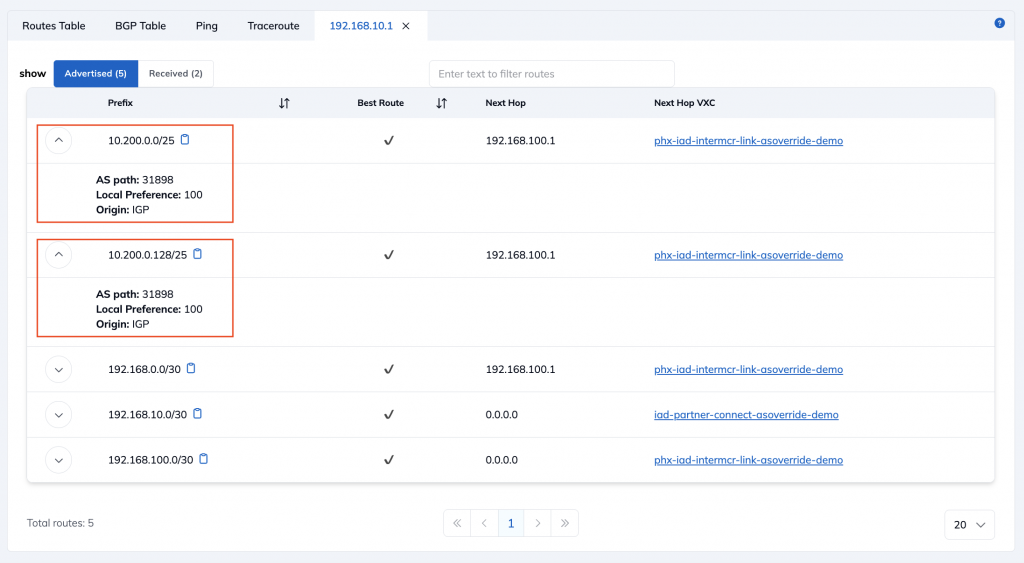
Routes advertised by Megaport MCR to the OCI DRG in Ashburn
As you can see, the Megaport MCR in Ashburn is advertising the 10.200.0.0/25 and 10.200.0.128/25 routes for the Phoenix VCNs to the Ashburn DRG. It has an AS_PATH of [31898]
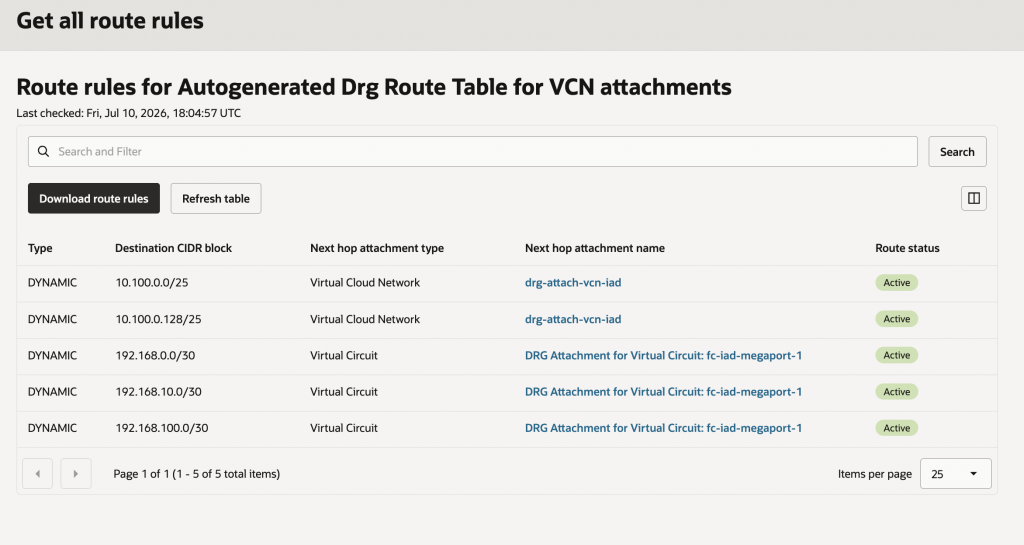
Routes installed by the OCI DRG in Ashburn
As you can see, even though the Megaport MCR advertises the routes for the Phoenix VCN to the Ashburn DRG over the Fastconnect virtual circuit, the DRG does not install them in the route-table due to the identical BGP ASN. It does install the other 192.168 routes because they originate in Megaport and only have an AS_PATH of [133937]
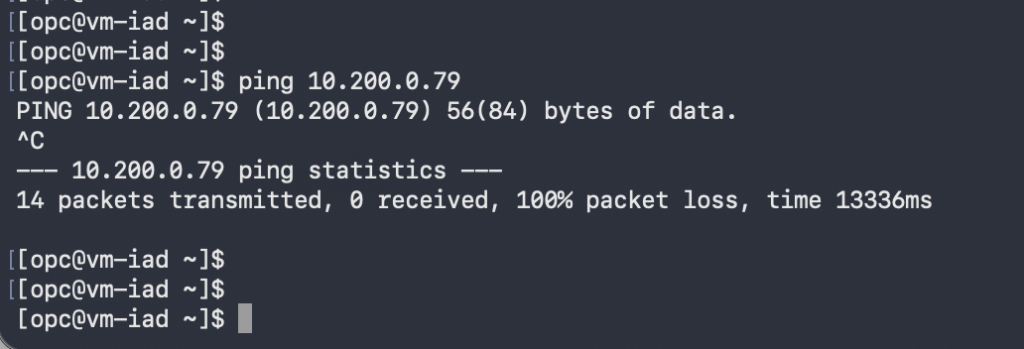
Ping Test from the Ashburn VM
Since there is no route from the Ashburn VM to the Phoenix VM, the ping test fails
Phoenix side
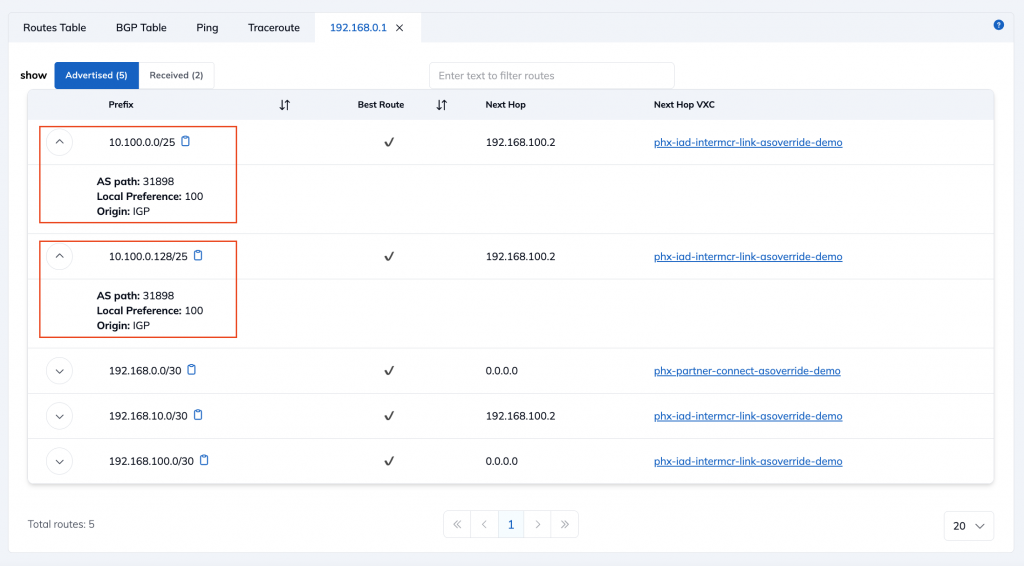
Routes advertised by Megaport MCR to the OCI DRG in Phoenix
As you can see, the Megaport MCR in Ashburn is advertising the 10.100.0.0/25 and 10.100.0.128/25 routes for the Phoenix VCNs to the Ashburn DRG. It has an AS_PATH of [31898]
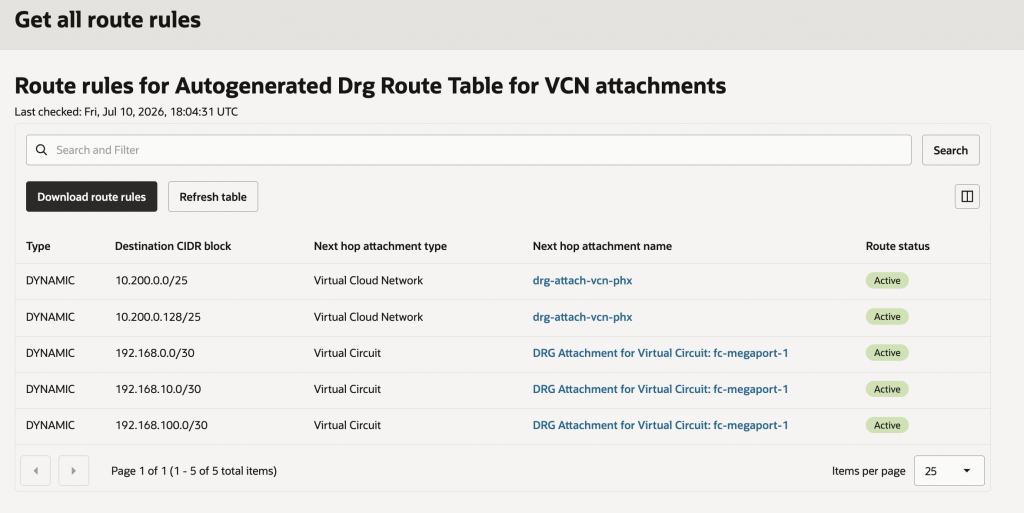
Routes installed by the OCI DRG in Phoenix
As you can see, even though the Megaport MCR advertises the routes for the Ashburn VCN to the Phoenix DRG over the Fastconnect cirtual circuit, the DRG does not install them in the route-table due to the identical BGP ASN. It does install the other 192.168 routes because they originate in Megaport and only have an AS_PATH of [133937]
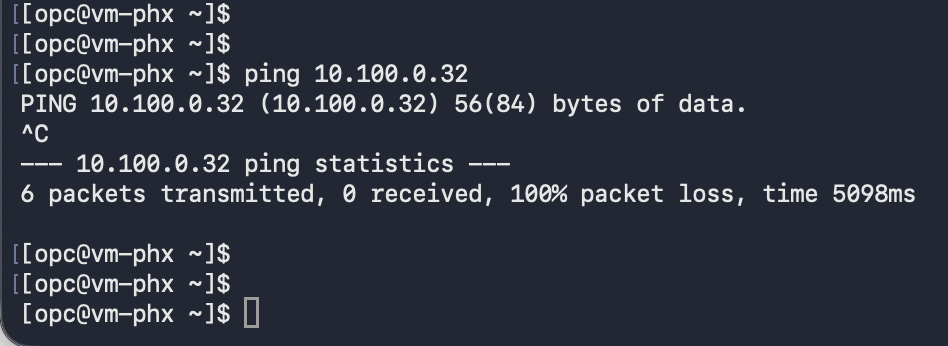
Ping Test from the Ashburn VM
Since there is no route from the Phoenix VM to the Ashburn VM, the ping test fails
Solving the Problem using AS Override
Enabling AS Override in Megaport
AS Override is a per-BGP peering setting. In order to enable it in Megaport, follow these steps:
(1) On the Megaport Portal, identify the Fastconnect virtual circuit and click on VXC details

(2) Click on the pencil icon above ‘A-end’
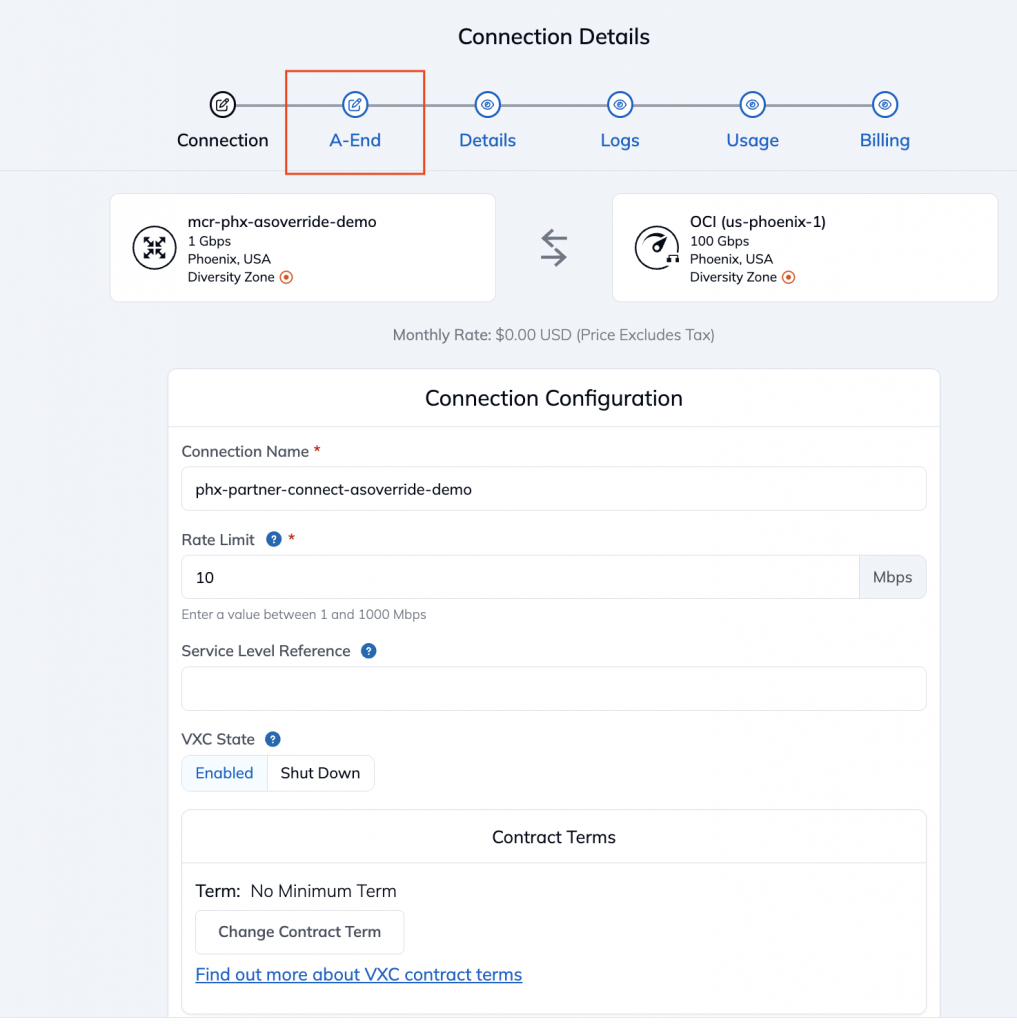
(3) Under BGP Connections, find the BGP peering and click on the Edit button against it
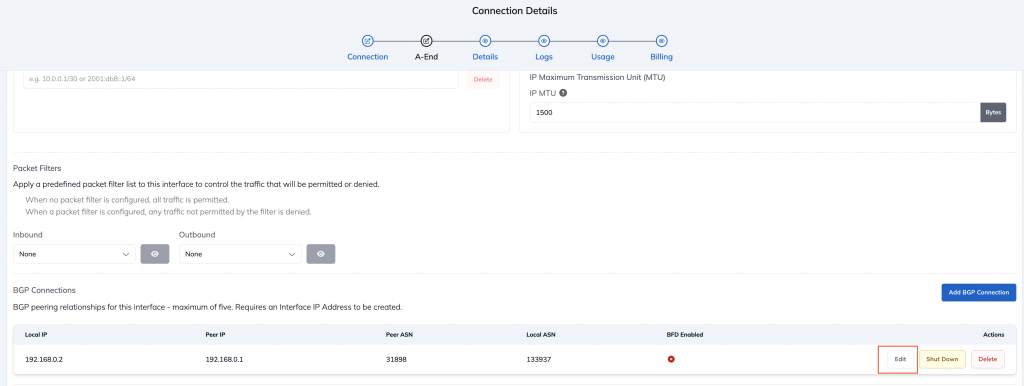
(4) Switch to the ‘Advanced’ tab. By default, AS Override will show as ‘Off’ as seen below. Toggle it to ‘On’ and click on ‘Update’
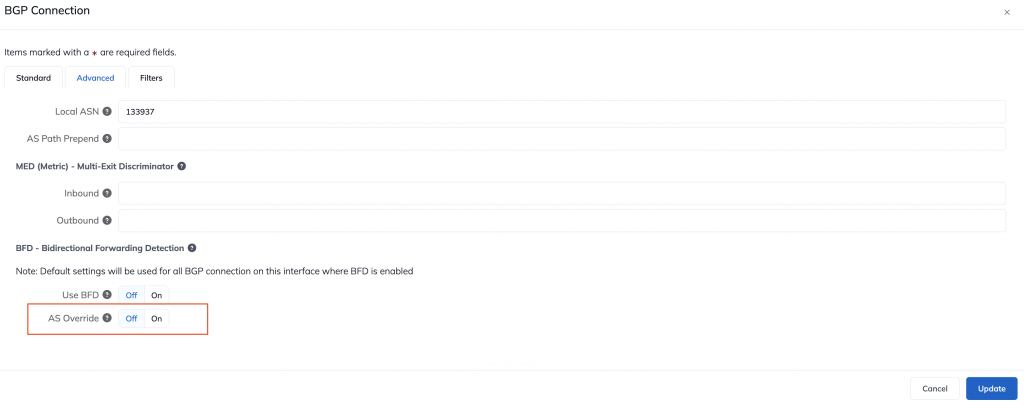
(5) Repeat this for the other FastConnect virtual circuit as well.
Observing the impact of enabling AS Override
The Ashburn DRG is now accepting and installing the routes learnt via BGP from Megaport for the Phoenix VCNs in its route-table.
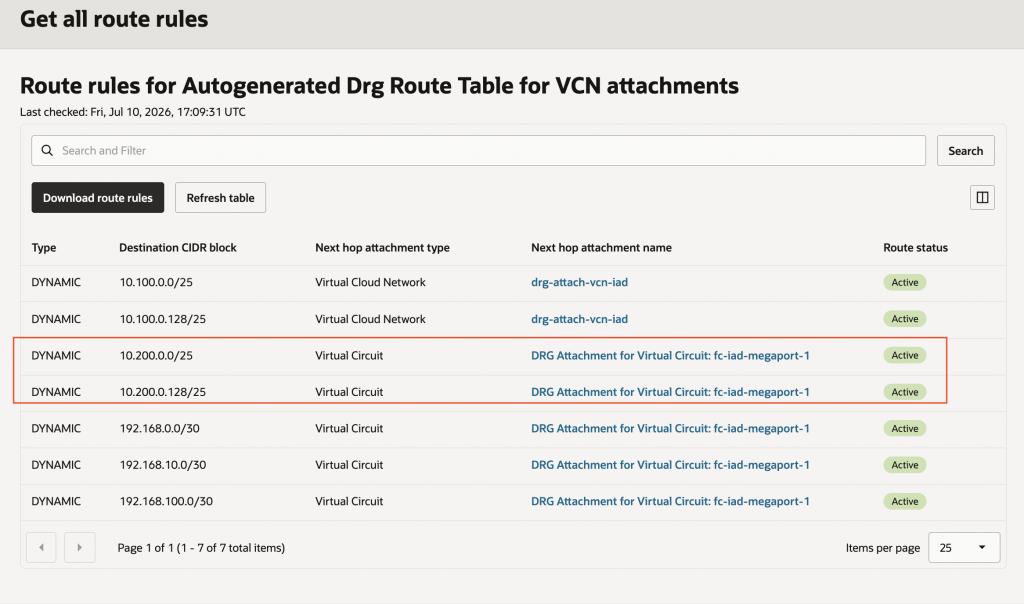
The Phoenix DRG is now accepting and installing the routes learnt via BGP from Megaport for the Ashburn VCNs in its route-table.
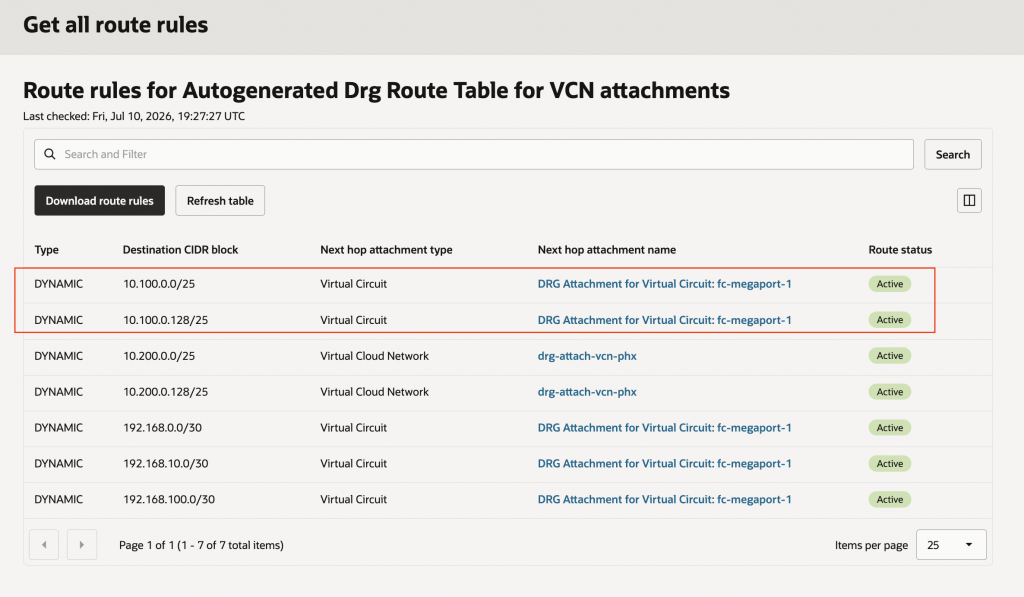
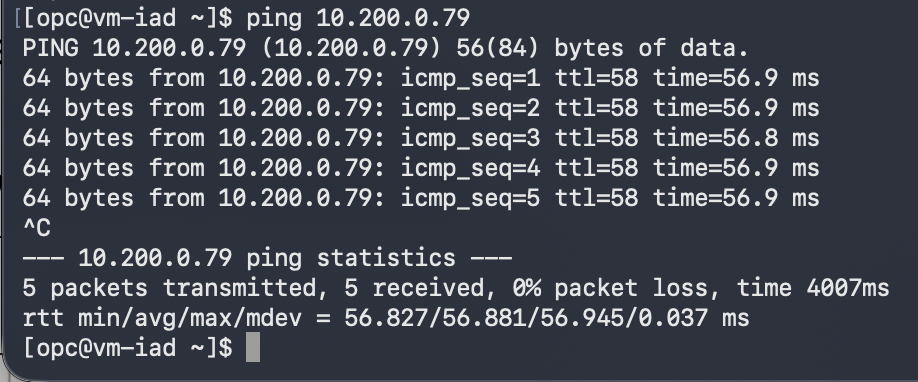
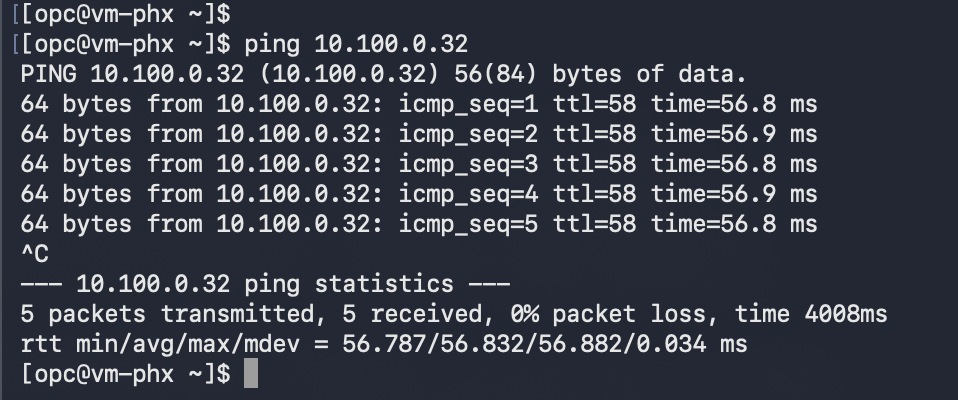
The test VMs in each region are now able to reach and ping each other.
Conclusion
We have demonstrated that it is possible to connect two OCI VCNs with each other by transiting via a Fastconnect partner such as Megaport. This type of connectivity is possible even when both VCNs use the same BGP ASN. This topology is enabled by setting AS Override in Megaport under Advance Settings for each BGP peering with OCI. This blog used 2 VCNs for demonstration but the same can be extended to multiple VCNs or other types of networks also connected to Megaport.