
In a previous article, we explored how to list and analyze user capabilities in an OCI IAM Identity Domain—answering the question: What is each user allowed to do?
For example, can a user create API keys, Auth Tokens, SMTP credentials, or Customer Secret Keys? While this information is useful, it only shows theoretical access. In many real-world scenarios, administrators and auditors need to answer a more important follow-up question:
This user is allowed to create credentials—but did they actually create any?
There is a critical difference between a capability being granted and a credential being configured. Without validating the actual state of credentials, you only see potential access, not real usage.
This post introduces a small Python utility that bridges that gap. It enumerates users, inspects their enabled capabilities, queries the Identity Domain for corresponding credentials, and exports the results to a CSV file for easy review.
What Problem This Solves
Tenant administrators and security teams frequently need to:
- Identify users who are allowed to create sensitive credentials
- Distinguish those users from ones who actually have credentials configured
- Detect unused capabilities and credential sprawl
- Support audits and access reviews with concrete evidence
Relying solely on can_use_* capability flags is not sufficient. Effective governance requires correlating permissions with actual configured objects. This script performs that correlation.
Approach
The script follows a simple and transparent workflow:
- List all users from the Identity Domain, including the SCIM capabilities extension.
- For each user, extract the enabled credential-related capabilities.
- For each enabled capability:
- Call the corresponding
list_*API in the Identity Domains client. - Filter results by user.
- Retrieve only the total count of credentials.
- Call the corresponding
- Write all results to a CSV file.
If the principal executing the script does not have permission to list a particular credential type, the script explicitly records UNAUTHORIZED rather than silently skipping it. This ensures visibility into authorization gaps.
Sample Python Script
Note: This is a sample script provided for educational and illustrative purposes only. It should be tested thoroughly in a non-production or sandbox environment before being used in any customer tenancy. Ensure appropriate error handling, logging, and access controls are in place when adapting this for real-world use.
import argparse
import csv
import logging
import oci
from oci.exceptions import ServiceError

CONFIG_PATH = "~/.oci/config"
PROFILE_NAME = "DEFAULT"
SCIM_COUNT = 1

logging.basicConfig(level=logging.INFO, format="%(levelname)s: %(message)s")

def get_clients(domain_url):
    config = oci.config.from_file(CONFIG_PATH, PROFILE_NAME)
    idc = oci.identity_domains.IdentityDomainsClient(config, domain_url)
    return idc

USER_ATTRS = (
    "id,userName,"
    "urn:ietf:params:scim:schemas:oracle:idcs:extension:capabilities:User"
)

def iter_all_users(idc):
    pages = oci.pagination.list_call_get_all_results_generator(
        idc.list_users,
        "response",
        attributes=USER_ATTRS,
        count=200
    )
    for resp in pages:
        for u in getattr(resp.data, "resources", []) or []:
            yield u

def scim_count(idc, method_name, user_id):
    try:
        method = getattr(idc, method_name)
    except AttributeError:
        return None, f"NO_METHOD:{method_name}"
    try:
        r = method(filter=f'user.value eq "{user_id}"', count=SCIM_COUNT, attributes="id")
        total = getattr(r.data, "total_results", None)
        if total is None:
            total = getattr(r.data, "totalResults", None)
        return int(total or 0), None
    except ServiceError as e:
        if e.status in (401, 403):
            return None, "UNAUTHORIZED"
        return None, f"ERROR:{e.status}"

def get_caps(user):
    caps = getattr(user, "urn_ietf_params_scim_schemas_oracle_idcs_extension_capabilities_user", None)
    def b(name): return bool(getattr(caps, name, False)) if caps else False
    return {
        "api_keys": b("can_use_api_keys"),
        "auth_tokens": b("can_use_auth_tokens"),
        "customer_secret_keys": b("can_use_customer_secret_keys"),
        "db_credentials": b("can_use_db_credentials"),
        "oauth2_client_credentials": b("can_use_o_auth2_client_credentials"),
        "smtp_credentials": b("can_use_smtp_credentials"),
    }

LIST_METHODS = {
    "api_keys": "list_api_keys",
    "auth_tokens": "list_auth_tokens",
    "customer_secret_keys": "list_customer_secret_keys",
    "db_credentials": "list_user_db_credentials",
    "oauth2_client_credentials": "list_o_auth2_client_credentials",
    "smtp_credentials": "list_smtp_credentials",
}

def audit(domain_url, write_csv=True, csv_path="user_capabilities_audit.csv"):
    idc = get_clients(domain_url)
    rows = []
    saw_unauth = set()
    for user in iter_all_users(idc):
        caps = get_caps(user)
        result = {
            #"user_id": user.id,
            "user_name": getattr(user, "user_name", "") or getattr(user, "userName", ""),
            "can_use_api_keys": caps["api_keys"],
            "can_use_auth_tokens": caps["auth_tokens"],
            "can_use_customer_secret_keys": caps["customer_secret_keys"],
            "can_use_db_credentials": caps["db_credentials"],
            "can_use_oauth2_client_credentials": caps["oauth2_client_credentials"],
            "can_use_smtp_credentials": caps["smtp_credentials"],
            "api_keys_count": 0,
            "auth_tokens_count": 0,
            "customer_secret_keys_count": 0,
            "db_credentials_count": 0,
            "oauth2_client_credentials_count": 0,
            "smtp_credentials_count": 0,
            "api_keys_status": "",
            "auth_tokens_status": "",
            "customer_secret_keys_status": "",
            "db_credentials_status": "",
            "oauth2_client_credentials_status": "",
            "smtp_credentials_status": "",
        }
        for key, enabled in caps.items():
            method_name = LIST_METHODS[key]
            col = f"{key}_count"
            status_col = f"{key}_status"
            cnt, err = scim_count(idc, method_name, user.id) if enabled else (0, None)
            if err == "UNAUTHORIZED":
                result[col] = "UNAUTHORIZED"
                result[status_col] = "UNAUTHORIZED"
                saw_unauth.add(key)
            elif err:
                result[col] = err
                result[status_col] = err
            else:
                result[col] = cnt
                if enabled and cnt > 0:
                    result[status_col] = "ENABLED & CONFIGURED"
                elif enabled and cnt == 0:
                    result[status_col] = "ENABLED, None CONFIGURED"
                elif (not enabled) and cnt > 0:
                    result[status_col] = "Check user profile, Feature is DISABLED "
                else:
                    result[status_col] = "DISABLED"
        rows.append(result)
    if write_csv and rows:
        fieldnames = [
            "user_name",
            "can_use_api_keys",
            "can_use_auth_tokens",
            "can_use_customer_secret_keys",
            "can_use_db_credentials",
            "can_use_oauth2_client_credentials",
            "can_use_smtp_credentials",
            "api_keys_count",
            "auth_tokens_count",
            "customer_secret_keys_count",
            "db_credentials_count",
            "oauth2_client_credentials_count",
            "smtp_credentials_count",
            "api_keys_status",
            "auth_tokens_status",
            "customer_secret_keys_status",
            "db_credentials_status",
            "oauth2_client_credentials_status",
            "smtp_credentials_status",
        ]
        with open(csv_path, "w", newline="", encoding="utf-8") as f:
            w = csv.DictWriter(f, fieldnames=fieldnames)
            w.writeheader()
            w.writerows(rows)
        logging.info("Wrote %d users to %s", len(rows), csv_path)
    if saw_unauth:
        logging.error("UNAUTHORIZED for: %s", ", ".join(sorted(saw_unauth)))

if __name__ == "__main__":
    p = argparse.ArgumentParser()
    p.add_argument("--domain-url", required=True, help="Identity Domain base URL (e.g., https://idcs-xxxx.identity.oraclecloud.com)")
    p.add_argument("--csv", default="user_capabilities_audit.csv")
    args = p.parse_args()
    audit(args.domain_url, write_csv=True, csv_path=args.csv)
How to run the Script
python audit_capabilities.py --domain-url https://idcs-xxxxx.identity.oraclecloud.com --csv capabilities_audit.csvThis will produce a CSV with one row per user.
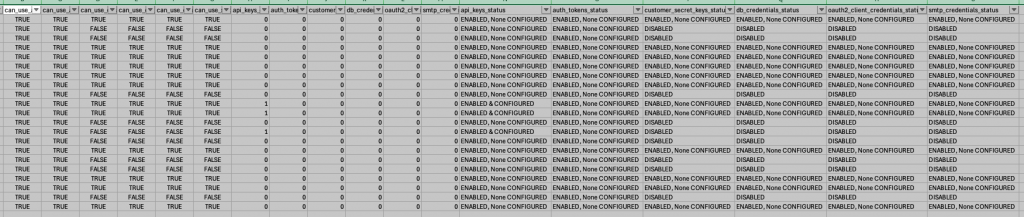
Here is a snippet of a sample output
Interpreting the Output
The thing of importance for us in each row in the CSV would be:
- Capability Columns (
can_use_*) : These columns reflect what IAM allows the user to do—for example, whether they are permitted to create API keys, Auth Tokens, or SMTP credentials. - Count Columns (
*_count): These columns show how many credentials of each type are actually configured for the user. - Status Columns (
*_status): These provide a quick, human-readable interpretation:- ENABLED & CONFIGURED – Capability granted and credentials exist
- ENABLED, None CONFIGURED – Capability granted but unused
- UNAUTHORIZED – The script could not list this credential type using the current principal
What This Enables
With this report, you can easily:
- Identify users who were granted capabilities but never used them
- Identify users who currently hold sensitive credentials
- Verify which credential types are listable in your environment
- Support audits and access reviews with concrete data
- Target cleanup and least-privilege initiatives
This shifts visibility from permission-based assumptions to usage-based reality.
Conclusion:
Understanding who can create credentials is only half the story. Understanding who did create them completes it.
Together with the earlier capability-listing approach, this script provides both:
- Configuration visibility (who is allowed to do what)
- Usage visibility (who actually did it)
That combination is often essential for audits, security reviews, and credential governance in OCI environments.
The script can easily be extended—for example, to emit JSON instead of CSV or to focus on a single credential type such as SMTP credentials. Even in its basic form, it provides a clear, actionable view of credential usage across an OCI IAM Identity Domain.