

Introduction:
In the previous parts of this blog series, we explored how to restrict public internet access to Oracle Fusion Cloud Applications while enabling secure, private access from on-premises environments using Oracle FastConnect via Equinix Fabric. While FastConnect through Equinix Fabric provides a highly reliable and deterministic network path, enterprise-grade architectures often require an additional layer of resilience to guard against unexpected failures or maintenance events.
In this continuation, we focus on designing a redundant connectivity model for Oracle Fusion Cloud Applications by combining FastConnect (via Equinix Fabric) with IPSec VPN. This dual-path approach ensures uninterrupted access to Fusion SaaS by allowing traffic to automatically fail over to IPSec VPN if the FastConnect path becomes unavailable.
Prerequisites:
Before implementing this redundant connectivity architecture, ensure the following requirements are met:
- An active OCI tenancy hosting the Oracle Fusion Cloud Applications environment.
- IAM credentials with sufficient permissions to create, modify, and manage OCI networking resources.
- Access to the OCI Console or OCI CLI for configuration and operational tasks.
- A dedicated compartment to logically organize and manage all networking components involved in the solution.
- Established connectivity between the on-premises environment and the Equinix Fabric Cloud Router (FCR), using physical cross-connects, carrier-provided links, or Equinix Fabric virtual connections.
- BGP peering configured between the on-premises edge router and the FCR, allowing on-premises prefixes to be advertised to OCI over the FastConnect private peering circuit.
- A Site-to-Site IPSec VPN tunnel configured between AWS and OCI, serving as a secondary (backup) connectivity path in the event of FastConnect unavailability.
High-Level Architecture:
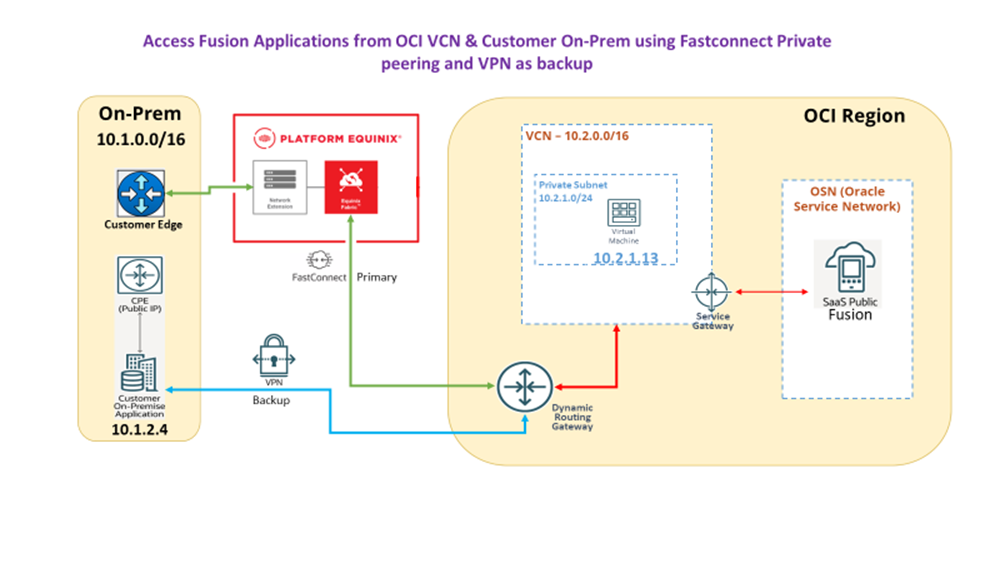
Traffic Flow:
- Normal operation:
On-Prem → Equinix → FastConnect → Fusion Cloud Applications - Failover scenario:
On-Prem → IPSec VPN → Fusion Cloud Applications
Implementation Guide:
In the previous blogs in this series, we covered the detailed configuration steps for setting up FastConnect via Equinix Fabric and establishing a Site-to-Site IPSec VPN as a backup connectivity option. In this article, we build on that foundation and focus specifically on traffic flow behavior, both during normal operation and during failure scenarios.
Rather than repeating the setup steps, this section explains:
- How application traffic flows from on-premises to Oracle Fusion Cloud Applications when FastConnect is available, and
- How the traffic path automatically shifts to the IPSec VPN when the FastConnect path becomes unavailable.
Step 1: Accessing the Fusion Application from an On-Premises Instance
Under normal conditions, when FastConnect is operational, users and applications access Oracle Fusion Cloud Applications from on-premises through the primary FastConnect path.
Key characteristics of this flow include:
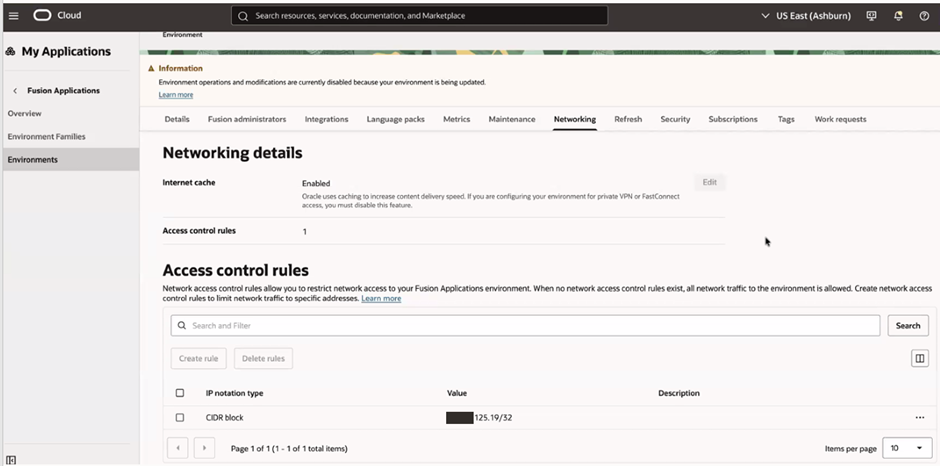
- The request originates from an on-premises instance using an IP address that falls within the allowed CIDR ranges defined in the Fusion SaaS network access control rules.
- Traffic is routed from the on-premises network to the Equinix Fabric Cloud Router (FCR) and then forwarded to OCI over FastConnect private peering.
- OCI routes the traffic internally to the Fusion SaaS endpoints, without traversing the public internet.
This ensures that application access remains private, predictable, and secure, leveraging FastConnect as the preferred connectivity path.
Edit the access control rule to allow the private CIDR from On-Prem.
Step 2: Validation and Testing
After configuring both FastConnect and IPSec VPN, it is important to validate that traffic follows the expected path under normal and failure conditions.
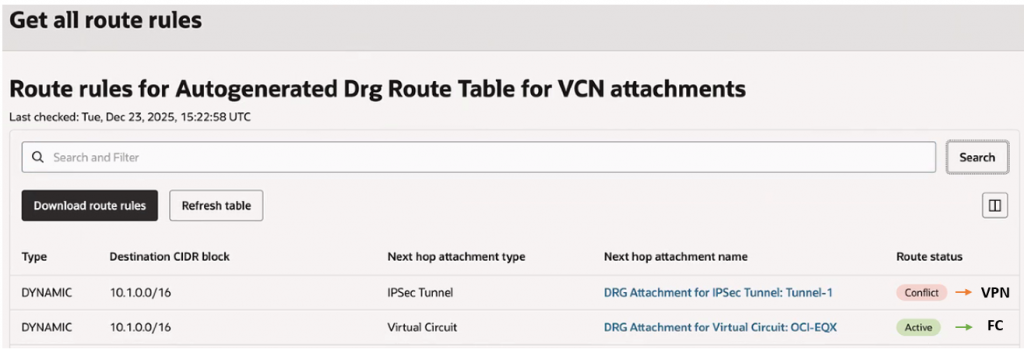
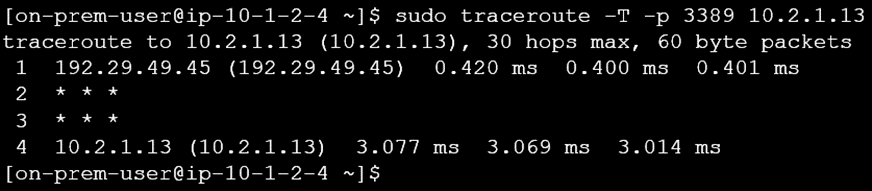
To determine whether traffic is traversing the FastConnect path or failing over to the IPSec VPN, a traceroute is initiated from the on-premises environment to a test compute instance within the OCI VCN in SaaS tenancy. The sequence of hops observed in the traceroute helps confirm the active connectivity path.
Normal Operation (FastConnect Up):
Traffic from on-premises is routed through FastConnect to reach the test instance.
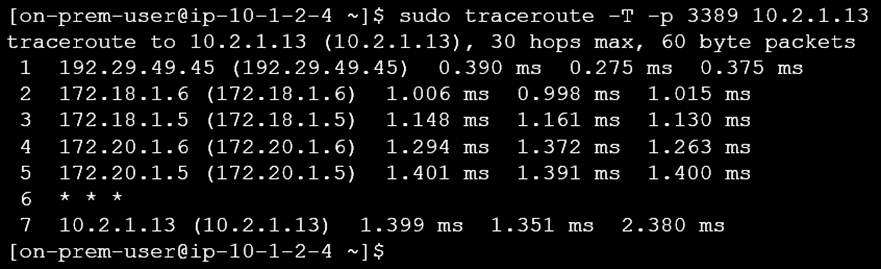
Failover Scenario (FastConnect Down):
- Simulate a FastConnect outage by administratively shutting down the circuit or BGP session.
- Re-run the traceroute and confirm that traffic now flows through the IPSec VPN tunnel.
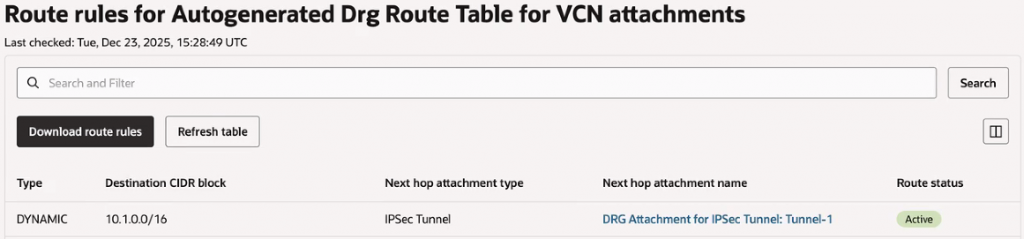
Since FastConnect is down, traffic is currently being routed through the VPN to access the test instance.
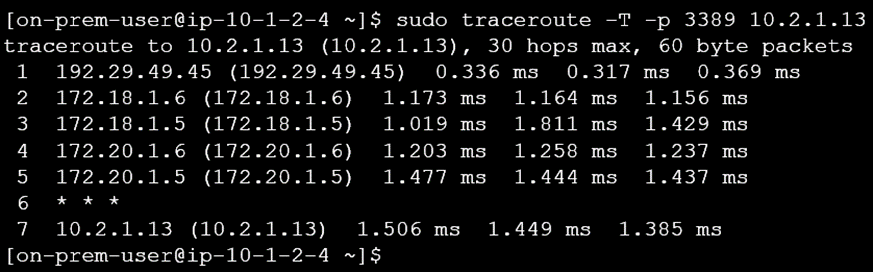
Recovery Validation:
- Restore the FastConnect connection.
- Confirm that traffic seamlessly shifts back to the primary FastConnect path.

Once the connection is restored, traffic will be rerouted through the FastConnect path.
Conclusion
By combining Oracle FastConnect via Equinix Fabric with a Site-to-Site IPSec VPN, organizations can build a resilient, enterprise-grade connectivity architecture for Oracle Fusion Cloud Applications. FastConnect provides the primary, high-performance and deterministic network path, while IPSec VPN serves as a secure and cost-effective backup, ensuring continuous access during outages or maintenance events.
This dual-connectivity design eliminates direct public internet exposure to Fusion SaaS, improves operational reliability, and enables automatic failover without application changes or manual intervention. Together, FastConnect, Equinix Fabric, and IPSec VPN deliver a balanced approach that meets performance, security, and high-availability requirements for mission-critical Fusion workloads.
Reference
Fusion Cloud Applications supports various network patterns as illustrated in MOS Note – Network Connectivity Patterns for Oracle Fusion Cloud Applications – https://mosemp.us.oracle.com/epmos/faces/DocumentDisplay?id=3060221.1
Restricting Public Access to Fusion Applications using IPsec VPN – https://www.ateam-oracle.com/part-1-restrict-public-access-of-fusion-cloud-applications-and-enable-access-to-oci-resources-using-vcn-customer-onprem-network
Restricting Public Access to Fusion Applications using Fastconnect Private peering – https://www.ateam-oracle.com/restricting-public-internet-access-to-oracle-fusion-cloud-applications-using-fastconnect-private-peering-equinix-fabric
Restricting Public Access to Fusion Applications using Fastconnect Public peering – https://www.ateam-oracle.com/restricting-public-access-to-oracle-fusion-cloud-applications-using-fastconnect-public-peering-with-equinix