

Overview
Oracle Cloud Infrastructure introduced a new compartment-hierarchy-based policy evaluation method that supports a higher number of IAM policy statements than was supported previously. The change allows customers to scale their IAM policies beyond previous limits while maintaining consistent policy evaluation and service reliability.
Oracle Cloud Infrastructure (OCI) now enforces a limit on the total number of IAM policy statements evaluated along the compartment hierarchy, starting from the root compartment down to the leaf compartment. This guide explains why customers may encounter policy-related errors and provides practical, prioritized actions to resolve and prevent them.
Compartment Hierarchy
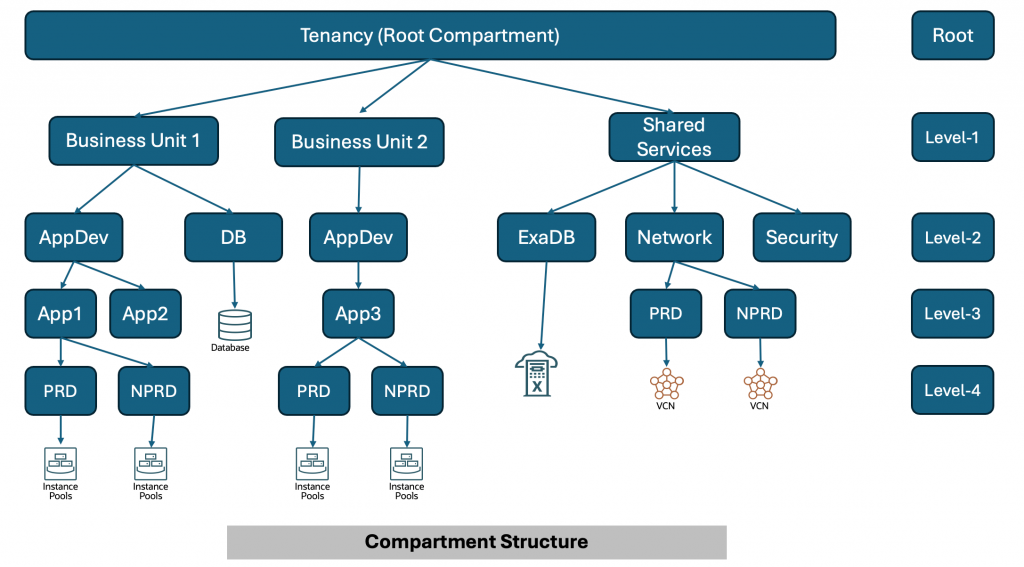
First, let’s understand what the compartment hierarchy is. For the compartment structure below, I have shown all the compartment hierarchies.
For the above compartment structure, below is the diagram with all compartment hierarchies.
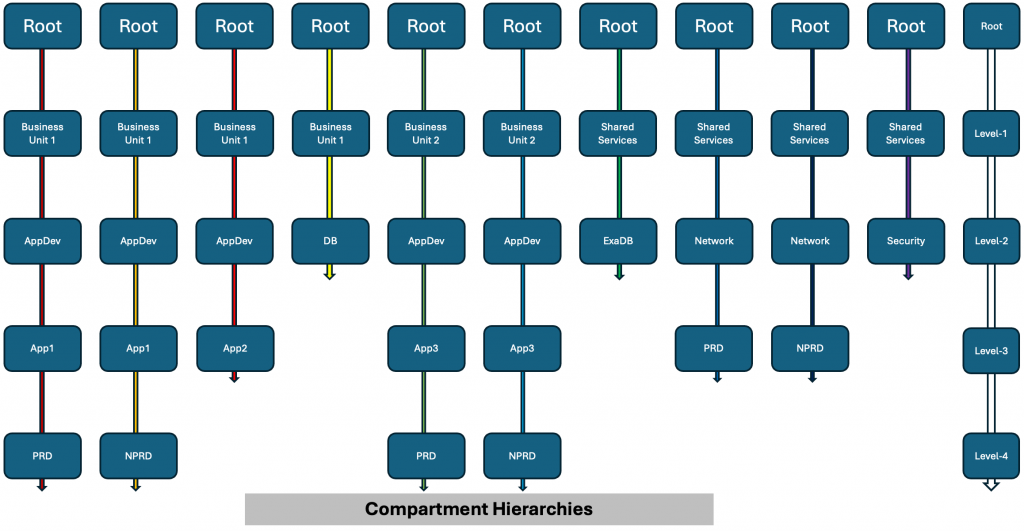
Every colored vertical line in the above diagram represents a compartment hierarchy. As shown in the diagram, the root compartment is part of every compartment hierarchy. Similarly, level-1 compartments will be part of multiple compartment hierarchies. Leaf compartments, on the other hand, will be part of just one compartment hierarchy. That is why, where possible, it is recommended to write most policies at the leaf compartment level.
Note: Some of the services live in the root compartment. You must write those policies in the root compartment.
For background on this limit, see the official documentation:
https://docs.oracle.com/en-us/iaas/Content/Identity/policymgmt/policy-limits-compartment-hierarchy.htm
IAM Policy Statement Limit
When the IAM policy statement limit is exceeded for any compartment hierarchy, you may encounter errors during Creating, Updating, or Deleting IAM policies.
Example error:
You have reached the maximum number of policy statements allowed for this compartment hierarchy (Limit: 500, Current Usage: 502).
What Is Not Impacted when you see the above error:
- Existing IAM policies within supported limits in a compartment hierarchy are not affected.
- There is no impact on runtime access enforcement for policies that are already created and valid.
- No action is required unless you are actively modifying policies or compartments.
Why do you see the error?
IAM policy limits are evaluated at the compartment hierarchy level. All policies defined at the root compartment and inherited by child compartments are counted together. When too many policies are placed high in the hierarchy, especially at the root, limits can be reached quickly, even if those policies are only relevant to a small subset of resources. To explain policy statement count for the compartment hierarchy, for a smaller subset of compartment hierarchy shown above, I will count number of policy statements for every compartment hierarchy in the diagram below.
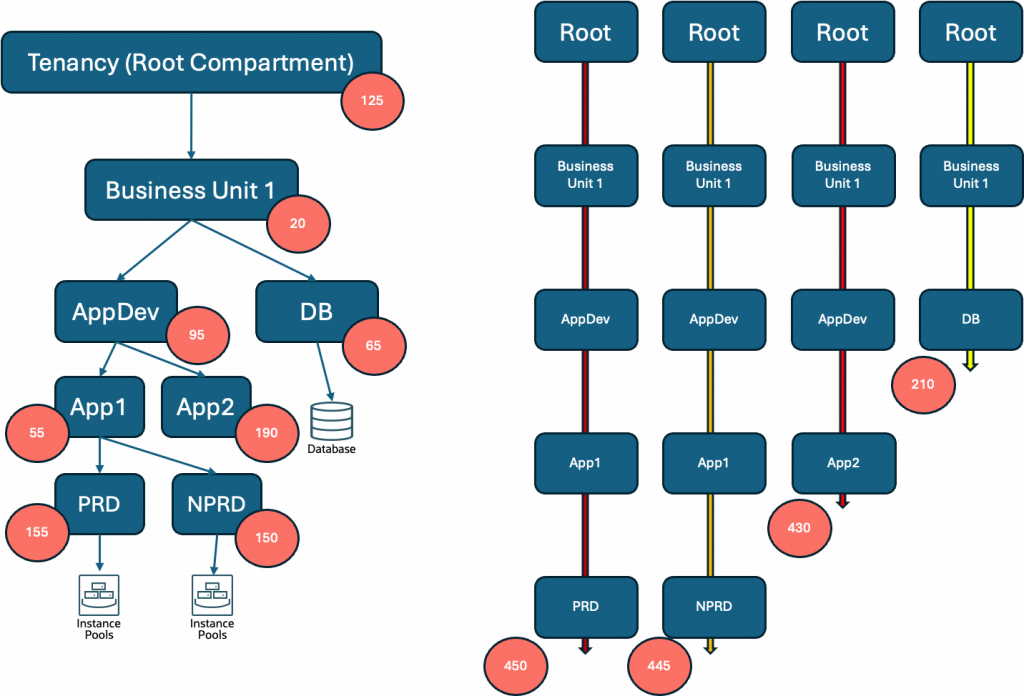
In the diagram above, each red circle represents the number of policy statements within that specific compartment. The structure illustrated contains four compartment hierarchies, with the total policy statement count for each hierarchy displayed beneath it. Across all four hierarchies, the maximum number of policy statements in any single hierarchy is 450.
This leads to a few important observations worth highlighting.
- Policy statements defined at the root compartment level count toward every compartment hierarchy, making root-level policies the most far-reaching in terms of scope and far-reaching in terms of impact on policy statement limit.
- Policies defined in the AppDev compartment contribute to three different hierarchies, reflecting its shared position in the structure.
- In contrast, policies in a leaf compartment — such as PRD or NPRD — count only toward their own individual hierarchy, making them most effective from policy limit perspective.
Understanding how policy statements accumulate across hierarchies is critical when planning your compartment structure, as approaching the per-hierarchy limit can constrain your ability to add policies as your environment grows.
Recommended actions
Follow the steps below to reduce the number of IAM policy statements in a compartment hierarchy and prevent policy create/update failures or compartment move failures. Perform the actions in order, starting with the lowest-risk changes.
1. Remove unused, duplicate, or unnecessary policies
It is the fastest way to reduce policy statement count without changing the compartment structure.
- Policies associated with retired projects or environments
- Duplicate statements granting the same permissions
- Temporary migration or break-glass policies that are no longer required
Example 1:
Before (duplicate statements):
Allow group AppTeamA to manage instances in compartment Dev
Allow group AppTeamA to read instances in compartment Dev
After (remove duplicates):
Allow group AppTeamA to manage instances in the compartment Dev
The example above suggests consolidating duplicate policy statements by removing overlapping or redundant permissions (e.g., “read” and “manage”), thus reducing the overall policy count.
Example 2:
Allow service osms to read instances in tenancy
Allow service osms to read instances in tenancy
Multiple application teams might create the same policy statements in different policy objects in the root compartment. You can find those duplicate statements and remove one of the two.
Example 3:
Allow service objectstorage-us-ashburn-1 to read keys in compartment Dev
Allow service objectstorage-us-ashburn-1 to read keys in tenancy
Allow service FaaS to use virtual-network-family in compartment Dev
Allow service FaaS to use virtual-network-family in tenancy
The above examples highlight the need to eliminate redundant statements at different levels of the compartment hierarchy, ensuring permissions are not unnecessarily repeated at both root and leaf compartments. While it is best practice to keep the policy at the leaf level and remove it from the root, you must ensure no other team is relying on the policy at the root for their use case.
2. Move policies closer to the target compartment
Policies defined in the root compartment apply across the tenancy and are counted in every compartment hierarchy. Scoping policies to the lowest appropriate compartment (mostly leaf compartment) reduces inheritance and lowers statement count for the unrelated hierarchy.
Example
Allow group FinanceAdmins to manage buckets in compartment Root:App:Prod:Finance
The above policy statement will count towards the policy statement limit for every compartment hierarchy in the tenancy.
Instead, move the policy to the Finance compartment as shown below.
Allow group FinanceAdmins to manage buckets in compartment Finance
The above policy statement will count towards the “Finance” compartment hierarchy only and will also reduce the number of policies in the root compartment.
3. Refactor and simplify existing policies
Reduce narrow, repetitive statements by consolidating policies while preserving least privilege.
Typical refactoring
- Combine statements for the same group and resource family
- Remove permissions that are no longer required
- Replace many single-resource statements with fewer family-level statements (when appropriate)
Example
Before (multiple narrow statements):
Allow group DevOps to read instances in compartment App
Allow group DevOps to read volumes in compartment App
Allow group DevOps to read vnic-attachments in compartment App
After (consolidate by family):
Allow group DevOps to read compute-family in compartment App
4. Use tag-based policies (long-term optimization)
Use tag-based policies to scale access control with fewer policy statements. Tag-based policies can replace many compartment- or resource-specific statements when you have consistent tagging.
How it works
- Apply tags to resources (for example, Environment=PROD)
- Write policies that grant access based on matching tags
Example
Tag applied to resources:
Environment = PROD
Policy:
Allow group ProdAppAdmins to use network-family-resources in compartment Network where target.resource.tag.Environment = ‘PROD’
Guidance
- Use consistent tag keys and values across teams
- Prefer defined tags and apply governance to tag creation and updates
Additional Support
If you continue to encounter IAM policy limit errors after completing the recommended actions, use the following options:
- Contact your Oracle account team
Engage your Oracle Account Manager or Customer Success Manager if:
- The issue impacts production workloads
- You require guidance on large-scale policy refactoring or tagging strategy
- You need help evaluating architectural changes across multiple compartments or regions
- Your account team can help review your current IAM design and recommend next steps.
- Open a support service request
Open a support service request if policy operations remain blocked or you need assistance validating changes. Include following information to expedite the resolution.
- The full error message returned by the API or Console
- The impacted compartment OCID and compartment hierarchy
- The operation that failed (policy create, policy update, compartment move)
- Current policy statement usage (if available)
For information about creating a support request, see:
https://docs.oracle.com/iaas/Content/GSG/Tasks/contactingsupport.htm
References
- Best practices for IAM on OCI (white paper)
https://docs.oracle.com/iaas/Content/Resources/Assets/whitepapers/best-practices-for-iam-on-oci.pdf - Manage access with tags
https://docs.oracle.com/iaas/Content/Tagging/Tasks/managingaccesswithtags.htm - Advanced policy features
https://docs.oracle.com/en-us/iaas/Content/Identity/Concepts/policyadvancedfeatures.htm - Policy syntax
https://docs.oracle.com/en-us/iaas/Content/Identity/Concepts/policysyntax.htm - Common IAM policies
https://docs.oracle.com/iaas/Content/Identity/Concepts/commonpolicies.htm - Get started with policies
https://docs.oracle.com/iaas/Content/Identity/policiesgs/get-started-with-policies.htm