

This blog is part of the blog series Extending Oracle Fusion Cloud Applications using Oracle APEX. In this blog post we will cover the steps to enable Authorization in Oracle APEX using Oracle Fusion Cloud Applications roles.
Oracle Fusion roles are available as OCI Groups and the same are passed to Oracle APEX via the groups specified in the Oracle APEX Authentication scheme.
Oracle APEX provides native declarative options to configure and enable Authorization. However, for the Oracle Fusion Extensions, we will leverage the Authorization details from Oracle Fusion roles and declaratively utilize them and enable Authorization in Oracle APEX. With this, Oracle Fusion would serve as the single source of Authorization details.
Prerequisites
- Access to the Oracle APEX environment.
- Complete the steps mentioned in the Extending Oracle Fusion Cloud Applications using Oracle APEX – Authentication blog.
High level steps
- Login to the APEX environment.
- Create a new Fusion Integrated APEX application or use the APEX application created in the Authentication blog.
- Verify and update the Authentication Scheme.
- Create the Authorization Scheme/s.
- Utilize the Authorization scheme in Oracle APEX Page/Region/Field/Button.
Detailed steps
Verify and update the Authentication Scheme/s: Navigate to the Shared Components –> Authentication Scheme and perform the below steps:
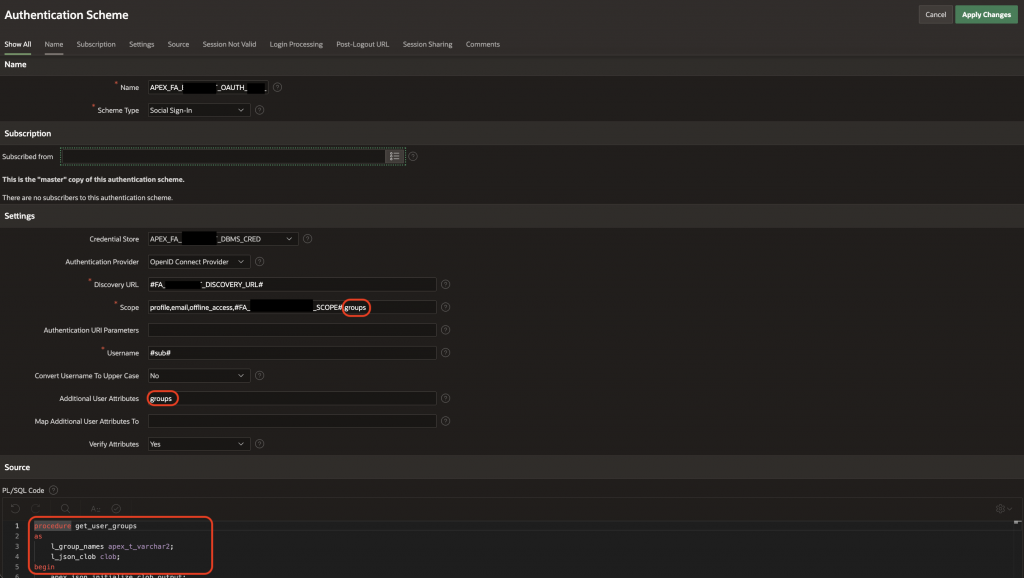
- Add groups to the Scope and Additional User Attributes.
- Add the below PL/SQL code (e.g procedure get_user_groups).
- Add the name of the procedure (e.g get_user_groups) to Post-Authentication Procedure Name.
Post-Authentication Procedure Sample code
-- Sample reference code
procedure get_user_groups
as
    l_group_names apex_t_varchar2;
    l_json_clob clob;
begin
    apex_json.initialize_clob_output;
    apex_json.write(p_values => apex_json.g_values);
    l_json_clob := apex_json.get_clob_output;
    apex_json.free_output;
    for i in 1 .. apex_json.get_count('groups')
    loop
        apex_string.push (
            p_table => l_group_names,
            p_value => apex_json.get_varchar2 (
                           p_path => 'groups[%d].name',
                           p0     => i
                       )
        );
    end loop;
    apex_authorization.enable_dynamic_groups (
        p_group_names => l_group_names
    );
end get_user_groups;
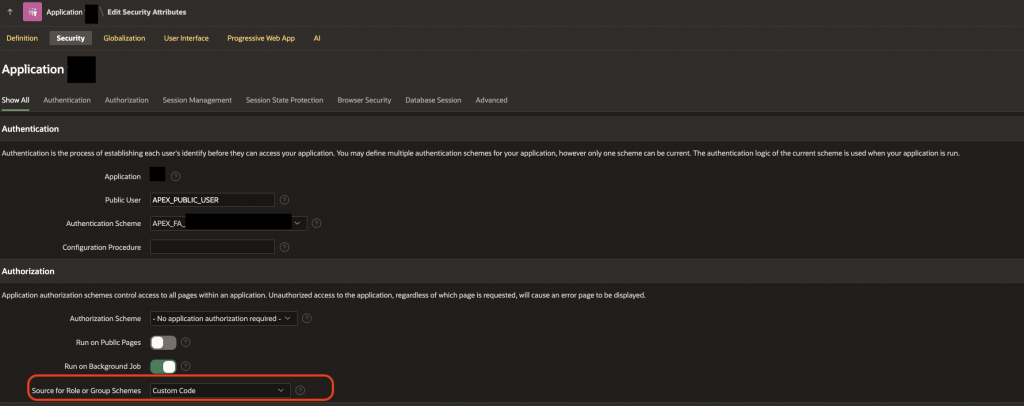
Edit the APEX Application Security: Navigate to Edit Application Definition –> Security.
Create the Authorization Scheme/s: Navigate to the Shared Components –> Authorization Scheme and perform the below steps:
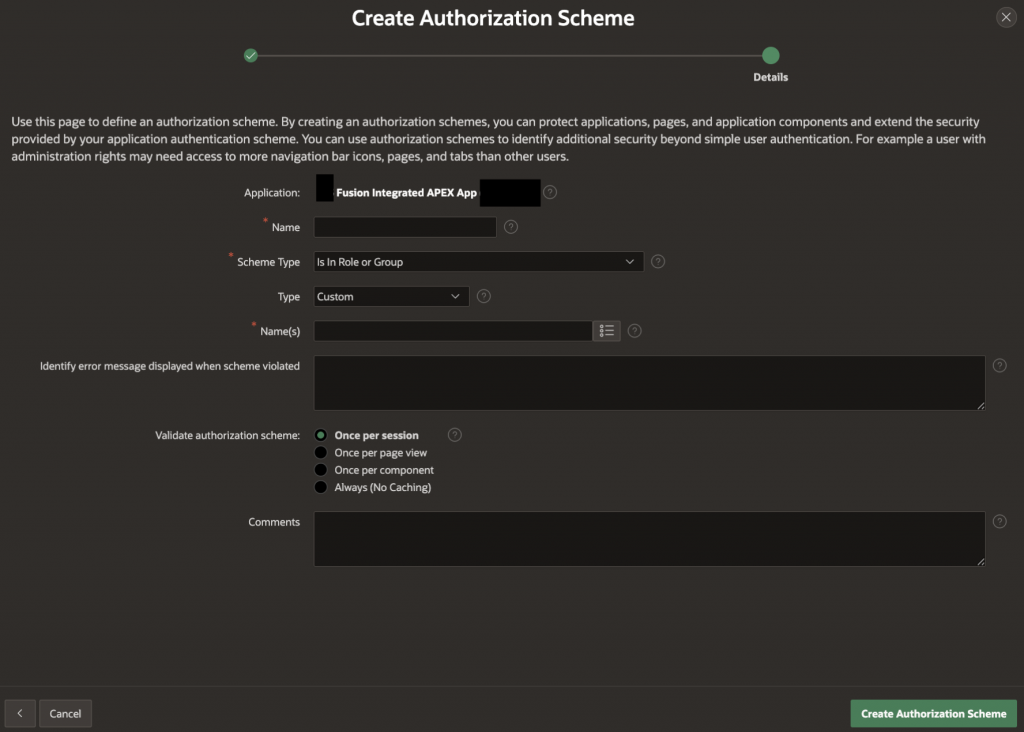
| Field | Value | Additional Information |
| Application | Defaulted to the current Oracle APEX application | Authorization schemes are local to Oracle APEX applications. |
| Name | Examples: Admin AuthZHR ManagerPayables ManagerHR User | Provide an appropriate name for the Authorization scheme. |
| Scheme Type | Is In Role or Group | This value needs to be used. |
| Type | Custom | This value needs to be used. |
| Name(s) | Examples: Compensation ManagerPayables ManagerIT Security Manager, Application Implementation Consultant | We can specify one or more Fusion roles (separated by comma) |
| Identify error message displayed when scheme violated | Examples: This page is accessible to managers/auditors/planners.This page requires specific roles. Please check with IT support for further assistance | Add an error message which will be displayed to the user if authorization check fails. |
| Validate authorization scheme | Once per session | Recommended to use Once per session. Other options also work. |
| Comments | Comments/Notes for future reference. |
Important points to note:
Oracle APEX allows Authorization to be applied at multiple levels:
- Page level
- Region in a page.
- Field in a page region.
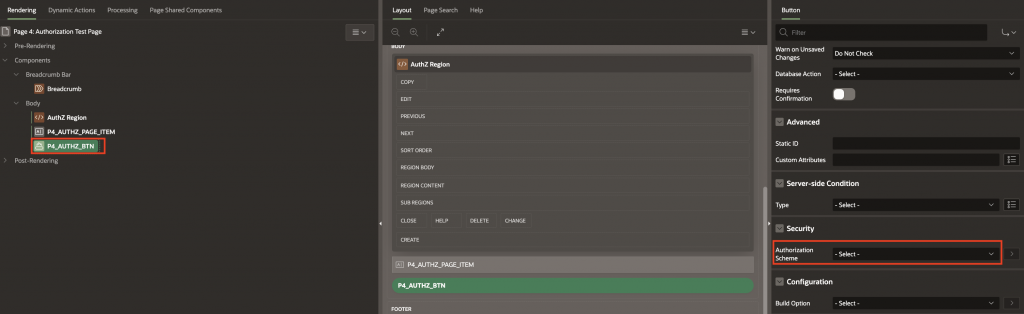
- Button in a page region.
We can apply only one Authorization scheme at any of the above levels. However, we can also have different Authorization schemes at different levels inside the same page, based on the security requirements for the page. Imagine a page with multiple regions, fields, buttons which are all controlled by the different Authorization schemes.
Page level Authorization scheme:

Region level Authorization scheme:
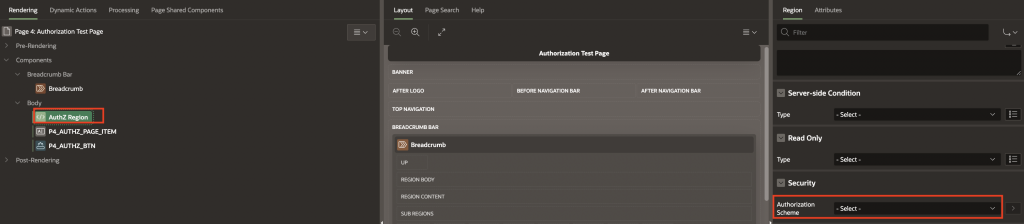
Page Item level (Text Field) Authorization scheme:

Page button level Authorization scheme:
Conclusion
With this configuration, we will be able to enable the required Authorization to the Oracle APEX Fusion Extension pages in a declarative way. Below are few take-aways:
- Identify the business requirements expected to be addressed by the Oracle APEX Fusion Extension.
- Identify logically related requirements and the number of Oracle APEX pages required to support it.
- Identify the Authorization required for the Oracle APEX pages/regions/fields/buttons.
- Create the required Authorization schemes.
- Enable the Authorization on the pages and test the same.