
TL;DR
Oracle Fusion Cloud Applications are built to cover a broad range of business requirements, but the implementation challenge is not whether change is possible. It is deciding which change belongs in standard configuration, which belongs in supported extension, which belongs in workflow or AI automation, and which should be built outside the Fusion core. The strongest architecture is still the simplest: configure first, personalize where the change is user-specific, extend only where Oracle supports it, use BPM Worklist for approvals and notifications, use AI Agent Studio for governed AI-assisted execution, and move truly new capabilities outside Fusion onto Oracle PaaS or Visual Builder. That keeps the core supportable, upgrade-safe, and consistent with the implementation framework used across the series.
Introduction
Fusion Cloud succeeds when the team makes the smallest supported change that satisfies the requirement. Oracle’s current configuration model separates changes into configuration, extension, and personalization, and those changes are preserved through release updates. That is the right operating model for a cloud application: let the product do the heavy lifting, tailor the experience where the platform already supports it, and avoid turning the application core into a custom-code surface.
In this series, customization is used as an architectural term for a new capability that cannot be met through configuration, personalization, supported extension, BPM Worklist, or AI Agent Studio. Those requirements belong outside the Fusion core, typically on Oracle PaaS or a standalone Visual Builder application, and should be integrated back through supported interfaces.
Configuration vs Extension vs Personalization vs Customization
| Approach | Description | Example |
| Configuration | Administrator-driven tailoring that affects many users. This includes setup choices, navigation, branding, page behavior, text, help content, reports exposure, and similar standard features that do not alter the product model. | Hide menu items, change a setup option, adjust page layout, map reports to a work area, or configure navigation for a role. |
| Extension | Supported runtime modification using Visual Builder Studio or object-level tools such as Application Composer. This is the path for adding fields, rearranging fields, applying conditions, or shaping page behavior inside the supported extension model. | Add a field to a page for a role, rearrange form fields, or apply a runtime condition. |
| Personalization | User-specific change made by an individual user, visible only to that user. Examples include hiding infolets or resizing table columns. | A user hides an infolet or changes a table column width. |
| Customization | A new capability that is not supported by configuration, extension, personalization, BPM Worklist, or AI Agent Studio and therefore belongs outside the Fusion core. In practice, this means a separate app or service built on Oracle PaaS or Visual Builder and integrated back through supported interfaces. | Build a separate app or service for a new business capability, then integrate it with Fusion. |
Why Configuration and Extensibility Matter
The value of this pillar is control. When the business changes, the implementation must decide whether the change belongs in setup, in reporting, in the user experience, in the data model, in workflow, in AI-assisted execution, or outside the core. Oracle’s current configuration framework supports that decision by making many of these changes available through browser-based tools and by preserving configurations, extensions, and personalizations across release updates.
This control matters even more because the same change can affect multiple downstream artifacts. A data-model change can surface in pages, mobile, and reports; a UI text change can affect labels and help; and a scheduled job or approval rule can alter the operational behavior of the business. The right pattern is not “customize until it works.” It is “select the correct supported mechanism and keep the scope narrow.”
Capability Map
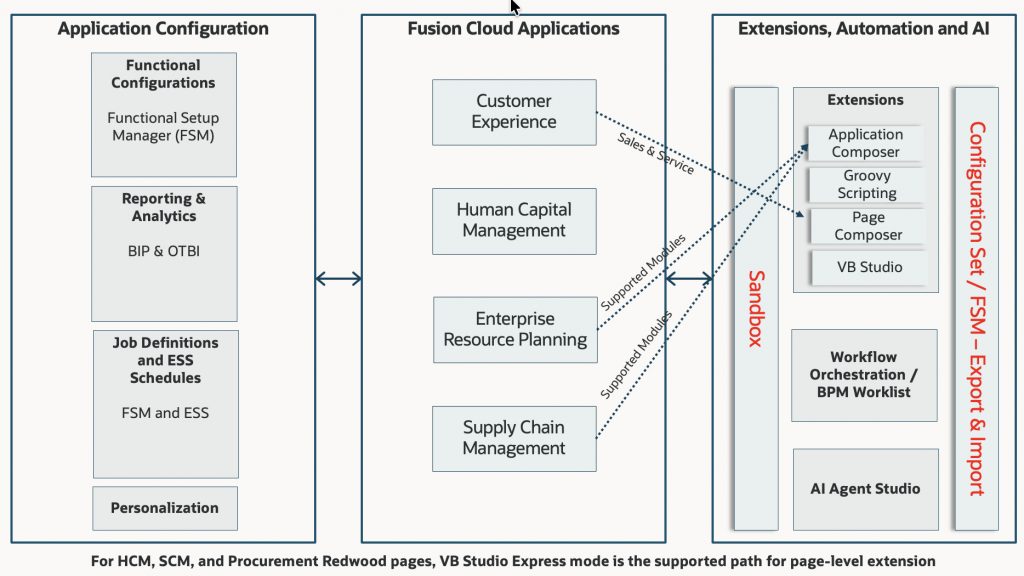
| Capability | Primary role | Typical use | Architectural note |
| Functional Setup Manager / Setup and Maintenance | Core functional configuration | Enterprise structures, offering setup, setup tasks, and implementation projects | Start here when the requirement is standard but needs tailoring. |
| UI, branding, and navigation configuration | Page and shell configuration | Structure, Appearance, User Interface Text, Page Template Composer | Use these tools to change the look, feel, navigation, and labels without altering the product model. |
| Reports & Analytics | Reporting configuration | BI Publisher, OTBI, dashboards, and work area reports | Keep reporting exposure governed and tied to the business work area, not ad hoc per-team workarounds. |
| Application Help / Getting Started | Embedded guidance and help content | Company policies, how-to help, onboarding content | Treat help content as part of the user experience and keep it versioned and manageable. |
| Alerts Composer | Informational notifications | HCM event alerts, worklist/email notifications, template-driven messaging | Use for notification design, not for full workflow orchestration. |
| DFF / EFF | Controlled attribute expansion | Add business-specific data without redesigning the base object model | Use DFF for descriptive attributes and EFF for extensible object context where supported. Sales Automation and Fusion Service do not support flexfields, and attributes for those applications should be added with Application Composer. |
| Page Composer | UI configuration | Page layout, visibility, help text, and page behavior | Best when the change is page-level and does not require a new app experience. |
| Application Composer | Object and data-model extension | Create fields, objects, relationships, workflows, and scripts | Supported for adding extension attributes to Sales and Fusion Service where DFF/EFF are not supported. Supported for selected ERP/SCM object extensions. |
| Visual Builder Studio | Application extension platform | Add supported runtime UI and logic changes, or build adjacent visual apps | Use for supported runtime extension; do not force unsupported changes into the base application. |
| BPM Worklist | Workflow orchestration | Approval routing, approval groups, notifications, and approvals management | Keep this separate from page extension and treat it as workflow configuration. |
| Job Definitions and ESS Schedules | Scheduled-process configuration | Define jobs, parameters, recurring schedules, and scheduled report output | Use this for controlled scheduled processing, not manual repeat execution. |
| AI Agent Studio | Governed AI execution | Create, configure, validate, and deploy AI agents and multiagent flows | Use when the requirement is AI-assisted work inside the governed Fusion AI model. |
| Personalization | User-specific tailoring | Individual page adjustments, hidden infolets, resized columns | Keep it personal; do not use it as a substitute for governed configuration. |
Visual Builder Studio / Visual Builder tooling options by pillar
| Tool | Description | Example | Pillar | Recommendation |
| VB Studio | Oracle’s extension and lifecycle platform for Oracle Cloud Applications and adjacent visual apps. It supports extension work and can also support standalone app development. | Extend a supported Oracle Cloud Applications page, manage extension lifecycle, or build a governed app experience around a Fusion process. | ERP, CX, and other supported areas. | Use VB Studio as the extension platform for supported Oracle Cloud Applications. For HCM, SCM, and Procurement Redwood pages, use Express mode only. If Express mode is not available, the page is not ready to be extended in that release. |
| VB Studio Express | Redwood page-extensibility mode inside VB Studio. The two core components are Business Rules and Page Properties; Business Rules include Configure Fields and Regions and Validate Field Values. | Make fields required, optional, read-only, or editable; show or hide fields and regions; default values; validate field values; adjust page properties. | HCM, SCM, Procurement Redwood pages. | Primary recommendation for Redwood page changes in these pillars. Do not use VB Studio / VB Studio Advanced mode for HCM, SCM pages. |
| Visual Builder | Separate cloud platform for building standalone visual applications. Visual Builder hosts standalone apps as a PaaS solution while VB Studio handles Oracle Cloud Applications extension and lifecycle work. | Build a separate app or service outside Fusion, then integrate it back through supported interfaces. | All pillars when the business need is a new capability outside Fusion core. | Use when the requirement cannot be met through configuration, personalization, BPM Worklist, AI Agent Studio, or supported extension. This is the right choice for new capabilities that should live outside the Fusion application core. |
Decision Framework
The decision framework should stay simple and strict. Choose the smallest supported change that satisfies the need, and keep the boundary between configuration, extension, workflow, AI, and external custom capability unmistakable. That is the only reliable way to preserve supportability and avoid turning one business request into a permanent architecture exception.
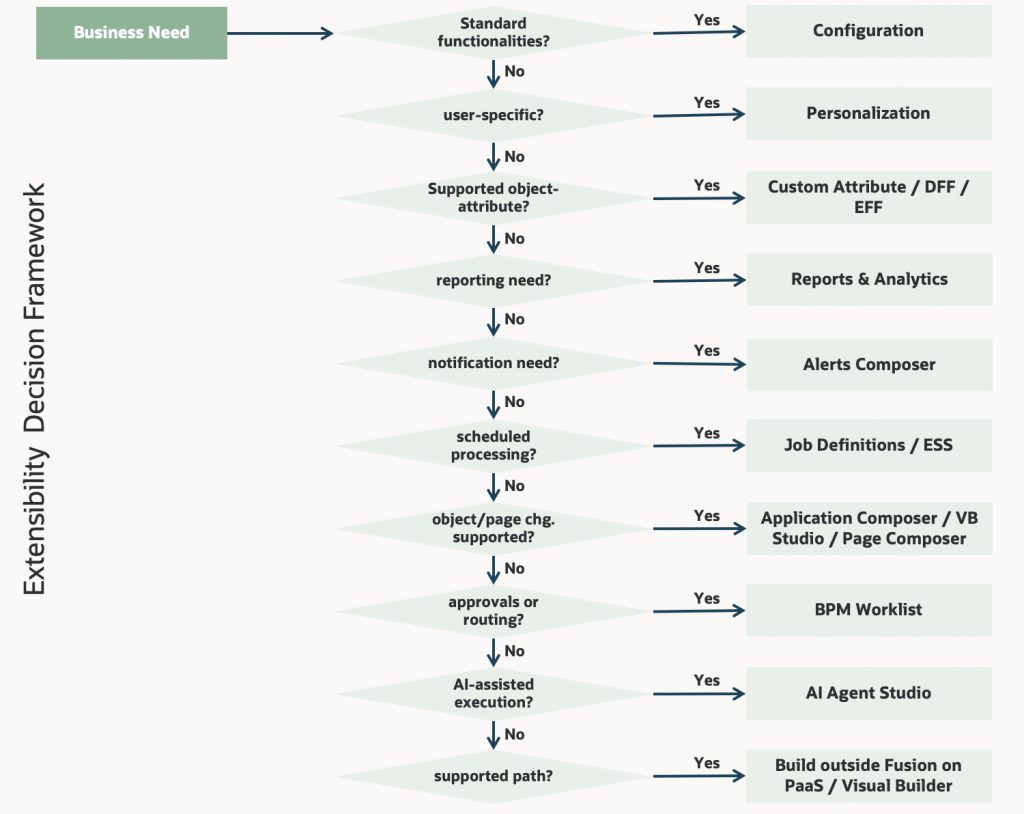
| Business need | Best choice | Use when | Example |
| The requirement is already supported by standard functionality | Configuration | The delivered application can meet the need through setup or page behavior | Change a lookup, menu, navigator entry, or page arrangement. |
| The requirement is navigation, branding, or text | UI configuration | You need to change Structure, Appearance, User Interface Text, or Page Template behavior | Reorganize the Navigator, change branding, or rename “buyer” to “customer.” |
| The requirement is user guidance or help content | Application Help / Getting Started | You need company policies, onboarding, or role-based help content | Add company-specific help or onboarding pages for new users. |
| The object needs additional governed data | DFF / EFF | The model is right, but the business needs extra governed attributes on a supported object | Add descriptive attributes with DFF or extensible object context with EFF, where supported. |
| The business needs reporting exposure or analytics mapping | Reports & Analytics configuration | A work area needs BI Publisher or OTBI content mapped into it | Map reports to a work area so users can access operational reporting from the work area. |
| The business needs alert-style notifications | Alerts Composer | You need event-based HCM notifications with templates and recipients | Send an informational worklist/email alert for a recruiting or talent event. |
| A job must run on a schedule or drive a report output | Job Definitions and ESS Schedules | The requirement is repeatable scheduled processing with defined parameters | Create a scheduled report job or recurring ESS process in Setup and Maintenance. |
| The object needs new behavior or logic inside the supported model | Application Composer / Groovy | Validation, triggers, workflows, or relationships are needed at object level | Add a rule that prevents save when a business condition is not met. |
| The requirement is an object-level change in Sales, Fusion Service, or selected SCM / Project Management objects | Application Composer | The need is for fields, relationships, logic, or page exposure on supported objects | Add custom attributes to a Sales or Service object, or extend a supported SCM object. |
| The page or flow needs a tailored user experience inside the Fusion extension model | Visual Builder Studio / Page Composer | The standard page needs a supported runtime change | Rearrange fields or build a guided experience for a role. |
| The page is a Redwood page in HCM, SCM, or Procurement | VB Studio Express | You need field/region control, validation, or page properties on a supported Redwood page | Make a field required, hide a region, or default a field value in Express mode. |
| The process needs approval routing or notifications | BPM Worklist | The business wants approval groups, approval levels, or notification control | Define approver groups and routing rules for a transaction. |
| The requirement calls for governed AI-assisted task execution or multiagent flow | AI Agent Studio | The business wants AI to assist, guide, or execute a controlled task inside Fusion | Create an AI agent to triage requests, guide a process, or automate a supported step in a controlled flow. |
| The requirement is a new business capability not covered by Fusion change options | Customization outside Fusion core | Configuration, personalization, extension, workflow, and AI Agent Studio cannot satisfy the need | Build a separate Oracle PaaS application or service and integrate it with Fusion. |
Lifecycle and Migration Controls
Configuration and extensibility are only part of the story. The implementation also needs a controlled migration path. Oracle’s current migration model uses a migration set on the Migration page, allows import into a sandbox in the target environment before applying to mainline, and supports delta migration only for sandbox-aware modules. The target environment should not be configured directly if the goal is to preserve consistency between environments.
| Control | Purpose | What it is used for |
| Configuration Set Migration | Migrate configuration between environments | Move configuration sets across environments and preview in a sandbox before applying to mainline. |
| FSM Export & Import | Move setup data between environments | Move setup data such as offerings, setup values, or other functional setup content. |
| Environment Refresh | Reset non-production environments from source environments | Rebuild test environments from production or other non-production sources to keep environments aligned. |
| Sandbox | Isolate untested changes | Test configuration and extension changes before publishing them to the mainline. |
| Security Console post-migration tasks | Complete manual governance tasks | Recreate or validate security changes that are not migrated automatically. |
Business Scenarios
HCM
A global HR team needs a region-specific attribute, a notification, and a conditional approval step. The right design is to configure the standard process first, add a governed DFF or EFF only if the attribute is truly needed, use Alerts Composer for event-style notifications if that is the functional need, and use BPM Worklist for approval routing. A user-specific display preference belongs in personalization rather than in the shared configuration. For Redwood pages in HCM, the supported page-level extension path is VB Studio Express mode only.
ERP
Finance wants reporting context, recurring jobs, and a stable release path without altering the accounting model. The right answer is governed configuration: expose the reporting through Reports & Analytics, define recurring processing through ESS job definitions and schedules, and keep the core object model intact unless the requirement truly belongs in Application Composer or an external custom app.
SCM
Supply chain needs a role-based page adjustment and a validation rule for a controlled process. This is a strong fit for page configuration plus localized logic, not a wholesale redesign of the process flow. For Redwood pages in SCM, the supported path is VB Studio Express mode only. If the process also needs approvals, BPM Worklist handles the routing model; if it needs a new object-level capability, Application Composer is the supported object-extension path for the relevant objects.
CX
Customer experience often needs a tailored object, action, or guided journey around a standard transaction. Application Composer is the right tool for object-level changes, while Visual Builder Studio is the right choice when the experience itself must be extended in a supported way. If the business asks for a completely new capability, the cleaner pattern is to deliver it outside the Fusion core and connect it back.
Best Practices
Use the standard product first. Configure in a sandbox or test environment, validate the result, and migrate through a controlled path to production. Treat the migration path as a design activity, not an afterthought. Keep reporting exposure, help content, alerts, and navigation changes governed, and do not let each team invent its own version of the truth.
Keep the extension footprint narrow. Use the least invasive supported tool that solves the problem. If the requirement does not fit configuration, personalization, extension, workflow, reporting, or AI-assisted execution, do not force Fusion Cloud into a custom-code platform. Deliver the capability on Oracle PaaS or a separate Visual Builder application, then integrate it back into the enterprise landscape.
Anti-Patterns
The main anti-pattern is over-extension. Teams move too quickly from requirement to custom build even when configuration or personalization would have been sufficient. Other common anti-patterns are duplicate fields, inconsistent naming, unsupported workarounds, mixing personalization with true extension, and using workflow or AI as a substitute for a sound process design. Those choices create avoidable complexity in testing, support, and release management.
A second anti-pattern is forcing a new business capability into the Fusion core when the platform does not support it through configuration, extension, personalization, workflow, or AI Agent Studio. That is the point where the design should move outward: build the capability on Oracle PaaS, connect it through supported interfaces, and keep Fusion clean. The same boundary applies to flexfields in Sales Automation and Fusion Service, where Application Composer is the supported path instead.
Conclusion
Configuration and extensibility are not side topics in Fusion implementation architecture. They are the mechanism by which business intent becomes a supportable, governed, and scalable solution. The architectural stance is clear: adopt standard Fusion capabilities first, use configuration and personalization to tailor standard features, use Reports & Analytics for controlled reporting exposure, use Job Definitions and ESS schedules for scheduled processing, use Alerts Composer for event-style notifications, use BPM Worklist for workflow approvals and notifications, use AI Agent Studio for governed AI-assisted execution, extend only when the platform needs controlled runtime change, and deliver truly new capabilities outside the Fusion core on PaaS.