
Executive Summary
Many enterprises continue to rely on Oracle E-Business Suite (eBS) for mission-critical operations, while also looking to adopt AI-enabled experiences available through Oracle Fusion Applications. This architecture shows how those priorities can come together: existing eBS instances can be connected to Fusion AI (FAI) Agents, giving users access to AI-assisted journeys, natural-language interaction, and intelligent workflow support without replacing the eBS system of record.
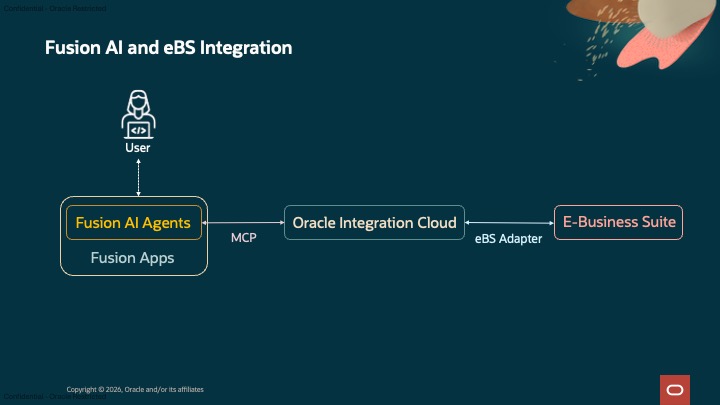
The core value is seamless integration. A user can interact with an FAI Agent, ask for information or initiate an assisted workflow, and have the request fulfilled through OIC and the eBS Adapter while preserving application ownership, service boundaries, identity controls, and audit requirements. The proof of concept validates the most important first step: end-to-end connectivity. An FAI Agent request successfully called the integration path, retrieved user identity information from eBS, and returned the corresponding Fusion and eBS user identifiers to the assistant experience (Fig. 1). This confirms that the framework can support real enterprise use cases in which FAI Agents need to interact with eBS data or transactions.
Background
Oracle E-Business Suite environments often contain years of enterprise process investment, custom extensions, operational integrations, and business-critical transaction history. These systems remain central to finance, procurement, supply chain, projects, order management, and other core functions, while users increasingly expect AI-assisted experiences that simplify navigation, summarize information, guide decisions, and automate repetitive steps.
The challenge is to introduce AI without bypassing or weakening the controls in place for existing eBS deployments.
The proposed pattern places Fusion AI Agents in front of eBS through a governed integration layer:
- Fusion provides the AI experience
- The AI Agent Framework selects the MCP Client tool
- OIC mediates the call through its hosted MCP server
- The eBS Adapter in OIC provides connectivity to the eBS application and
- eBS continues to own the system-of-record data
This creates a bridge between existing eBS deployments and new AI-enabled user experiences. Organizations can start with low-risk, read-oriented use cases such as identity lookup, order status, supplier status, or invoice exception inquiry, then expand toward more advanced workflows as tool contracts, approval rules, and observability mature.
The rest of this blog describes the setup and testing of a simple end-to-end connectivity test case that demonstrates the synchronization of key data, such as Person ID, between Fusion Applications and eBS endpoints. Oracle Integration Cloud (OIC) and the eBS Adapter provide connectivity between OIC and eBS, whereas the MCP tool available within the Fusion AI Agent framework is used to connect to OIC via the MCP server it exposes.
Technical Architecture
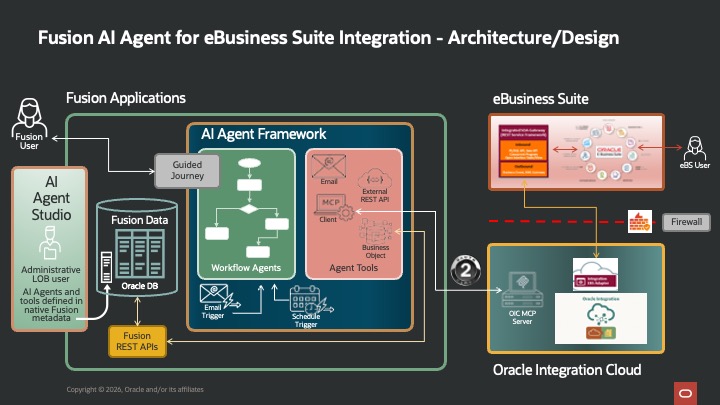
The detailed architecture describes the three major components of the solution (Fig. 2):
- Fusion Applications and its AI Agents
- Oracle Integration Cloud (OIC) and
- E-Business Suite (eBS) application
Each component has a clear responsibility. Fusion provides the AI-enabled user experience and tool orchestration, OIC mediates the integration path, and eBS continues to own the system-of-record information.
Fusion Applications and AI Agent Studio
Fusion Applications provide the user entry point, business context, and agent configuration surface. In the diagram, the administrative line-of-business user defines AI agents and tools in AI Agent Studio using native Fusion metadata [1]. This is important because it keeps the AI experience connected to enterprise business objects, security roles, and application semantics rather than creating an isolated automation script.
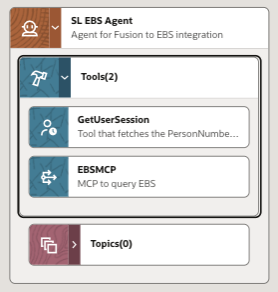
For this exercise, a simple agent was configured with 2 tools (Fig. 3), as described below.
- GetUserSession – built-in tool to get user information about the logged-in Fusion User
- EBSMCP – MCP tool configured to connect to the MCP server hosted by OIC using client credentials as an authorization mechanism [2]. The details on how to configure a confidential app and use its client credentials can be found in this blog post by my teammate, Dipak Chhablani, from A-Team [3].
Oracle Integration Cloud
Oracle Integration Cloud provides the integration mediation layer between Fusion AI Agents and E-Business Suite. In the architecture diagram, the OIC MCP Server and the Integration eBS Adapter sit inside the Oracle Integration Cloud boundary.

The diagram shows the basic synchronous integration setup, triggered by a REST input payload, which then uses the eBS Adapter to call the eBS API and receive a response [4]. OIC was configured as an MCP server, and this integration was exposed as an MCP tool accessible via Fusion AI Agent Studio [5].
E-Business Suite
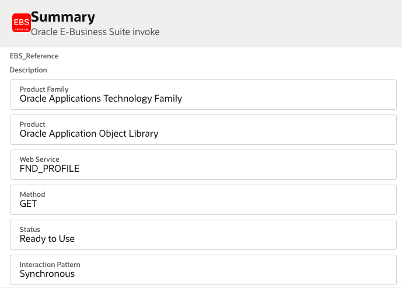
The E-Business Suite side exposes services through the Integrated SOA Gateway and REST Service Framework [6]. For this exercise, the eBS was not modified. The default FND_PROFILE interface in the Oracle Application Objects Library was used to retrieve the user profile containing the user ID. The eBS Adapter configuration shows the details (Fig. 5).
The firewall shown in the technical architecture (Fig. 2) is also significant. It indicates that the eBS integration path is a controlled crossing rather than an open backend call. For production use, this boundary should include authentication, network controls, service authorization, traceability, and operational monitoring.
Together, the three components create a practical enterprise AI pattern:
- Fusion provides the AI-enabled user and configuration experience.
- The AI Agent Framework provides runtime reasoning and tool orchestration.
- Oracle Integration Cloud and E-Business Suite enable governed execution of existing eBS services.
Test Results
The end-to-end connectivity test was performed in debug mode within Fusion AI Agent Studio. The user information was requested as the input query, and the corresponding user profile information from Fusion and eBS was shown in the response (Fig. 6).
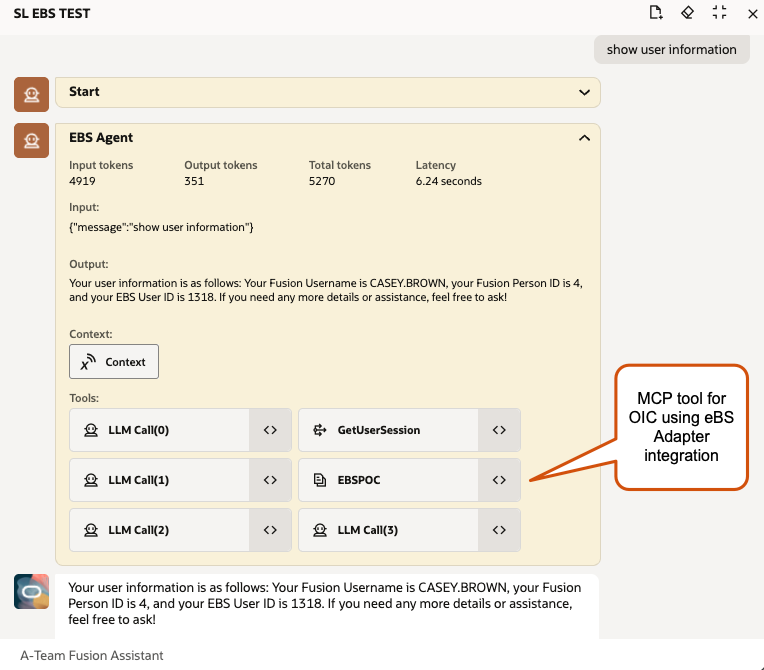
Consolidated test results are listed below:
- Fusion Username: CASEY.BROWN
- Fusion Person ID: 4
- eBS User ID: 1318
- Input tokens: 4919
- Output tokens: 351
- Total tokens: 5270
- Latency: 6.24 seconds
Summary
The POC proves that Fusion AI Agents can reach eBS and return synchronized identity information. The next phase should prove measurable business outcomes. For example, a supplier onboarding agent could reduce time spent checking status across systems. An invoice exception agent could summarize the reason for a hold and suggest the next action. A purchase order inquiry agent could retrieve the eBS status and explain it in user-friendly language.
The long-term opportunity is to expose AI features to eBS users and processes without forcing an immediate full application migration. Fusion AI Agents can become the intelligent engagement layer, while eBS continues to operate as the trusted transaction backbone.
Acknowledgements
I would like to acknowledge the assistance received from my teammate in A-Team, Shreenidhi Raghuram, in configuring the authorization for the MCP tool in Fusion AI Agent Studio to connect to Oracle Integration Cloud. Finally, I would like to recognize the efforts of the Oracle Cloud Demo team in providing an eBS instance, which was utilized to set up the test case for this blog.
References
- Oracle AI for Fusion Applications – Oracle AI for Fusion Applications, Oracle Product Documentation
- Connect to external MCP servers from AI Agent Studio – Oracle Fusion Cloud Common Technologies, Oracle Product Documentation
- Getting Started with Model Context Protocol (MCP): Secure MCP Server – Part 2 – Dipak Chhablani, Oracle A-Team Blog
- Using the Oracle E-Business Suite Adapter with Oracle Integration 3 – Oracle Integration Cloud 3, Oracle Product Documentation
- Oracle Integration as an MCP Server – Oracle Integration Cloud 3, Oracle Product Documentation
- Oracle® E-Business Suite Integrated SOA Gateway User’s Guide – Oracle E-Business Suite Technology Library, Oracle Product Documentation