




Introduction
Ransomware recovery differs from high availability (HA) and disaster recovery (DR). HA and DR maintain service after infrastructure or regional failures; ransomware recovery restores a known-good copy after production data or administrative controls may have been compromised. This blog describes two recovery patterns for Oracle AI Database in Multicloud: (1) a same-tenancy recovery environment and (2) a cross-tenancy recovery environment.
Note: The scope of this blog is on Multicloud Ransomware Recovery. We will not dive into Multicloud HA or DR; please consult Oracle’s Maximum Availability Architecture (MAA) guides for Multicloud. Many of the concepts in this blog are also relevant for Oracle Database customers in OCI as well. For OCI Ransomware Recovery best practices, please review ‘Incorporate cyber resilience capabilities into your OCI tenancy’
This blog will introduce the design patterns customers can use to protect themselves from Ransomware threats. In subsequent follow-on blogs we will dive deeper into how-to guides.
Oracle AI Database is now available on Cloud Service Providers (CSPs) such as Amazon Web Services (AWS), Microsoft Azure, Google Cloud (GCP), and is known as the Oracle AI Database in Multicloud. Application stacks are often sensitive to any increase in database latency. This is especially true when the database is not co-located with the rest of the stack, performance can degrade significantly. To solve that problem the Oracle AI Database in Multicloud provides physical infrastructure co-located within AWS, Azure and GCP. Customers can now provide cloud native access to Oracle services within the CSP of their choice.
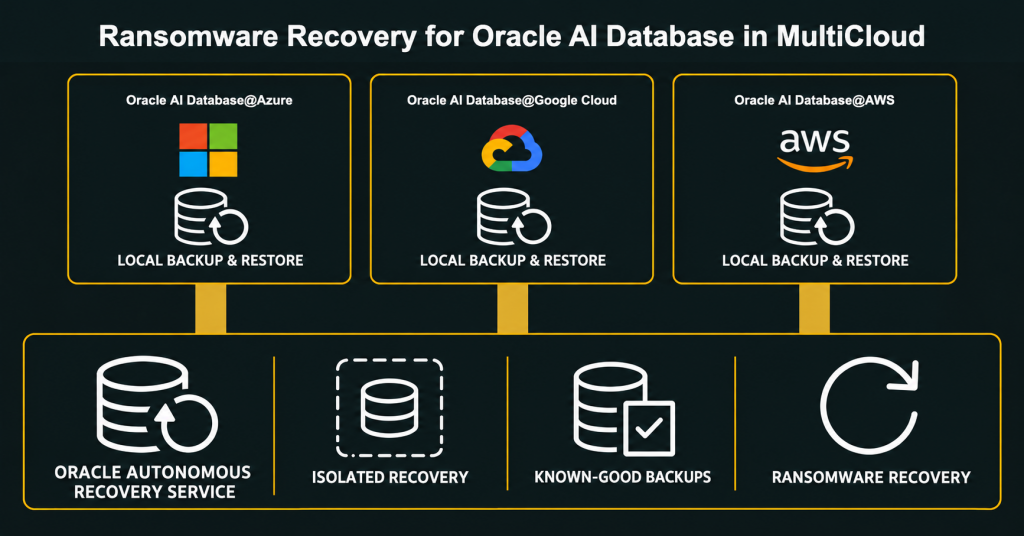
Why do we need Ransomware Recovery?
As cyber threats become more commonplace, there are now several ransomware recovery regulatory requirements that are impacting industries such as Healthcare, Financial Services and Insurance (FSI), Energy, and Government agencies. Regulations including but not limited to DORA, NIS2, NYDFS, emphasize protected backups, segregated recovery, tested restoration and board-level accountability. Many customers are also contending with Board level or Executive mandates to create a logical, Ransomware Recovery airgap for their critical infrastructure.
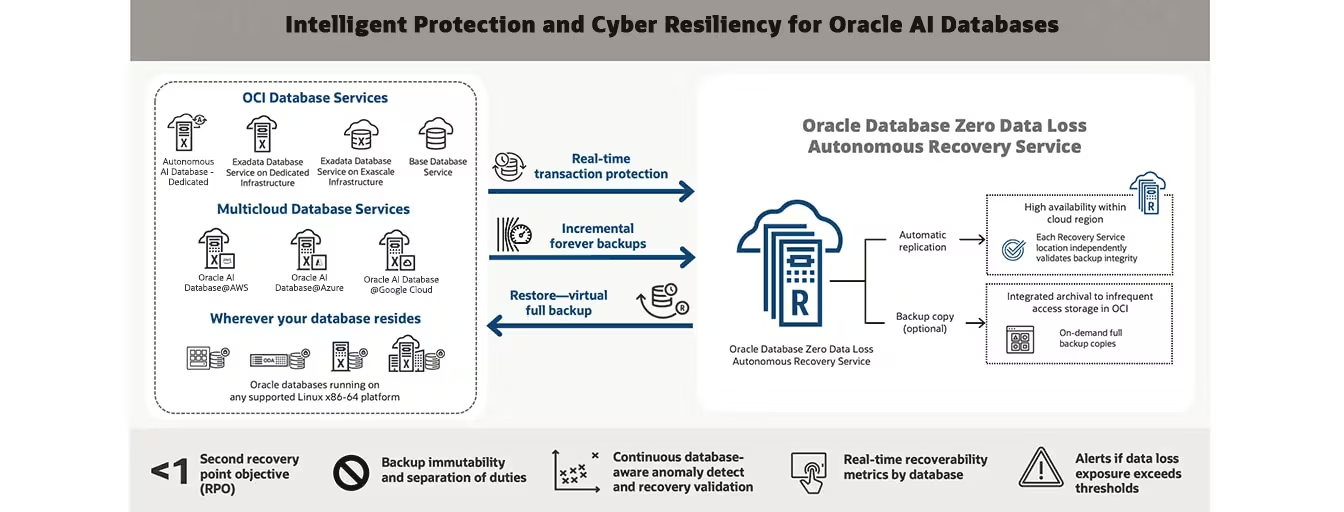
For over a decade Oracle’s Zero Data Loss Recovery Appliance (ZDLRA) has protected mission critical workloads on-premises, providing transaction level protection, recovery automation, backup immutability and high availability. In the cloud, and in Oracle’s Multicloud database offerings, the Zero Data Loss Autonomous Recovery Service provides similar capabilities as a managed service. It provides policy-based retention, encrypted backups, anomaly detection, and recovery validation. An optional retention lock prevents backups from being modified or deleted until their retention period expires. The benefits include but are not limited to:
- Tenant Isolation – an Oracle-managed tenancy provides a logical air gap.
- Backup Encryption with Transparent Data Encryption (TDE)
- Backup immutability and separation of duties
- Minimize the impact of cyberattacks with real-time data protection
- Reduce data loss exposure to sub-second RPO
- Database-aware anomaly detection and recovery validation
Ransomware Recovery Design patterns
There are two Ransomware Recovery design patterns that customers are utilizing today with Oracle AI Databases in Multicloud:
- Same Tenant recovery
- Cross-Tenant recovery
Let’s dive into both patterns in greater detail.
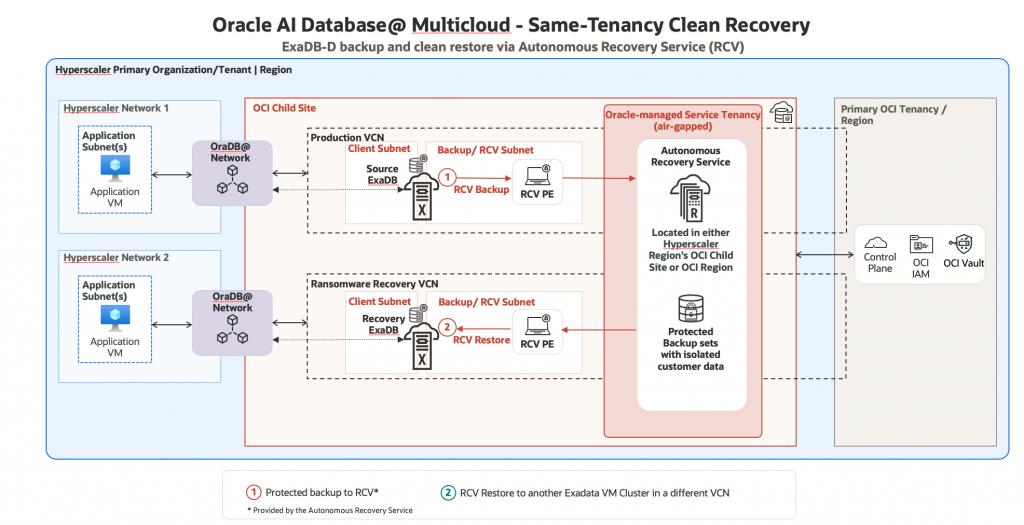
Figure 1 – Same Tenant Recovery Model
In the ‘Same Tenant’ Recovery model, the customer utilizes one Oracle AI Database environment and segments the traffic with different networks. In the figure above, an Oracle AI Database in Multicloud example is provided. The production database has its own Production VCN. For Exadata databases you must have Client and Backup subnets predefined. In addition, the Autonomous Recovery Service utilizes Private Endpoints and private DNS views to provide connectivity to the backup services. The security lists should allow the recovery service to communicate with the database over TCP/2484 (SQL*Net) and TCP/8005 (HTTPS backups). Please review the Autonomous Recovery Service checklist for a more comprehensive list of requirements for this service.
The backup infrastructure is Oracle managed, in a separate environment that is not accessible to customers directly. If the production environment is compromised, the operations team may leverage a pre-provisioned Ransomware Recovery VCN in the diagram above. An Exadata Cloud Infrastructure and Autonomous Recovery Service backup subnet should already be deployed in Ransomware Recovery VCN to ensure the required network connectivity is established. Using the Autonomous Recovery Service, a database or backup administrator can choose to recover the production database into the Exadata VM Cluster in the recovery environment. In the event of an actual cyber-threat, Cloud Administrators could remove network connectivity from the Production VCN while the DBAs verify the integrity of the restored database in the Ransomware Recovery VCN for example.
After the cyber-event, the customer can choose to either:
(a) restore the database back into production and restore network connectivity
(b) promote the Ransomware Recovery VCN as the new production environment and build out network connectivity (DRGs, LPGs, Service Gateways, etc) as needed.
Cross-Tenancy design pattern details
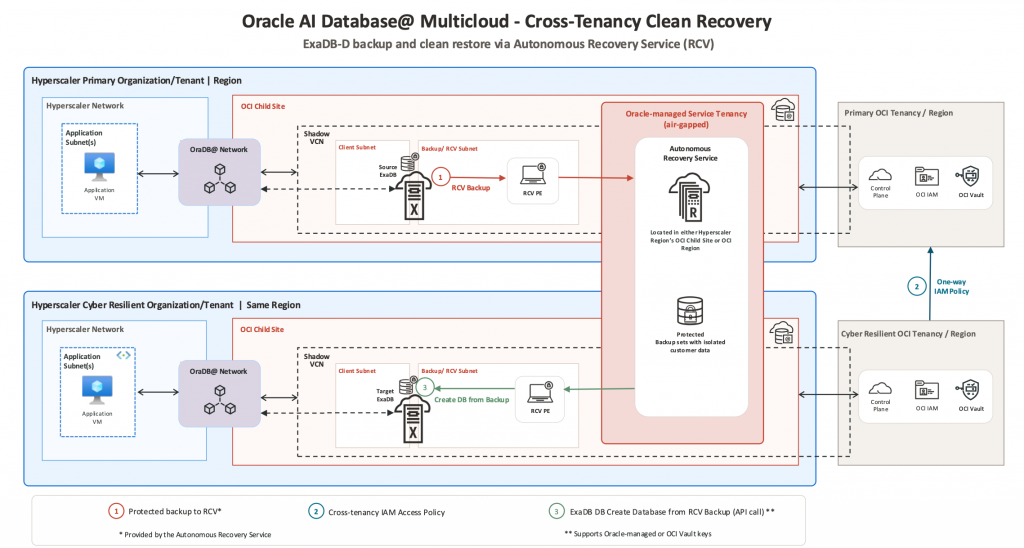
Figure 2 – Cross-Tenancy Design Pattern
While the native features of the Autonomous Recovery Service meet most customer’s needs, some customers require an “air-gapped” ransomware recovery environment with two separate subscriptions and tenancies, (1) for Production and (2) for Ransomware Recovery.
Note: The following design pattern has been tested and validated to work but is not a fully automated feature of the Autonomous Recovery Service. If you decide to implement this architecture, please consult with your Oracle account team.
Design Details:
Step 1 – Prepare – Protect your production databases and gather data. Utilize the Autonomous Recovery Service to protect your Production database, and ensure backups are protected with a retention lock. To facilitate recovery into the Ransomware Recovery clean room you need to collect both the Database OCIDs and any KMS Key OCIDs associated with each database (if using customer managed keys).
oci db database list \
--compartment-id <your-compartment-ocid> \
--query "data[*].{DB_Name: \"db-name\", DB_OCID: id, KMS_Key_ID: \"kms-key-id\",
Vault_ID: \"vault-id\"}" \
--output table
This is the minimum amount of information needed, which can be collected locally in the Production or the Ransomware Recovery environment. You should also keep updated configuration information needed to create databases and clusters in the new tenancy.
- Current DB software version.
- DB size to ensure enough storage is allocated
- VM sizing and configuration
Step 2 – Configure Cross-Tenancy IAM policies to enable the Ransomware Recovery Tenancy to access the Production tenancy. For reference, please review the OCI product documentation on Cross-Tenancy Access Policies. Please also review the required IAM policies in the Mandatory Requirements Checklist in the Recovery Service product documentation.
Step 2.1 – Endorse (in the Ransomware Recovery OCI Tenancy)
Define tenancy Production as <Production ocid>

Endorse group <identity domain name>/<RcsAdminGroup group name> to manage recovery-service-family in tenancy Production
The following policy statements are needed if OCI Vault is used as Customer Managed Key for TDE and a dynamic group needs to be created for the Exadata VM cluster in the recovery environment.
Endorse group <identity domain name>/<RcsAdminGroup group name> to use key-delegate in tenancy Production

Endorse group <identity domain name>/<RcsAdminGroup group name> to use keys in tenancy Production

Endorse dynamic-group <identity domain name>/<dynamic group name of the exadata vmcluster in recovery environment> to manage keys in tenancy Production

Endorse dynamic-group <identity domain name>/<dynamic group name of the exadata vmcluster in recovery environment> to read vaults in tenancy Production
Step 2.2 – Admit (Production OCI Tenancy)
Define tenancy RansomwareRecovery as <RansomwareRecovery ocid>

Define group RcsAdminGroup as <RcsAdminGroup ocid in RansomwareRecovery>

Admit group RcsAdminGroup of tenancy RansomwareRecovery to manage recovery-service-family in compartment id <compartment ocid of protected database>
The following policy statements are needed if OCI Vault is used as Customer Managed Key for TDE and the dynamic group referenced in these statements is the dynamic group created in the Ransomware Recovery OCI Tenancy for the Exadata VM Cluster in the recovery environment.
Define dynamic-group RcvVMC as <Dynamic group ocid in RansomwareRecovery>

Admit group RcsAdminGroup of tenancy RansomwareRecovery to use key-delegate in compartment id <compartment ocid of OCI Vault and Keys >

Admit group RcsAdminGroup of tenancy RansomwareRecovery to use keys in compartment id <compartment ocid of OCI Vault and Keys >

Admit dynamic-group RcvVMC of tenancy RansomwareRecovery to manage keys in compartment id <compartment ocid of OCI Vault and Keys >

Admit dynamic-group RcvVMC of tenancy RansomwareRecovery to read vaults in compartment id <compartment ocid of OCI Vault and Keys >
Step 2.3 – Enable RCV Policies (in both tenancies to enable the recovery service)
Allow group RcsAdminGroup to manage recovery-service-protected-database in compartment <protected_db_compartment>

Allow group RcsAdminGroup to manage recovery-service-subnet in compartment <recovery_service_subnet_compartment>

Allow group RcsAdminGroup to manage virtual-network-family in compartment <vcn_compartment>
Step 3 – Create a new database using the API.
If the production environment is compromised, the operations team may leverage a pre-provisioned network and infrastructure to mirror the primary production environment. Prior to recovery in the Ransomware Recovery tenancy, all production components must be created, and access to the Autonomous Recovery Service must be configured. You must identify the last known good backup point. Depending on the type and severity of the attack, this could be the last backup received, or it could be a point prior to the attack. The last known good recovery point will determine what method of database restore and recovery will be needed.
Using the OCI Python SDK method, CreateDatabaseFromAnotherDatabase, you can restore and recover to the last backup, or to a specific known good point in time. If you want to restore to a specific backup you can leverage the OCI Python SDK method, CreateDatabaseFromBackup.
In step 2 above, we captured the needed access to the source database’s encryption information, such as a TDE wallet password or access to the OCI Vault key material required for recovery. Along with database OCID, it provides the information needed to restore from the Autonomous Recovery Service Backup. To identify where to restore to in the cyber tenancy you need to provide the new Database Home OCID, the destination tenancy and region and the new database administrator password.
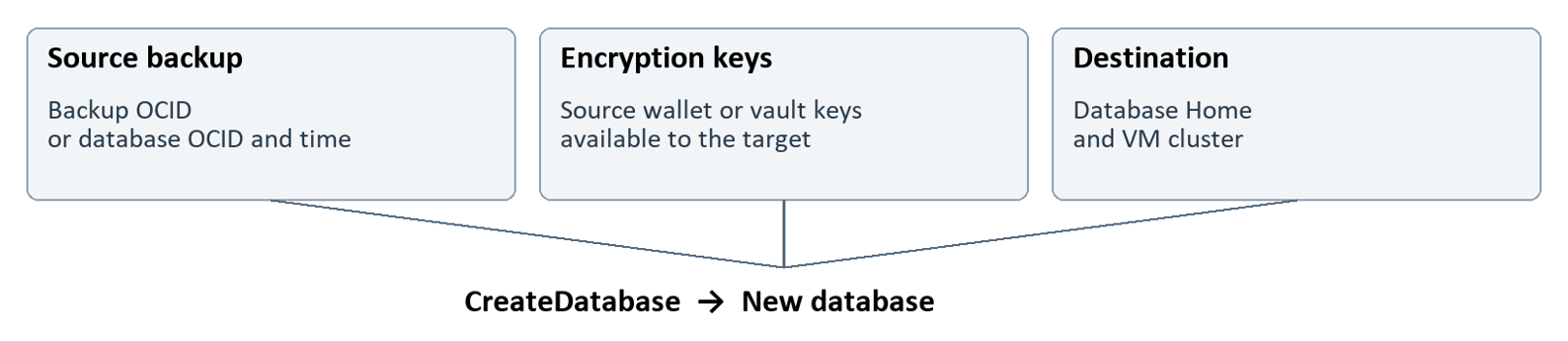
This can be implemented in Python and/or Terraform. In subsequent blogs, we will dive deeper into:
- A detailed set of steps for using the CreateDatabaseFromBackup API to recover into the Ransowmare Recovery tenancy.
- A deeper dive into concepts to consider, such as OCI Vault and Storage replications techniques.
Choosing the right recovery pattern
The same-tenancy pattern provides network and workload separation with lower operational complexity but shares an administrative boundary with production. The cross-tenancy pattern adds administrative isolation for recovery resources, with additional configuration and operational requirements.
The table below summarizes these tradeoffs. Customers should select the pattern that best aligns with their threat model, recovery objectives, regulatory requirements, operational readiness, and risk tolerance. Whichever pattern you choose, you should validate it through regular recovery testing and incorporate it into a documented incident-response plan.
| Consideration | Same tenancy | Cross-tenancy |
|---|---|---|
| Best fit | Simpler recovery operations | Stronger administrative separation requirements |
| Administrative isolation | Lower | Higher |
| Operational complexity | Lower | Higher |
| Automation Approach | Console UI and/or APIs | Customer-developed API scripts |
| Recovery infrastructure | Separate network in the same tenancy | Separate recovery tenancy and network |
| Identity-compromise boundary | Shared | Separately administered if designed correctly |
Closing Thoughts
If you decide to move forward with the recommendations in this blog post, choose a representative Oracle AI Database workload in your Multicloud environment, define what successful recovery looks like, and bring your IT, security, database, and application teams into the process from day one. Use your proof-of-concept and UAT environments to practice the full recovery workflow with Autonomous Recovery Service—from confirming cross-tenancy IAM permissions, OCI Vault/TDE key access, and network connectivity to validating that the application works after recovery. Measure the results against your recovery objectives, test failure scenarios, and turn what you learn into clear, repeatable runbooks.
Before moving into production, make sure another team member can follow those runbooks successfully, and promote your validated configurations and automation through your established change-management process. Then keep practicing. A successful pilot is an important milestone; regular recovery drills are how you build the confidence to act when it matters most.
Thank you for reading, we hope this post gives you a practical starting point for building a ransomware recovery runbook for Oracle AI Databases in Multicloud.