
Introduction
OCI Audit is an OCI service that automatically records calls to all supported OCI APIs as OCI events. OCI Audit offers the following benefits:
- All audit data with multiple identity domains is available in one central place
- Provides a single source of truth for all actions in your cloud
- Tracking who did what, when, and from where
- Data can be pushed to external systems such as SIEMs.
- OCI Audit stores event data for a year
In Oracle Cloud Infrastructure (OCI), there is standard system managed (Provided out-of-the-box by OCI) default log group – _Audit where all audit service log entries are automatically stored, it captures all audit events (e.g., API calls, CLI commands, Console actions, OCI resources, service activities, User Actions ) for whole tenancy.
This data can be extracted from _Audit log group for various governance, security monitoring , compliance (regulatory audits) & tracking user actions (login, MFA, password reset, provisioning changes) requirements, retention is 1 year, post that you can export to object storage.
In this blog we will explore methods & ways to fetch OCI Events using Standard – _Audit Log group into external systems like SIEM, below is decision tree when to use what scenario’s.
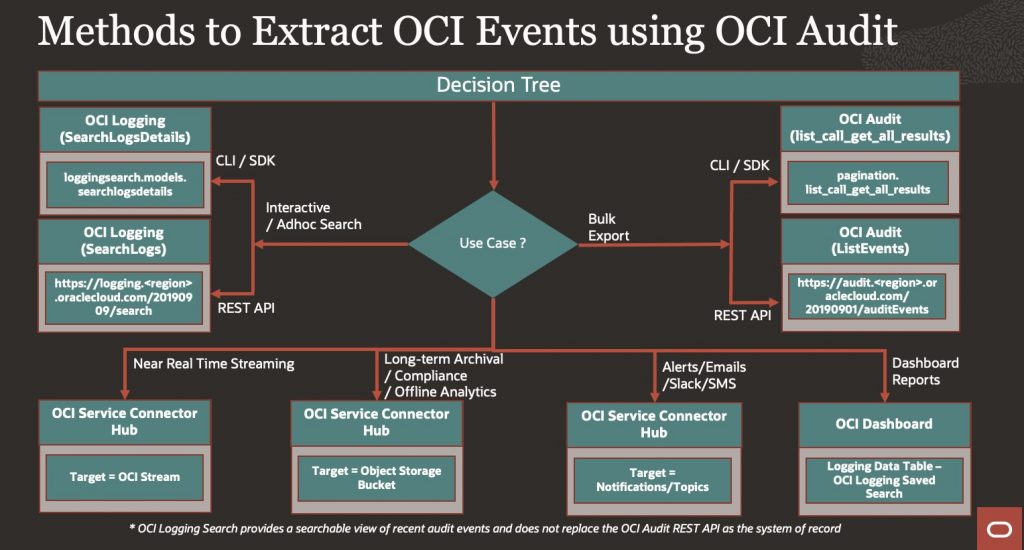
Each method serves different use cases based on performance, flexibility, integration, and scalability, we will discuss in detail.
Prerequisites
Following IAM Policies are required to enable Access to OCI Audit Logs & use OCI Logging features, you need to setup these policies accordingly to your OCI governance requirements.
- Enable Access to Log Analytics and Its resources
- Viewing Audit Log Events
- Logging Search
- Connector Hub
- Common IAM Polices
Details
OCI Audit provides multiple ways to access and analyze Audit logs & below are the key integration options available for extracting and processing audit data
- OCI CLI/SDK
- OCI Logging search API (SearchLogsDetails)
- OCI Audit API (list_call_get_all_results)
- Service Connector
- Stream logs to Oracle Streaming
- Export logs to Object Storage
- Topics for Notifying
- OCI Logging UI
- Saved Search
- OCI Dashboard
- OCI REST API
- OCI Logging search (/20190909/search)
- OCI Audit API (/ 20190901/auditEvents)
1. OCI CLI/SDK
Connecting to OCI REST APIs using an SDK involves leveraging language-specific libraries provided by Oracle to interact with OCI services programmatically. This approach simplifies API calls by handling authentication, request signing, and response parsing.
You can refer below example to understand how it can be done – Manage Oracle Cloud Infrastructure REST APIs Programmatically using Shell and Java Code
OCI CLI commands wrapped inside scripts or Python code that run as serverless functions (OCI Functions). These functions can be triggered via API Gateway endpoints, enabling external systems to call them easily over REST APIs.
We will use Oracle Cloud Infrastructure SDK for Python
Below two methods can be used to fetch Audit logs –
1.1 OCI Logging search API (SearchLogsDetails)
Invoke oci.loggingsearch.models.SearchLogsDetails to perform log queries, as we search in OCI Logging UI Search.
Refer example – Export OCI Audit Logs in CSV format for a custom time range
You need to pass query statement as you can query in Logging UI along with start time & end time
Query variable contains – Compartment ID, User Principle, Events, Event Attributes etc., same way you query in Logging UI, this search provides more flexibility for ad-hoc searches.
search_details = oci.loggingsearch.models.SearchLogsDetails(
    time_start=start_time,
    time_end=end_time,
    search_query=query,
    is_return_field_info=False
)

#Execute Search

response = client.search_logs(search_logs_details=search_details)
Response variable will return JSON Payload response as per Audit REST API Schema.
1.2 OCI Audit API (list_call_get_all_results)
Automatically fetches more data from the service until the no more records are available
Use oci.pagination.list_call_get_all_results to fetch complete results efficiently
Refer Sample Code using oci-python-sdkYou need to pass Compartment ID (tenancy ID), start time & end time & it will return all information till all pages are fetched recursively, this way you can export entire audit logs for provided time range.
response = oci.pagination.list_call_get_all_results
(
    audit_client.list_events,
    compartment_id=compartment_id,
    start_time=start_time,
    end_time=end_time
)
Response variable will return JSON Payload response as per Audit REST API Schema.
2 Service Connector
Service Connector in OCI Logging is used to stream log data from one OCI service (like Logging or Audit) to another destination (like Object Storage, Streaming, Functions, Topics, Monitoring, etc.)
We will use Standard Source – _Audit log group provided by OCI Audit.
We will cover below targets , you can refer for more scenarios
2.1 Stream logs to Oracle Streaming for near real-time processing or alerting
Create Connector, Source as Log group – _Audit , Target as Stream
Filter on OCI Service Name & OCI Event Type which you want to capture.
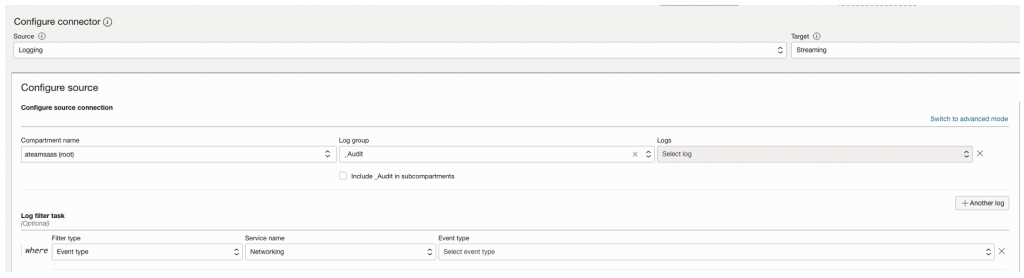
Define Oracle Stream & use that as target

2.2 Export logs to Object Storage for long-term retention and analysis.
Create Connector, Source as Log group – _Audit , Target as Object Storage.
Filter on OCI Service Name & OCI Event Type which you want to capture.
Define Object Storage Bucket & use that as Target

2.3 Using Topics for Notifying external receipting using – Email, Slack, SMS
Create Connector, Source as Log group – _Audit , Target as Stream
Filter on OCI Service Name & OCI Event Type which you want to capture.
Define Topic & use that as Target

3 Using OCI Logging Saved Search and OCI Dashboard
3.1 Saved Search
OCI Logging Saved Search – A predefined query in OCI Logging that filters and retrieves log data based on custom criteria for quick access and analysis
3.2 OCI Dashboard
OCI Dashboard – A customizable visual interface in OCI that displays metrics, logs, and saved searches in a unified, interactive view for monitoring and insights
Create Saved Searches and build custom dashboards to visualize and monitor audit events interactively.
Refer this working example – Generate Identity and Access Management Reports from Oracle Cloud Infrastructure Audit
4 Using OCI REST API via Middleware (e.g. Oracle Integration Cloud)
OCI provides two mechanisms to access audit data Via REST : the Audit REST API for authoritative extraction and the Logging Search API for query-based analysis of recent events.
OCI Audit API – designed for complete, authoritative audit extraction.
OCI Logging Search API – designed for filtered, query-based analysis of recent audit data
Both APIs serve different purposes and are complementary, not interchangeable.
4.1 OCI Audit REST API
Endpoint: /20190901/auditEvents
Operation : GET
Example :
https://audit.<region>.oraclecloud.com/20190901/auditEvents?compartmentId=<tenancy_ocid>&startTime=<RFC3339&endTime=<RFC3339>
Characteristics
- Covers entire audit retention period (365 days)
- Deterministic pagination (opc-next-page)
- No server-side filtering/search
- No query language (raw event stream only)
- Parameters are limited to compartment ID, Start time & End time
4.2 OCI Logging Search API
Endpoint: /20190909/search
Operation : POST
Example :
https://logging.<region>.oci.oraclecloud.com/20190909/search
{
  "searchQuery": "search \"<tenancy_ocid>/_Audit\" | where data.eventName like 'IdentitySignOn.%'",
  "timeStart": "...",
  "timeEnd": "...",
  "limit": 1000
}
Characteristics
- Rich search & filtering
- Can apply Operations like – WHERE, SELECT, SORT
- 14-day maximum query window
Since Oracle Cloud Infrastructure (OCI) REST APIs do not support Basic Authentication (username/password) — you must use OCI Signature-based authentication, Oracle Integration Cloud (OIC) Gen 3 and other OCI services enforce OCI Signature Version 1.
You need to setup OCI API keys for the user based on which REST APIs will connect to the OCI tenancy.
Use the REST Adapter with OCI Signature-based authentication to programmatically retrieve audit events into workflows or third-party tools.
Refer OCI Gen3 Connection Method – OCI Signature Version 1
Summary
Below is a comparison table explaining when to use what method and why
1. OCI CLI/SDK (Logging Search API + OCI Audit API)
| Method | Use Case | When to Use | Why Use It |
| oci.loggingsearch.models.SearchLogsDetails | Interactive search of audit/session logs using structured queries | When you need ad-hoc, precise filtering by event name, user, IP, MFA, or session activity | Provides powerful querying using Logging Search Query Language |
| oci.pagination.list_call_get_all_results | Paginated retrieval of Bulk audit events | When extracting large volumes of audit data programmatically | Simplifies pagination and ensures complete retrieval from the Audit system of record |
Ideal for: scripting, automation, investigation, monitoring specific identity or session events (e.g. AccessApp, InteractiveLogin, ChangePassword).
2. OCI Service Connector Hub
| Method | Use Case | When to Use | Why Use It |
| Service Connector → OCI Streaming | Near-real-time event streaming | When audit events must be processed as they occur | Enables event-driven pipelines without API polling |
| Service Connector → Object Storage | Audit log archival | When audit data must be retained for compliance or offline analytics | Provides durable, long-term storage |
| Service Connector → Notifications / Topics | Alerts and notifications | When audit events should trigger alerts or messages | Enables near-real-time alerting and integrations |
Ideal for: near-real-time processing, archival, alerting, and event-driven workflows.
3. OCI Logging UI (Saved Search + Dashboards)
| Method | Use Case | When to Use | Why Use It |
| OCI Logging Saved Search | Reusable audit or session queries | When the same searches are executed repeatedly | Eliminates need to rewrite queries |
| OCI Logging Dashboards | Visual reporting and monitoring | When auditors or security teams need visibility | Provides no-code dashboards and charts |
Ideal for: visualization, audit reviews, executive reporting, and operational monitoring.
Not ideal for: automation, bulk extraction, or integrations.
4. OCI REST API (e.g., via OIC or middleware)
OCI Logging Search REST API (POST /20190909/search)
| Method | Use Case | When to Use | Why Use It |
| /20190909/search | Interactive search over audit logs | When structured, query-based search is needed over HTTP | Provides server-side filtering using Logging Search Query Language |
Ideal for: Workflow-driven interactive analysis.
OCI Audit REST API (GET /20190901/auditEvents)
| Method | Use Case | When to Use | Why Use It |
| /20190901/auditEvents | Authoritative audit extraction | When integrating audit data with external systems | Provides complete audit history with deterministic pagination |
Ideal for: Compliance and governance pipelines
Conclusion
Each method for accessing and analyzing OCI Audit logs offers distinct advantages based on use case, scalability, and integration needs
- OCI CLI/SDL Methods
- Best for developers and automation. Logging Search enables targeted, interactive queries, while the Audit API supports complete, paginated extraction of audit data.
2. Service Connector Hub (via _Audit Log Group)
- Ideal for near-real-time, event-driven architectures. It enables streaming, alerting, and archival without continuous API polling.
3. OCI Logging – Saved Search & Dashboards
- Ideal for visualization and ongoing monitoring. Dashboards provide actionable insights for auditors, administrators, and security teams without needing to write queries repeatedly.
4. OCI Audit REST API via Middleware (e.g., OIC)
- Seamless integration with external systems or workflows. Using REST with OCI Signature ensures secure, controlled access and can be embedded in automation pipelines or low-code environments.
Key takeaway:
- OCI Audit API is the system of record.
- OCI Logging Search is a powerful analytical view of recent audit events.
- The most effective solutions combine these approaches based on timeliness, completeness, and integration needs.
We will demonstrate how OCI Events can be extracted with one use case – Methods and ways to extract Session Information using OCI Audit and Integrate into external systems
Align the choice of method with your organization’s operational model, tooling maturity, and compliance requirements.
References
- OCI Audit
- OCI Events
- OCI Service Connector
- OCI Logging
- OCI CLI
- OCI Dashboard
- OCI SDK
- OCI Audit API
- Manage Oracle Cloud Infrastructure REST APIs Programmatically using Shell and Java Code
- Export OCI Audit Logs in CSV format for a custom time range
- Implement multicloud security using OCI Audit to capture events from OCI Identity and Access Management
- Generate Identity and Access Management Reports from Oracle Cloud Infrastructure Audit
- Implement multicloud security using OCI Audit to capture events from OCI Identity and Access Management