
Introduction
Oracle Cloud Applications Suite is the complete cloud applications suite with embedded artificial intelligence that brings consistent processes and a single source of truth across the business functions – from enterprise resource planning (“ERP”), supply chain management (“SCM”), and human capital management (“HCM”) to advertising and customer experience (“CX”). Oracle Fusion Applications with a unified data model provide modular, flexible, service-enabled enterprise applications for building, managing, and tracking solutions for finance, human resources, supply chain, manufacturing, customer service, and marketing needs.
Continuing from my previous blog on the Fusion Cloud Applications implementation journey, I would like to share my experience in helping large customers set up effective operational governance for their cloud applications. This blog aims to help architects and application administrators in your organization learn about available Fusion Cloud Application administration features to define your administration processes and procedures for administering your Fusion Cloud Applications. Fusion Cloud Application administration is a common component applicable for all your subscribed Fusion Cloud Applications including ERP, SCM, HCM, and CX.
Good cloud governance helps organizations use the cloud in an organized and effective way. Setting up rules and processes during the start of a cloud project makes sure everything runs smoothly after launch. This blog explains how Fusion Cloud Applications administrators can use features like managing system uptime, subscriptions, usage, security, and environment refresh to support their cloud governance.
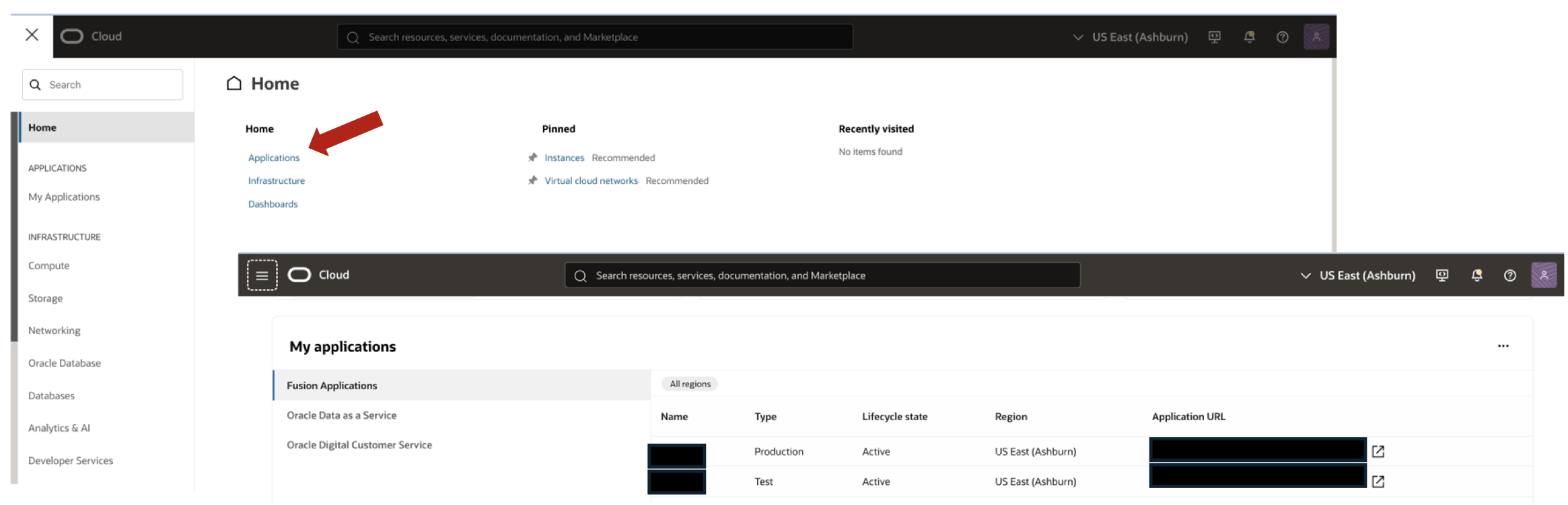
The Oracle Cloud Console provides a single interface to manage all your cloud services. When you sign in to the Oracle Cloud Console, the Applications Home provides access to all your applications and to helpful resources such as documentation and guided tours. It is recommended that your application administrators and team become familiar with the Oracle Fusion Cloud applications management features during the early stages of the project.
Fusion Applications Environment Management
Self-service management is a key feature of Fusion Applications via the Oracle Cloud Console where you provision, run, and maintain your Fusion Applications.
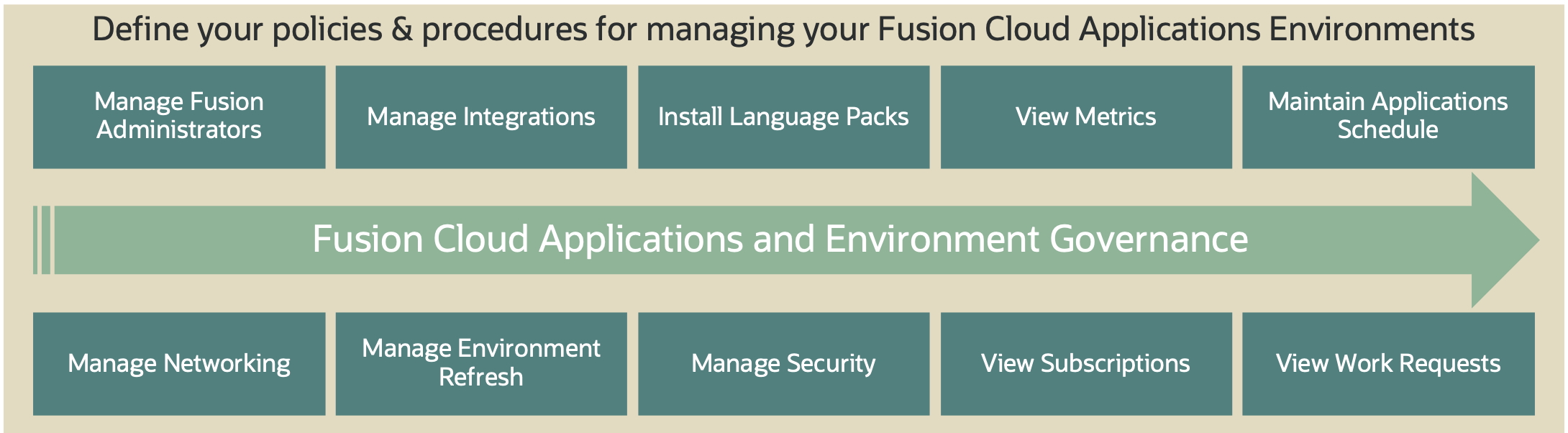
When you subscribe to Fusion Applications, you are allotted one production environment, one test environment, and you have the option of purchasing development environments. You will manage the lifecycle of your environment like viewing metrics, availability, scheduled maintenance, environment refresh activities, managing language packs, and network access control rules.
Note: The screenshots in this blog are examples. Your console may look different.
1) Manage Fusion Administrators
The Fusion Administrator has access to manage Fusion Applications installed on environments. You can add administrators either through your application service console or through the environment details page of the Oracle Cloud Console. Make sure the user to be added does not exist in the Identity Domain corresponding to the Fusion Applications environment. As an administrator, you can add new administrators, reset passwords for administrators, and delete administrators.

2) Manage Integrations
When you provision an environment, additional services are provisioned and integrated with your Fusion Applications. These services extend the functionality of your applications. The Integrations feature of environment management lets you discover and manage these additional services from a single interface.

3) Install Language Packs
A language pack contains artifacts that are translated into a specific language. When you create an environment, English is installed by default. Adding a language pack does not impact the availability of the environment. Translated artifacts include UI text, predefined data, messages, BI catalog data, and so on. I recommend installing only the languages that you plan to use. Note that you can’t remove a language pack once installed.

4) View Metrics
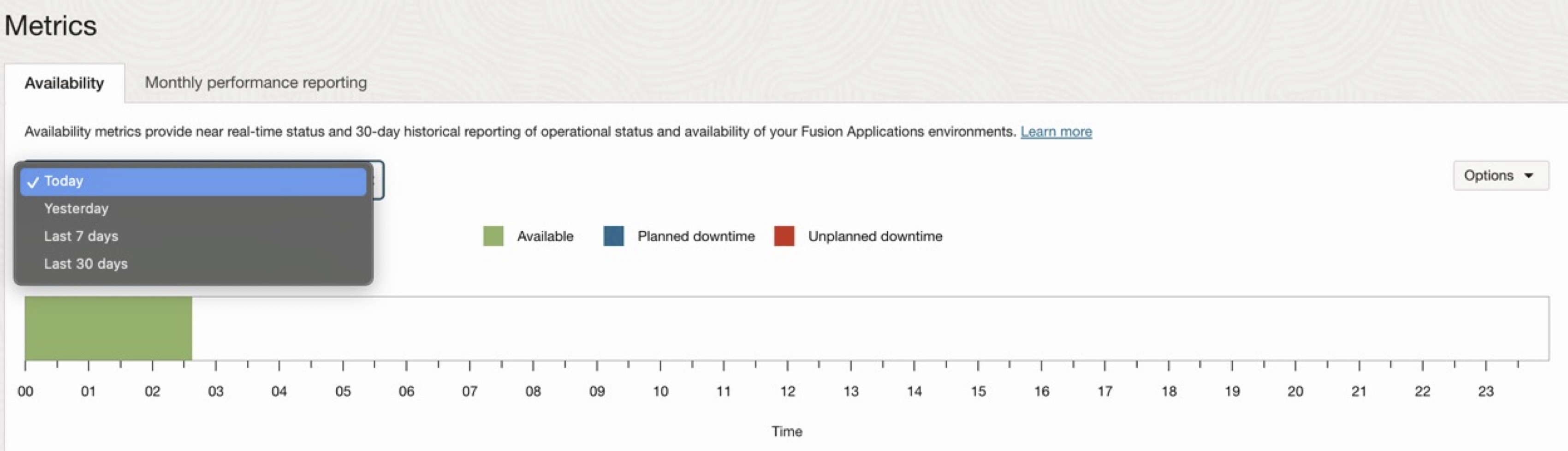
The environment availability metric provides near real-time status and 30-day historical reporting of operational status and availability of your Fusion Applications environments. Monthly performance metrics only shows data for previous months and collected for production environments only.
5) Application Maintenance
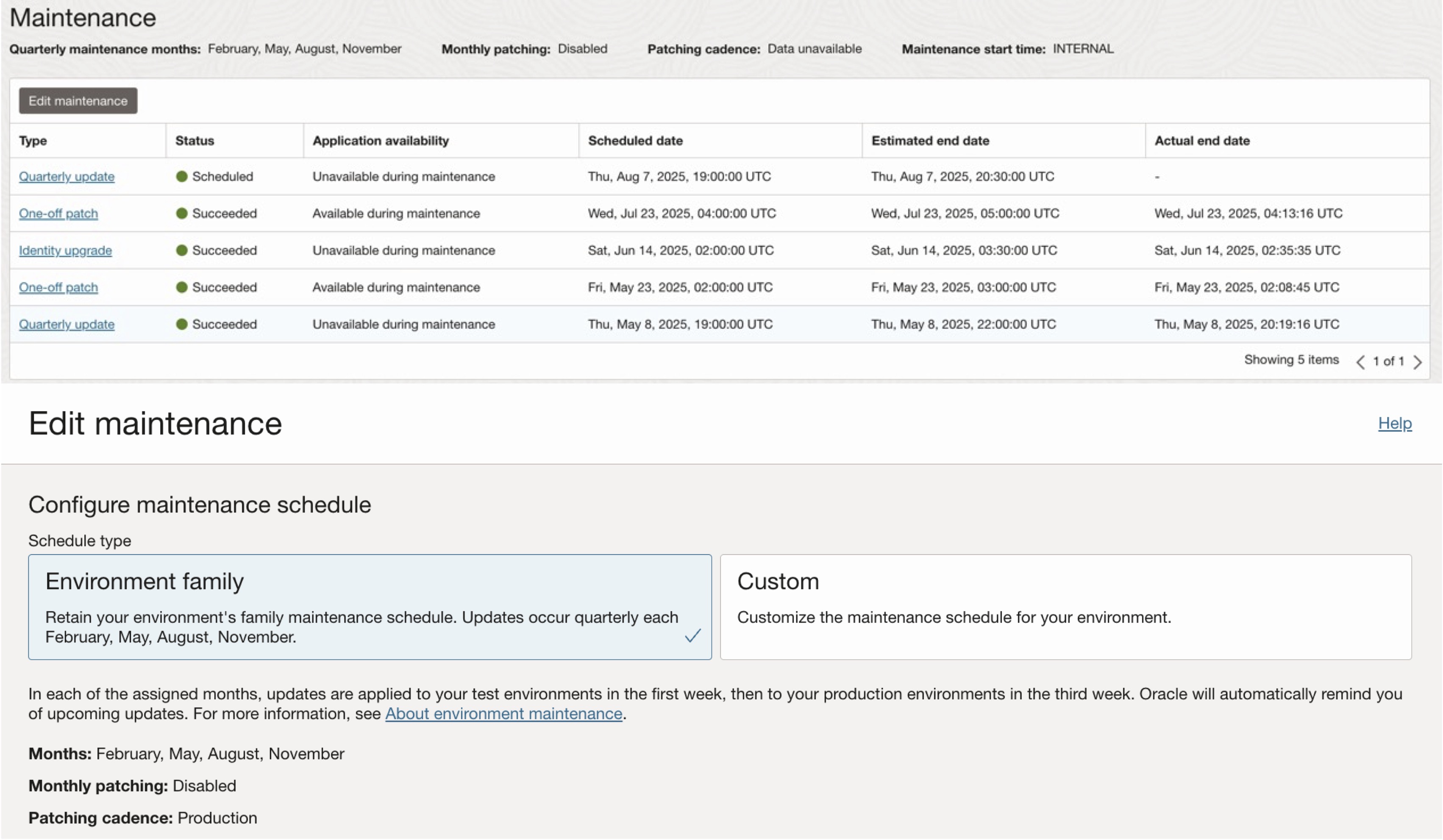
Maintaining the health and performance of your Oracle environments is crucial. Oracle automatically runs maintenance on your environments to apply feature updates and patches to your applications, according to your maintenance policy schedule. Oracle notifies you in advance of upcoming maintenance times. You can also get information about upcoming maintenance at any time on the environment details page.
Refer to Oracle Fusion Applications Cloud Suite Maintenance Pack Documentation (Doc ID 2816277.1) for the bug fixes that are included in the weekly or monthly maintenance packs as well as quarterly updates’ key bug fixes for Oracle Fusion Applications. Note Weekly Maintenance Packs are also known as Cumulative Weekly Bundles (“CWB”).
Type of maintenance and schedules
Quarterly schedule
- Oracle releases new features and major enhancements four times a year through quarterly updates.
- All customers must receive these quarterly updates.
- The updates are applied according to the maintenance months you have chosen.
- For Oracle Payroll service, there are fixed maintenance periods that cannot be changed.
Monthly patching
- Monthly patching is an optional service that you can choose. If you select it, your environments get maintenance packs each month.
- Patches are applied based on the schedule you chose for production or non-production.
- Monthly patching does not include new features.
- New features are delivered only in quarterly updates.
- Monthly patching only provides bug fixes.
6) Manage Networking
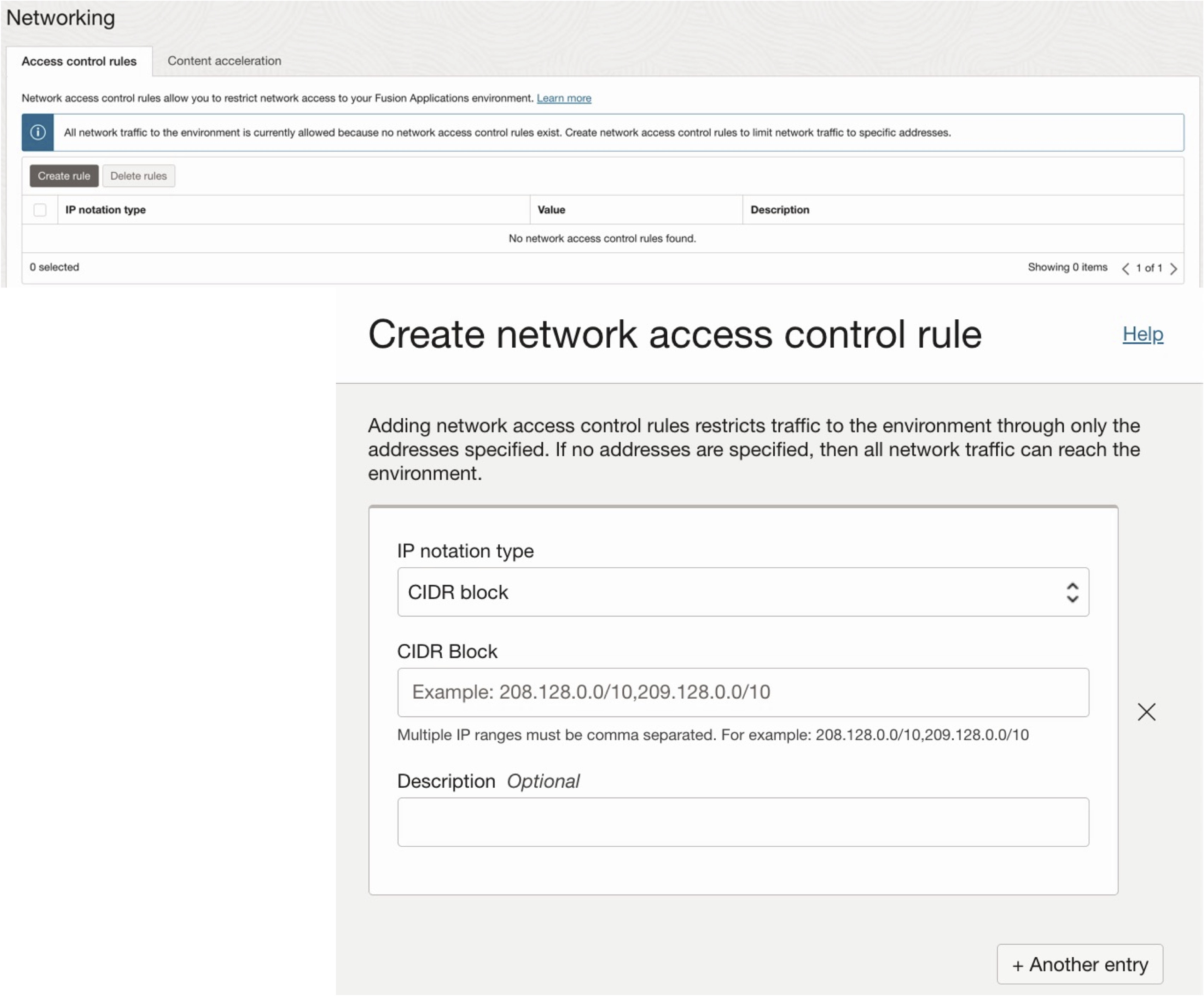
Network access control rules allow you to restrict network access to your Fusion Applications environment. As an administrator, you can manage (create, delete) network access control rules to limit network traffic to specific addresses. Adding network access control rules restricts traffic to the environment to only the addresses specified. If no addresses are specified, then all network traffic can reach the environment.
7) Manage Environment Refresh
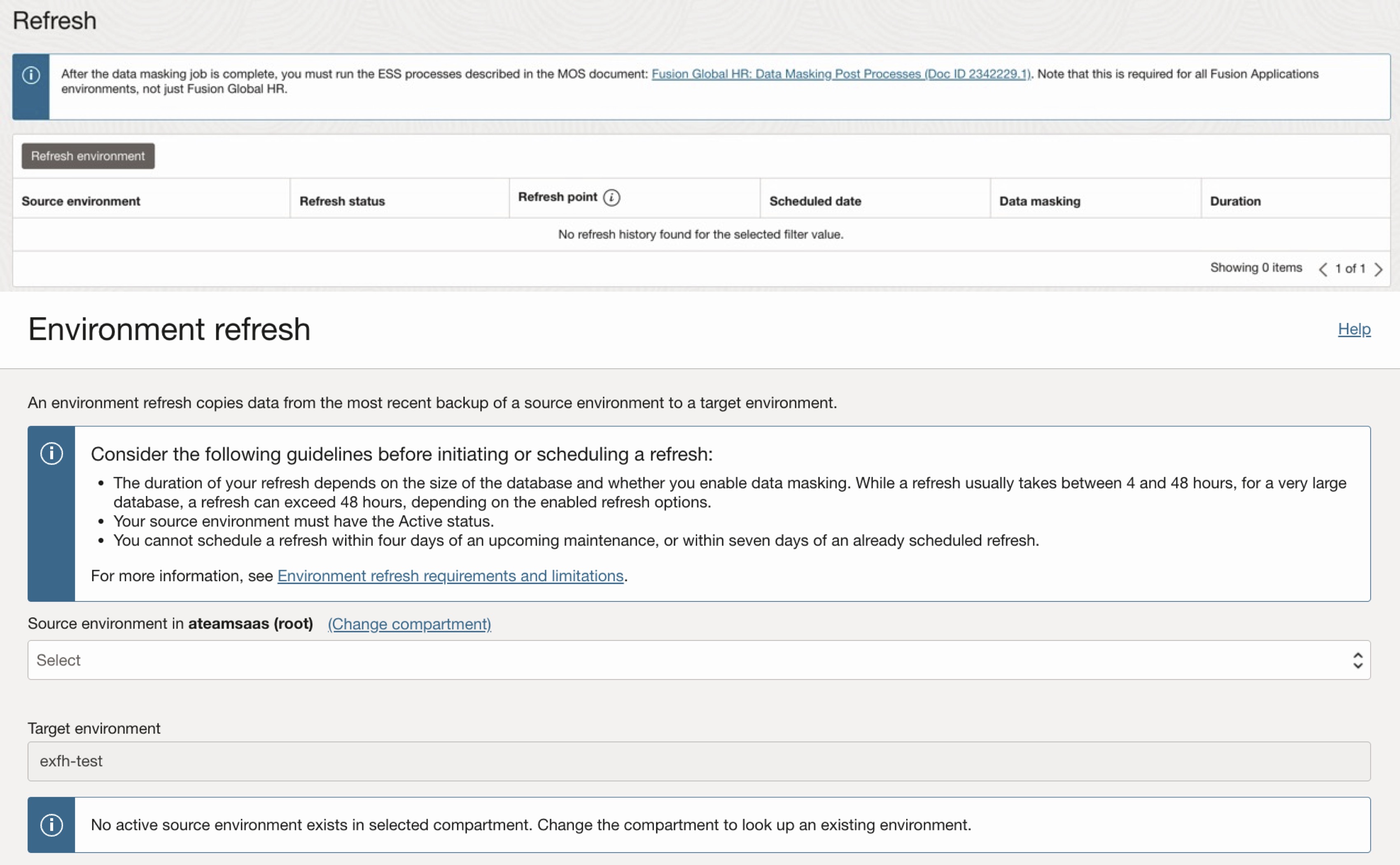
An environment refresh copies data from the most recent backup of a source environment to a target environment. Refresh is allowed only on non-production environments. You can select a source from your active production or another non-production environment to a target non-production environment and specify the refresh start time. You may enable data masking optionally. The duration of your refresh depends on the size of the database and whether you enable data masking.
When you schedule a refresh, keep in mind that the maintenance cycles of the source and target environments may not be in synch, because production environments are typically patched two weeks later than the non-production environments.
8) Manage Security
Encryption
Your Fusion Applications environments are protected by Oracle-managed encryption keys. Data encryption keys are encrypted with a master key assigned to the bucket. Encryption is enabled by default and cannot be turned off. For more information on customer-managed keys. See Learn more about customer-managed keys.

Breakglass
Break Glass for Oracle Applications provides you with additional security by restricting administrative access to systems and services. For more information, see Learn more about breakglass.
The customer-managed keys feature allows you to provide and manage the encryption keys that protect your environments. With customer-managed keys, you use your keys, stored in an OCI vault, to secure the data stored at rest in your production and non-production environments. You can enable the customer-managed keys option on your environment either during environment creation or after you create the environment.
Note: This feature is available as an add-on subscription.

Data masking
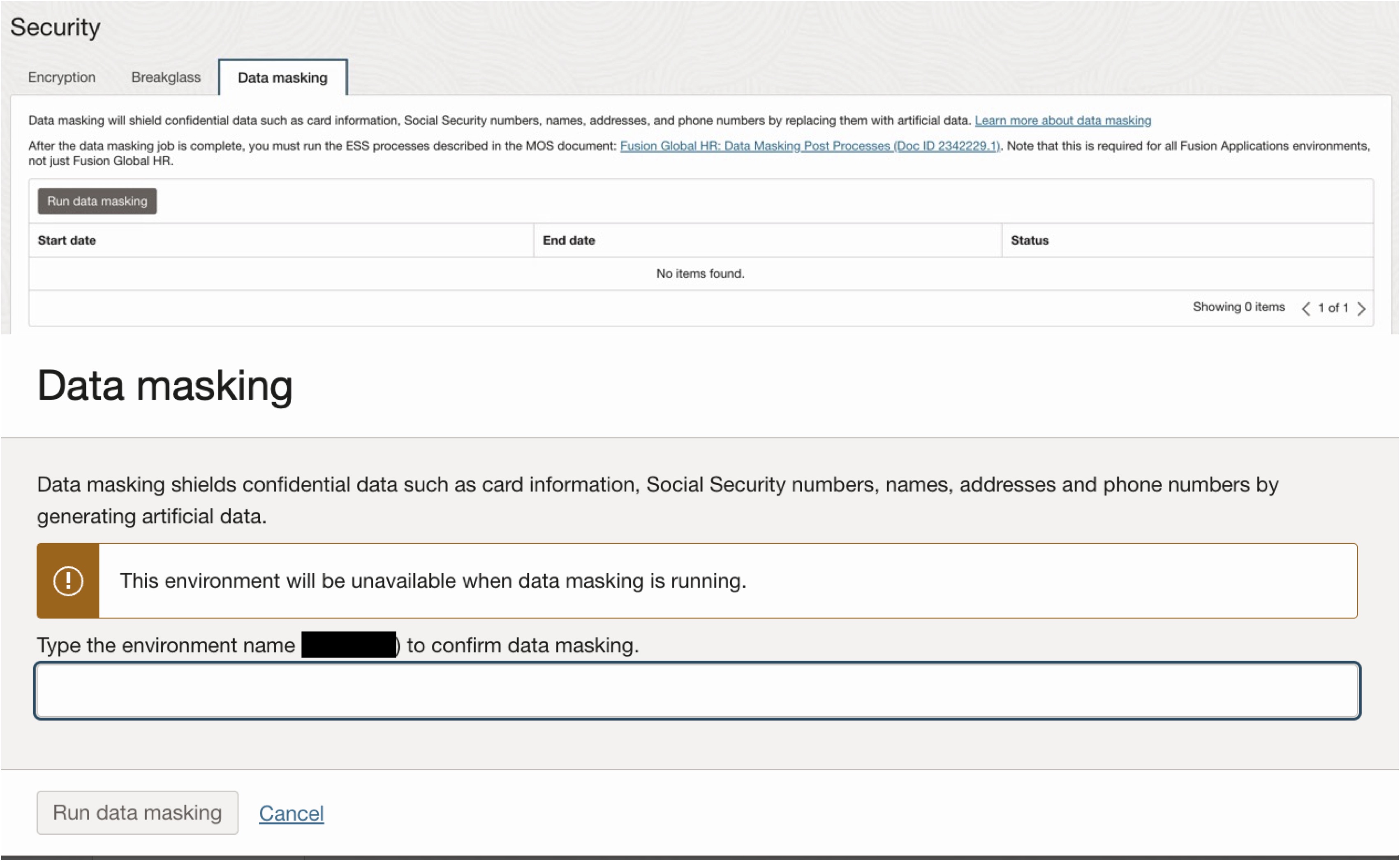
Data masking will shield confidential data such as card information, Social Security numbers, names, addresses, and phone numbers by replacing them with artificial data. Data masking permanently masks, or obscures, data in a non-production environment to protect sensitive or personally identifiable information (PII) from users who access that environment.
Data masking is available to customer tenancies that have subscribed to a service SKU that includes the data masking feature on test and development environments only. You can run data masking on your non-production environments either in conjunction with an environment refresh or as a standalone job.
Data is masked based on a template provided by Oracle. The template defines the masking rules applied to the different types of PII data fields.
After the data masking job is complete, you must run the ESS processes described in the MOS document: Fusion Global HR: Data Masking Post Processes (Doc ID 2342229.1). Note that this is required for all Fusion Applications environments, not just Fusion Global HR.
9) View Subscriptions
You can view service details and usage metrics specific to Applications subscriptions on the Subscriptions page. Refer to the documentation for additional information.

10) View Work requests
You can view the work requests completed, status, logs and error details on the Work requests page.

Guidelines
- Group all your subscribed Fusion Applications in a single environment family for simplified administration.
- Consider the geographical location of your organization and your customers when choosing the right region.
- Consider data privacy laws that might require customer data to be maintained within specific geographical borders. For a list of all regions available in Oracle Cloud Infrastructure, see Regions and Availability Domains.
- For application maintenance, set only the production environment to the “Production” cadence, and all other test and development environments to the “Non-production” cadence. Properly configuring your production and non-production environments ensures smooth transitions and optimal results. If you have a separate non-production environment for Production Support consider having a “Production” cadence to help resolve production issues.
Conclusion
The purpose of this blog is to help you better understand Oracle Fusion Cloud Applications administration features and to guide you in setting up governance for both implementation and post go-live phases.