
Introduction
When building agents in Fusion Application AI Agent Studio, integration with external systems is often essential. Many Fusion Application customers already use Oracle Integration Cloud (OIC) to connect Fusion applications with external services. The same Oracle Integration Cloud integrations can now be exposed as tools for AI agents, enabling agents to interact with external systems in a more dynamic and scalable way.
In this blog, we will explore the different ways Oracle Integration Cloud can expose integrations as tools for AI agents, along with the options available in Fusion AI Agent Studio for calling OIC integrations.
Integration as Tools
Oracle Integration Cloud provides two options for exposing integrations as tools for an AI agent.
An integration can be created using the REST Adapter with the Trigger option enabled on the connection. Such integrations can be configured directly as External REST tools in Fusion AI Agent Studio, with no additional setup required.
Direct Integration
Integrations created both inside and outside an OIC project can be used as tools. They can be monitored through the standard observability layer, and when created within a project, they can also be monitored at the project level.
MCP Server
MCP is an industry-standard approach for tool exposure and allows the AI agent to discover tools dynamically at runtime. The MCP Server option is available only within OIC projects. An OIC project provides a unified workspace where teams can design, manage, and monitor automation solutions, including integrations, AI agents, B2B, decisions, healthcare, human-in-the-loop workflows, and robotic automation. It also simplifies lifecycle management and streamlines updates for prebuilt integrations.
To configure MCP server, you first create a project in OIC and then add the required integrations inside that project. To expose these integrations as tools through MCP, add a tool in the AI Agents section of the OIC project and associate it with the relevant integration. A meaningful tool description and parameter metadata are important, as they help the AI agent identify the correct tool based on the user’s request. It is not necessary to create tools for every integration in the project. You can expose only the integrations intended for AI agent use.
Once the tools are defined, the project can be enabled as an MCP server. All tools within that project become part of the MCP endpoint, which can then be configured in Fusion Application AI Agent Studio as an MCP tool. OIC MCP does not introduce additional observability. The underlying integrations continue to be monitored through the standard observability layer, both inside and outside the project.
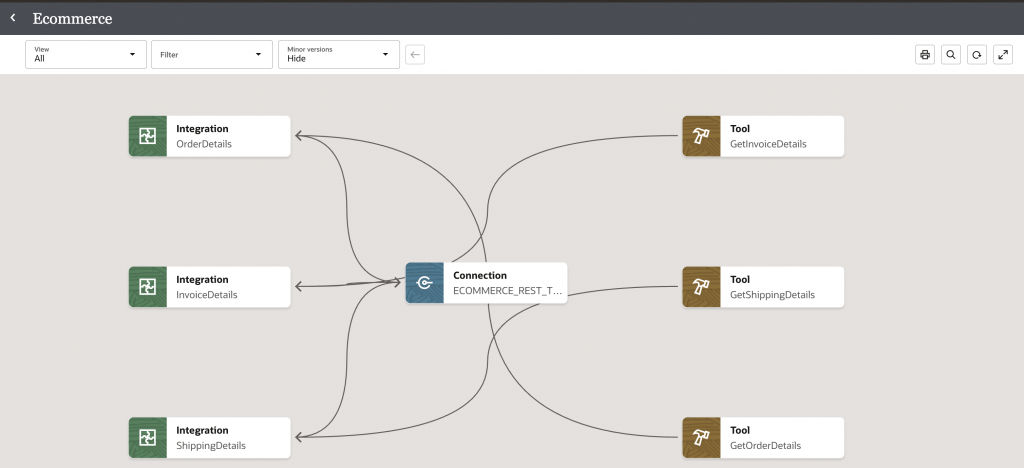
The following image illustrates a sample ecommerce project with three integrations for retrieving order, shipping, and invoice details, along with the corresponding three tools included in the Ecommerce MCP Server.
External Integration Tools for Fusion Application AI Agents
Fusion AI Agent Studio provides various options for configuring tools that connect to external systems. Both OIC integrations exposed directly and integrations exposed through MCP can be configured as tools, depending on the capabilities supported by Fusion AI Agent Studio.
Direct Integration
There are two ways to configure direct access to OIC integrations in AI Agent Studio
1. External REST
In this approach, the integration is configured as an External REST tool type. This option provides multiple authentication methods for connecting to external integrations. For OIC integrations, authentication can be handled through either:
- OAuth 2.0 Client Credentials
- OAuth 2.0 Resource Owner Password Credentials
Both options require a confidential application in the OIC Identity domain. The OAuth 2.0 Client Credentials flow additionally requires the confidential application to have the Service Invoker role. With the client credentials flow, the integration is invoked through the application context. With the resource owner password credentials flow, the integration is invoked using a shared integration user configured in the authentication settings of the External REST tool. Neither of these methods supports identity propagation for the logged-in user. For OIC Integration, OAuth 2.0 Client Credentials is generally the preferred option.
{
    "grant_type":"client_credentials",
    "client_id":"xxxxxxxxxxxxxxxxxxxxxx",
    "client_secret":"xxxxxxxxxxxxx",
    "scope":"https://xxxxxxxx.integration.us-region.ocp.oraclecloud.com:443urn:opc:xxxxxxxx::all https://xxxxxx.integration.region.ocp.oraclecloud.com:443/ic/api/"
}
2. Business Object
In this approach, the integration is configured as a business object and then wrapped in a tool of type Business Object. The business object supports multiple resource type options, and the integration is configured using the Other Data Source Application resource type. This option requires a Data Source Application configuration that includes the Token URL, Client ID, Scope, Private Key, and Public Key. It generates an access token using a user assertion based on the logged-in user, which enables identity propagation between Fusion Application and Oracle Integration Cloud. Please refer to the identity propagation blog for a detailed implementation guide.
MCP Server
The OIC MCP server can be configured as an MCP tool in Fusion AI Agent Studio. This tool type supports both SSE and Streamable HTTP options. For OIC MCP, the Streamable HTTP option is recommended.
This tool type also supports multiple authentication methods. OIC MCP can be configured using Client Credentials by providing the relevant configuration details in the JSON payload. Fusion AI Agent Studio also supports JWT authentication, but this approach is tied to a single user through the sub claim and requires private key and claim configuration. For OIC MCP server scenarios, Client Credentials is generally the preferred option.
It is important to note that OIC MCP configuration in AI Agent Studio does not support identity propagation. Fusion AI Agent Studio also allows you to select only specific tools from an MCP server. This is useful when an agent needs only a subset of the available tools. For example, if an MCP server exposes 10 tools but the agent needs only 3, this selection helps optimize token usage because only the chosen tool definitions are passed to the agent.
1. MCP Tool Type
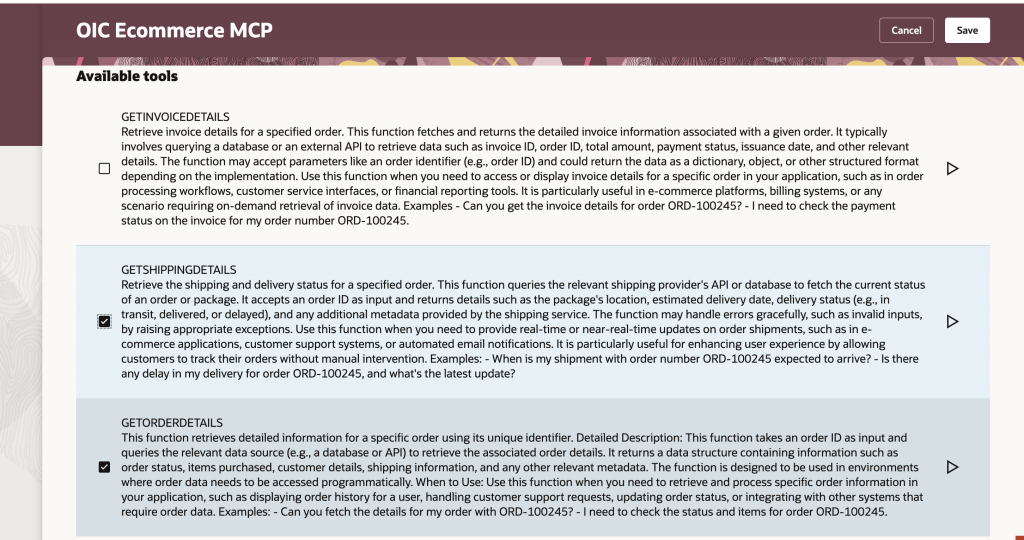
The following image shows the AI Agent Studio MCP Tool, which allows you to select the tools exposed by the OIC MCP server.
2. MCP Connector Tool Type
The Connectors capability was introduced in the 26B release of AI Agent Studio, enabling AI agents to connect with a variety of data sources and applications. With the 26C release, AI Agent Studio extends this capability by introducing custom connector definitions, allowing you to define connectors that align with your specific workflows and data sources while supporting both MCP and OpenAPI 3.0 specifications.
Oracle Integration Cloud (OIC) MCP Server can now be integrated with the Connector framework in AI Agent Studio. The following steps describe how to configure an OIC MCP Server as a connector and make its tools available to an AI agent.
a. Create the Connector Definition
Click Create Connector Definition to create the MCP Server configuration. Provide the connector definition name and configure the following properties:
- Type: MCP
- Credential Type: OAuth 2.0
- Protocol: Streamable HTTP
- Grant Type: Client Credentials
- Token URL: OIC Identity Domain token endpoint
- Client ID: Confidential application client ID
- Client Secret: Confidential application client secret
- Scope: OAuth scope required by the OIC MCP Server
- Instance URL: OIC MCP Server endpoint
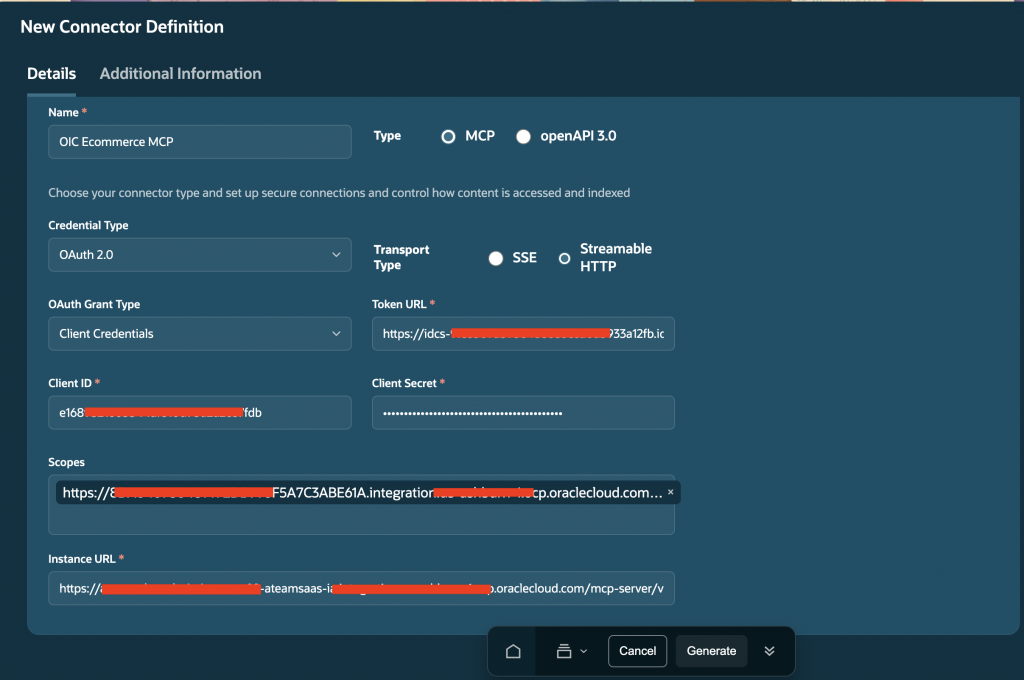
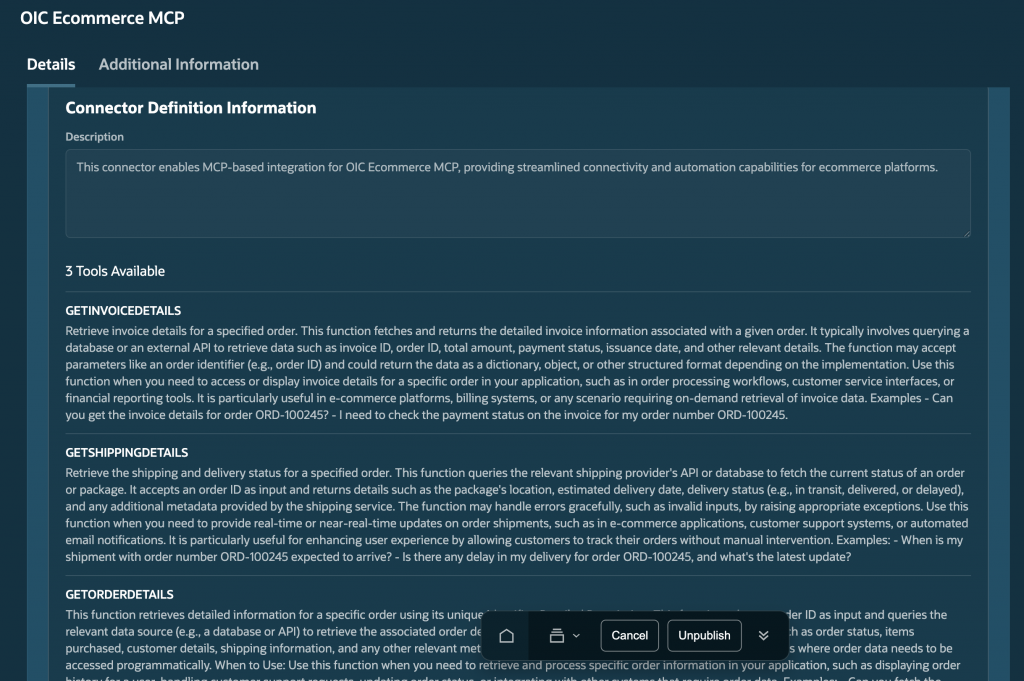
After entering the required details, click Generate. AI Agent Studio invokes the MCP Server’s list tools operation and retrieves the tools exposed by the server. The available tools are then displayed, as illustrated in the following image.
b. Create the Connector
Once the connector definition has been created, click Add Connector to create the OIC MCP Server connector. Provide the following details:
- Name: Connector name
- Description: Purpose and capabilities of the connector
- Family: Connector family
- Product: Product associated with the connector
- MCP URL: Automatically populated from the connector definition
- Authentication Type: Client Credentials
- Token URL: OAuth token endpoint
- Client ID: Confidential application client ID
- Client Secret: Confidential application client secret
- Scope: OAuth scope required by the OIC MCP Server
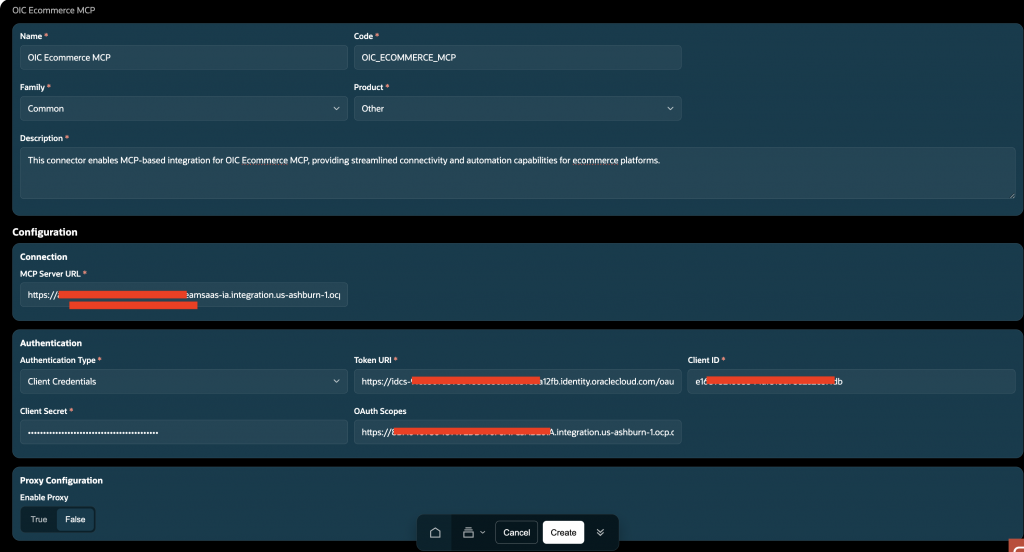
Review the configuration and create the connector.
c. Configure the Tools
Navigate to Resources → Tools and select Create New Tool. Configure the tool as follows:
- Tool Type: Connector
- Family: Connector family
- Product: Product associated with the connector
- Description: Meaningful description of the tool and its intended use
- Connector: Select the newly created OIC MCP Server connector
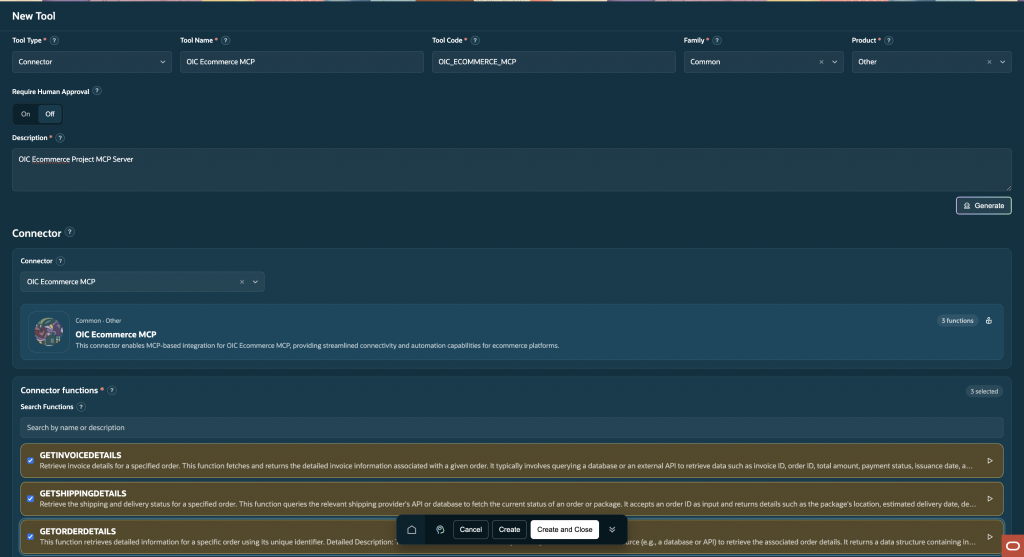
After selecting the connector, wait for AI Agent Studio to retrieve the tools exposed by the OIC MCP Server. The available tools will be displayed, allowing you to select only the tools required by the AI agent. This selective tool configuration is particularly useful when an MCP Server exposes a large number of tools but an individual agent requires only a subset of them. It helps keep the agent context focused and reduces unnecessary tool definitions being passed to the underlying LLM.
Fusion Application AI Agents
Once tools have been configured, they can be used within Fusion Application AI Agents. Fusion AI Agent Studio provides different ways to consume tools exposed through OIC direct integrations and the OIC MCP server.
Direct Integration
Direct integration tools configured as External REST or Business Object can be used in both Agent and Workflow scenarios in Fusion Application 26C.
- Agent: The agent can be configured with either External REST or Business Object tools. When a Business Object tool is used, the system generates the access token using the logged-in user’s identity and invokes the OIC integration accordingly.
- Workflow Agent: OIC integrations can be invoked directly through the External REST node or the Business Object Function node. When configured as a Business Object Function node, the system again uses the logged-in user’s identity to generate the access token and call the OIC integration.
MCP Server
The OIC MCP Server tool can be used only within an Agent in Fusion Application. It cannot be invoked directly from a workflow. Workflows can access it indirectly through an Agent node.
The OIC MCP Connector tool type can be used within both Agents and Workflows. When used within an Agent, the agent can dynamically determine and invoke the most appropriate tool from the set of tools exposed by the MCP server based on the user’s request. In a Workflow, however, the specific MCP tool to be invoked must be explicitly selected from the available tools, as illustrated in the image below.
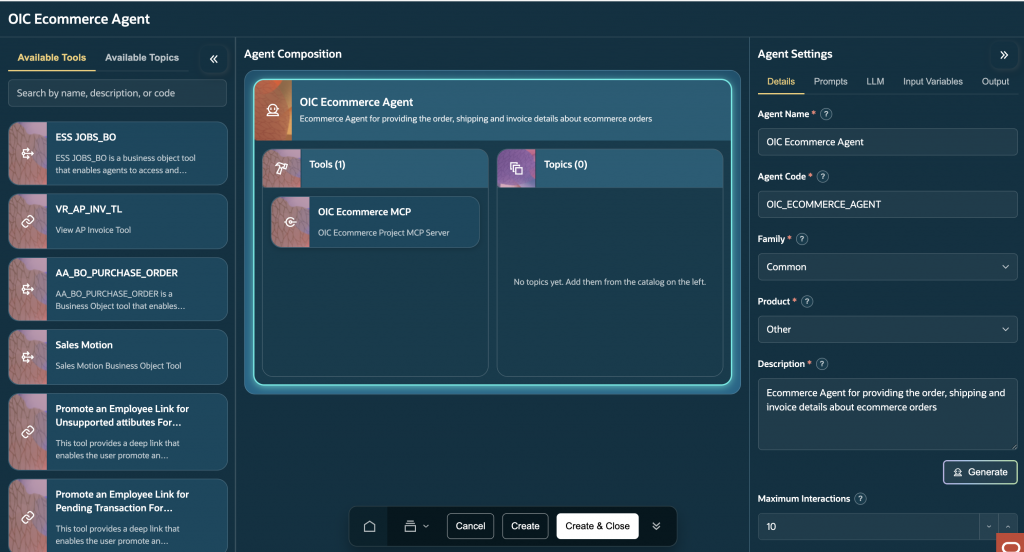
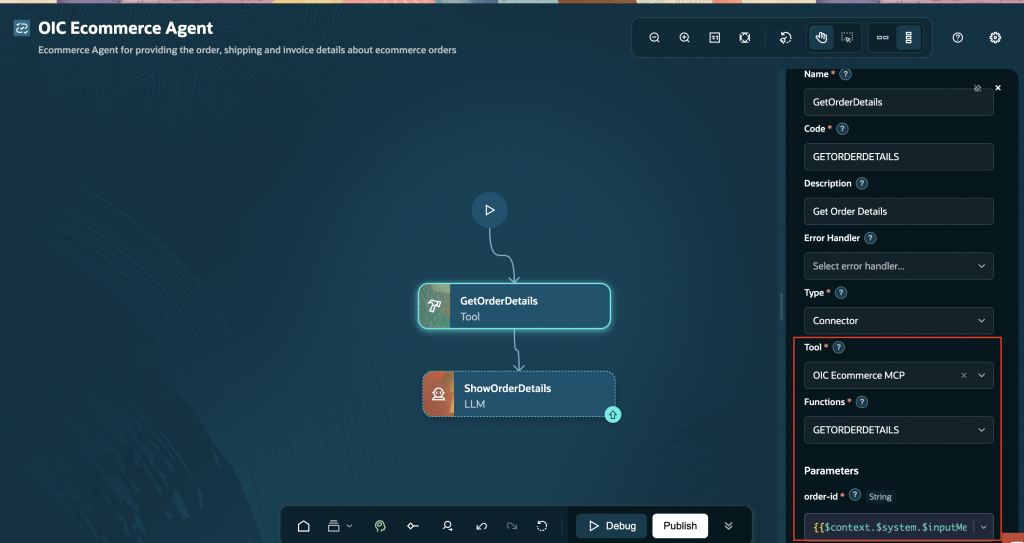
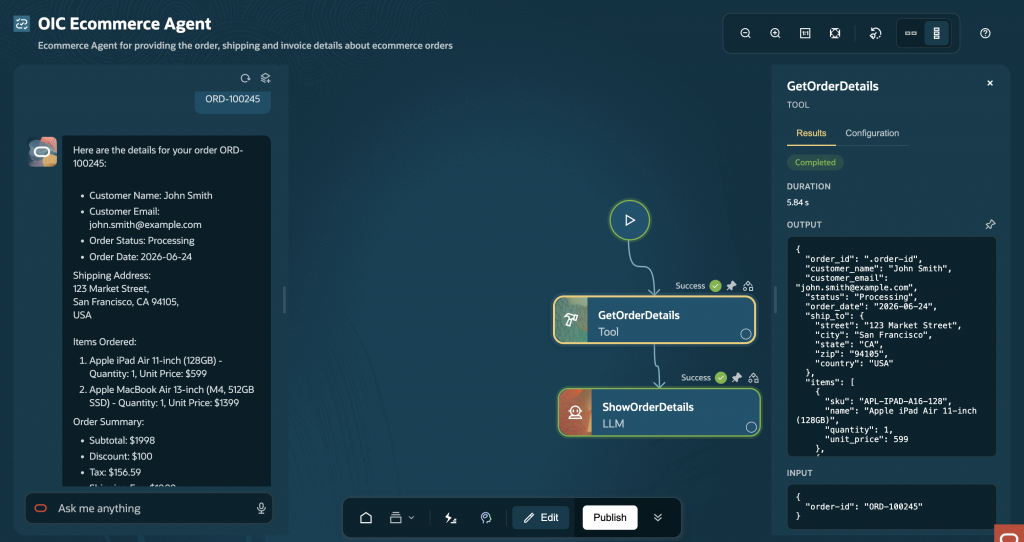
The Connector approach requires additional configuration compared with directly configuring an MCP Server tool. The MCP Server tool type is well suited for scenarios where dynamic tool discovery and agent-driven tool selection are the primary requirements. In contrast, the Connector tool type is a better fit when you need the flexibility of MCP-based tool discovery along with the ability to explicitly invoke individual MCP tools within workflows. Unlike direct integration, the MCP Server for both tools type invocation does not use the logged-in user’s identity. It is authenticated through the client credentials flow.
Unlike direct integration, the MCP Server invocation does not use the logged-in user’s identity. It is authenticated through the client credentials flow.
Summary
MCP is an industry-standard approach for exposing tools to an agent, and it can be enabled in Oracle Integration Cloud with a single click. Fusion AI Agent Studio allows you to select only the tools you want from an MCP server, ensuring that only the required tools are included in the agent’s context window.
Direct integration is best suited for scenarios where identity propagation from Fusion Application to Oracle Integration Cloud is required, or when integration needs to be called directly from an agent or workflow. MCP is a stronger choice when an agent needs to dynamically discover and select the appropriate integration based on the user’s request. MCP tools can also be invoked individually within workflows, providing additional flexibility for orchestrated business processes. Choose MCP Server when you want to leverage the industry-standard MCP protocol, enable dynamic tool discovery at runtime, and provide agents with greater flexibility in selecting and invoking the appropriate tools.
Oracle Integration Cloud: Direct Integration vs MCP Server
Feature | Direct Integration | MCP Server |
| Scope | Supported for integrations created both inside and outside OIC Projects | Available only for integrations created within OIC Projects |
| Configuration | No additional configuration required beyond creating the integration | Requires creating AI tools for integrations and enabling the project as an MCP Server |
| Tool Exposure | Each integration is exposed individually | Multiple integrations can be exposed through a single MCP endpoint |
| Observability | Standard Integration Monitoring | Standard Integration Monitoring (no additional MCP-specific monitoring) |
| Tool Discovery | Tool definitions are configured individually in Fusion AI Agent Studio | Tools are discovered dynamically from the MCP server |
| Best Fit | Individual integrations with minimal configuration | Multiple AI tools managed centrally using the MCP standard |
Fusion AI Agent Studio: Direct Integration vs MCP Server
Capability | Direct Integration | MCP Server |
| Supported Tool Types | External REST, Business Object | MCP, Connector |
| Authentication | OAuth 2.0 Client Credentials or Data Source Application | OAuth 2.0 Client Credentials |
| Identity Propagation | Supported through Business Objects using a Data Source Application | Not supported |
| Agent Support | Supported in AI Agents | Supported in AI Agents |
| Workflow Support | Supported through External REST and Business Object Function nodes | MCP Tool Type: Not supported directly but available through an Agent node Connector Tool Type: Supported through Tool node |
| Tool Selection | Each tool is configured individually | AI Agent Studio allows you to select only the required tools exposed by an MCP server, both when configuring an MCP tool type and when using a Connector tool type within workflows. |
| Recommended Use Case | When identity propagation or direct workflow invocation is required | MCP Tool Type: Best suited when an agent needs to dynamically discover, select, and invoke the appropriate integration based on the user’s request. Connector Tool Type: Best suited when dynamic tool discovery is required along with the ability to explicitly select and invoke individual MCP tools within a workflow. |
Conclusion
Fusion Application AI Agent Studio, together with Oracle Integration Cloud, provides a flexible way to extend AI agents with enterprise integrations. Whether you choose Direct Integration for simpler connectivity and identity propagation, or MCP Server for standardized, dynamic tool discovery, both approaches enable agents to interact with external systems in a secure and scalable manner. The right choice depends on your use case, Direct Integration is ideal when user context and workflow invocation are important, while MCP Server is better suited for scenarios where agents need to select from multiple tools at runtime.