
Introduction
My blog about Fusion Cloud Applications monitoring features led me to explore best practices for Oracle Fusion Applications Enterprise Scheduler Service (“ESS”).
Fusion Cloud Application scheduled processes (Enterprise Scheduler Service (“ESS”)) do tasks that are too complex or time-consuming to do manually, for example importing data or updating many records. You can run scheduled processes on a recurring schedule and send notifications based on how the process ends. Scheduled processes are a common feature that is used across enterprise resource planning (“ERP”), supply chain management (“SCM”), Customer Experience (“CX”), and human capital management (“HCM”) application modules.
Options to access ESS processes
- Scheduled Processes work area within the fusion cloud application to manage all the processes you have access to and to manage submissions.
- Using REST API / Web Services to access ESS processes
Refer to Overview of Scheduled Processes and Overview of Managing Job Definitions and Job Sets documentation for details.
This blog will help you understand the Scheduler REST API and ESS job scheduling best practices in Oracle Fusion Applications Suite.
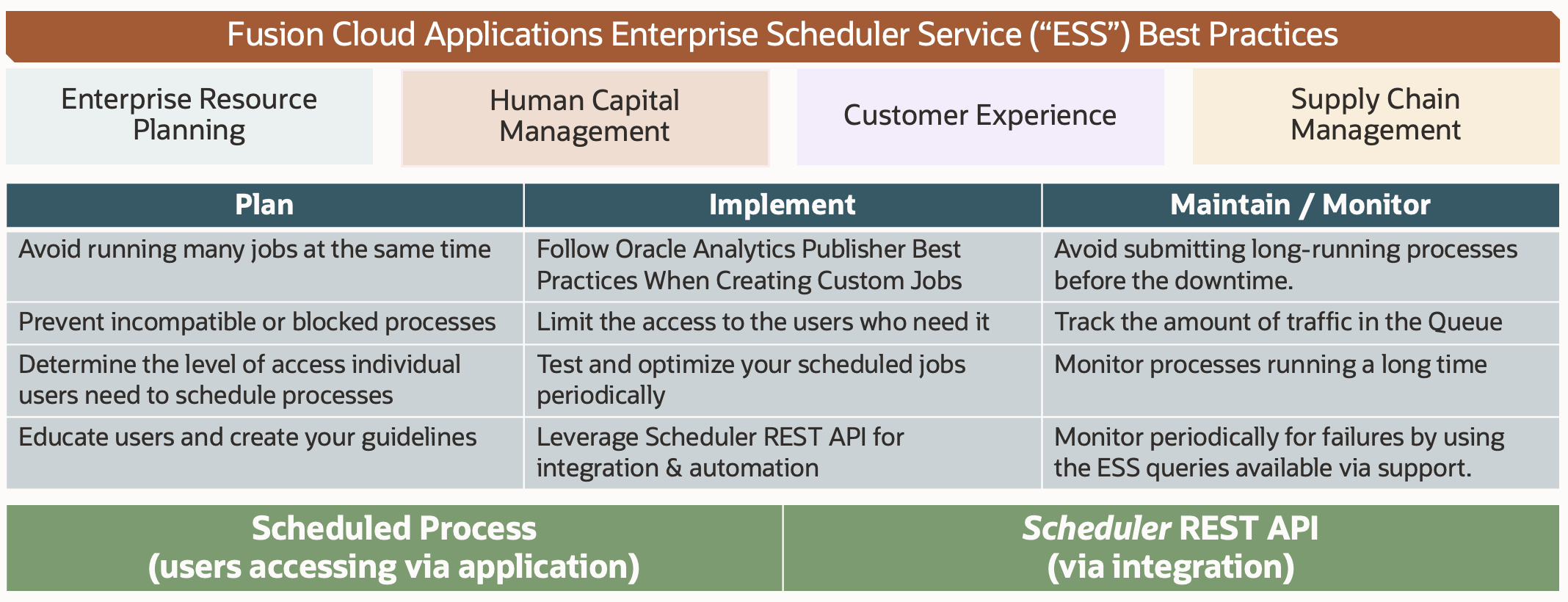
ESS Job Scheduling Use Cases
The most common job scheduling use cases for Oracle Fusion Applications Suite are:
- Ability to schedule seeded jobs and custom jobs.
- Example: Import bulk data, Seeded ESS Jobs, BIP Reports, …
- Manage your jobs (search, cancel, hold, pause, resume) within the fusion cloud application.
- Support integration and orchestration of jobs using REST (available from 23B)
- Monitor scheduled jobs using BIP reports.
Scheduler REST API
Oracle introduced Scheduler REST API for managing scheduled processes in 23B. This enablement will help our customers in the automation, orchestration, and integration of ESS jobs.
With the new Scheduler REST API in 23B, (ess/rest/scheduler/v1/requests) you may perform many operations including query job requests, submit a new job request, cancel, force-cancel, hold, register a call back URL.
The table below shows Scheduler REST sample methods, parameters, and use cases. Refer to the latest documentation for all available operations and sample payloads.
| Use Case | Method | Example REST Parameters |
|---|---|---|
| List the currently running jobs |
GET |
ess/rest/scheduler/v1/requests/?q=state eq “RUNNING” |
| Get information about a specific job |
GET |
ess/rest/scheduler/v1/requests/{requestId}?fields=@full ess/rest/scheduler/v1/requests/{requestId}?fields=@basic |
| Cancel a request |
POST |
ess/rest/scheduler/v1/requests/{requestId}/cancel |
| Hold a request |
POST |
ess/rest/scheduler/v1/requests/{requestId}/hold |
| Force cancel a request |
POST |
ess/rest/scheduler/v1/requests/{requestId}/forceCancel |
Monitor Scheduled Jobs
You can monitor/manage scheduled jobs within the fusion cloud application. You can search for your needs to monitor. Another option to monitor is using BI Publisher reports. There are no seeded reports available. The job set and job definitions are not stored in any database tables to query. Once the jobs or job sets are run you can query ESS_REQUEST_HISTORY, ESS_REQUEST_PROPERTY tables to check the properties of the jobs. You can also create custom BIP Reports to help in monitoring. Refer to the support knowledge base “Additional Optimization Opportunities for Scheduled Processes (Doc ID 2820161.1) to download sample queries. Note that these are sample SQL queries that you can use for monitoring the Enterprise Scheduler Service (ESS). These queries will not be maintained or enhanced for reporting purposes against the ESS tables. These sample SQL queries are provided for educational purposes and are not supported by Oracle Support.
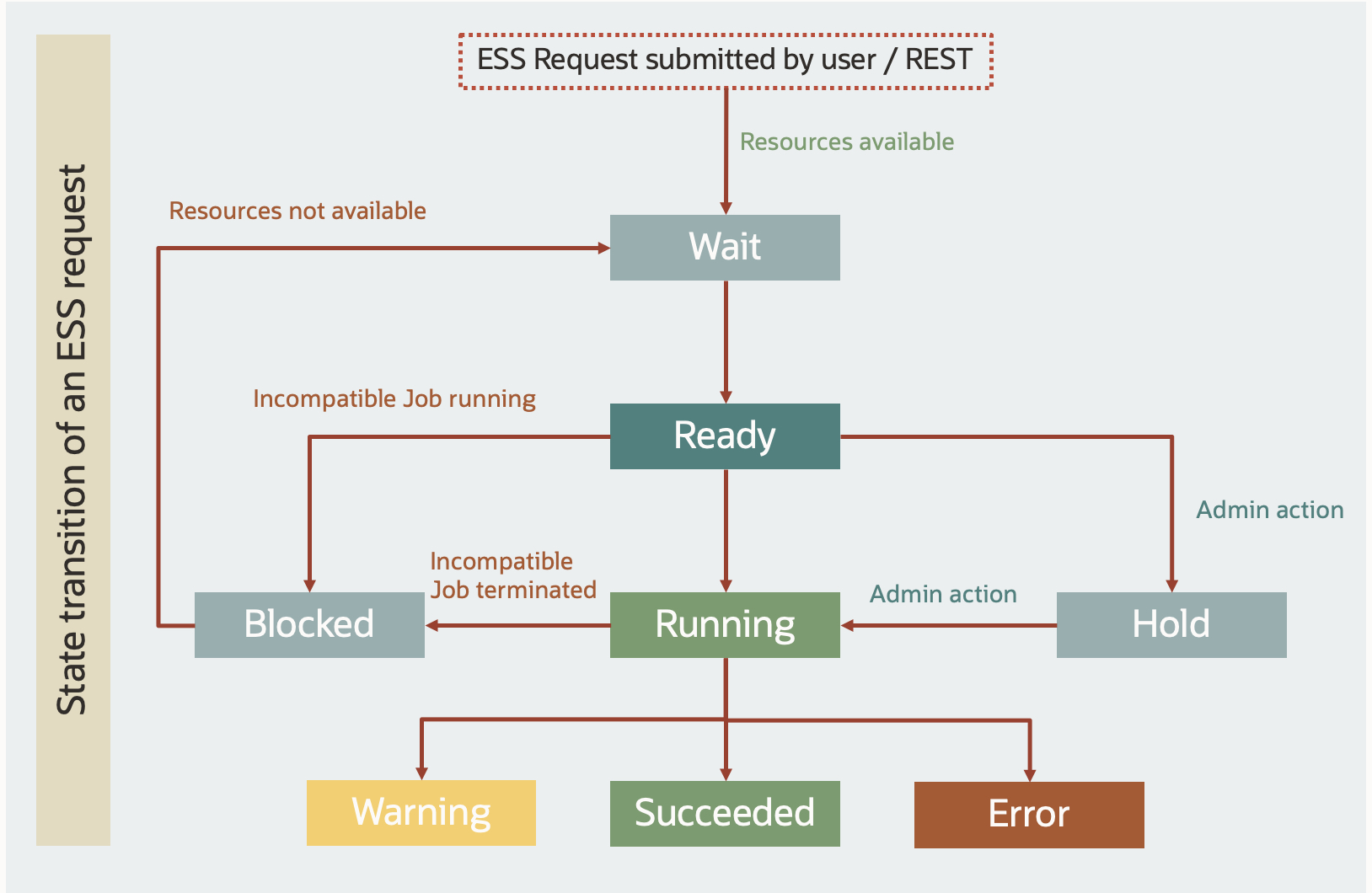
The diagram below provides an overview of state transition for a submitted ESS process/job.
The table below provides the consolidated Oracle documentation (23B) links for respective scheduled processes from every Fusion Cloud Application Suite pillar. As a best practice use the latest documentation.
| Pillar / Module | Scheduled Processes (ESS) Documentation |
|---|---|
| Common ESS Jobs |
|
| CX – Sales & Service |
|
| ERP |
|
| SCM |
|
| HCM |
|
| Student Management |
|
| Integration related |
Scheduler REST API (New in 23B) |
Scheduling Jobs Guidelines
- Plan your scheduled processes well in advance.
- Schedule business critical jobs during peak hours and less critical ones during non-peak hours to avoid concurrency issues.
- Educate users about ESS & scheduling to avoid redundant jobs being scheduled.
- Establish a governance process to centralize job scheduling through
- Leverage submission notes with job names and additional information for easy maintenance.
- Implement your scheduled processes and jobs.
- Optimize the number of ESS threads for business-critical jobs.
- Add a higher threshold gap between the job executions while scheduling.
- Limit the number of jobs to 20 jobs per job set to reduce complexity and to help in troubleshooting.
- Avoid creating too many custom jobs as they will increase maintenance overhead on your side. Oracle will not update your custom jobs.
- Maintain your scheduled processes and jobs periodically.
- Leverage self-service options to manage ESS jobs.
- Cancel & Force-Cancel will help in clearing stuck jobs that are unresponsive and blocking the ESS queue.
- Monitor periodically for failures by using the ESS queries available via support (Doc ID 2820161.1).
- Review the ESS process queue after updates to avoid the sudden flowing of job submissions. Place less critical jobs on hold and release them in a controlled manner to avoid overload situations.
- ERP and SCM Import processes are executed by the Enterprise Scheduler Service (ESS), which manages all concurrent processes. Plan to monitor the status of each process and access the output reports. Refer to my blog on Data import options and guidelines for fusion application suite.
- Hold/Cancel any running ESS jobs before the start of planned maintenance. You may release it after the maintenance.
- After the environment refresh,
- ESS Job Definitions aren’t copied to the target environment. You should set up any custom jobs required for this environment.
- Review the process parameters in the target for your key ESS processes. Reestablish scheduling and reset those default parameters (for example, the number of threads) you want to change.
Conclusion
To summarize, ESS job scheduling is a critical component of Oracle Fusion Cloud Application with pre-seeded jobs to do tasks that are complex or time-consuming to do manually. ESS framework also allows you to define your custom jobs. With the new Scheduler REST, you can integrate, orchestrate and automate your ESS jobs easily. Finally, I want to thank Karthick Saravanan and Sanjay Sil, Oracle Consulting for their contribution and support.
I hope this blog will enable your organization’s data import processes efficiently.
References
Note: Always refer to the latest documentation.
- Overview of Scheduled Processes
- Fusion Cloud Applications: Best Practices for Scheduled Processes
- Avoid these five mistakes with ESS
- Additional Optimization Opportunities for Scheduled Processes (Doc ID 2820161.1)
- Fusion Applications: ESS Frequently Asked Questions (FAQ’s) (Doc ID 2723272.1)