
The Situation
OKE nodes in a node pool use their boot volume for pod storage. The default size for the boot volume is 46.6G. On a typical, Oracle Linux 8 based node, the root filesystem has a capacity around 38G, and available space for pod images of around 12G. There are numerous ways to check the file system capacity and availability on a node. One way is to make an API call for the node stats from kubectl.
❯ kubectl get --raw "/api/v1/nodes/<node name (usually the IP Address)>/proxy/stats/summary"
In the rootfs section you can get the capacity and available byes. This is returned for each pod on the node, it will normally be identical accross all pods.
    "rootfs": {
      "time": "2023-05-19T04:46:29Z",
      "availableBytes": 12663369728,
      "capacityBytes": 38069878784,
      "usedBytes": 0,
      "inodesFree": 18235246,
      "inodes": 18597888,
      "inodesUsed": 25
     }
Obviously, if you try to deploy a 16G container image to a node with the default boot volume described above, it will not fit. The image pull will fail and the container will go into a retry loop.
The Accommodation
Create a cluster and set a custom boot volume size for the node pool. The default is 46.6G as noted, 96G is used here and adequate to handle a 16G image.
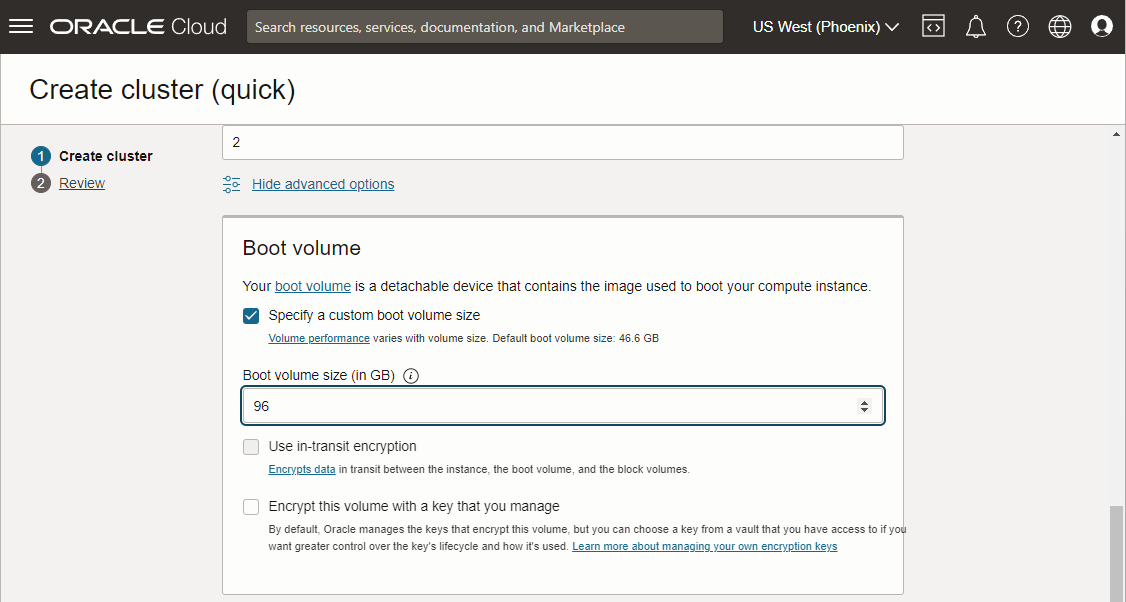
Assuming a typical, Oracle Linux, node instance, the above setting will adjust the boot volume size but the file system will not automatically grow to fill the additional space. In order to fill the additional space, change the init script to add a “growfs” command. The default init script for a Oracle Linux node will look something like the following.
#!/bin/bash
curl --fail -H "Authorization: Bearer Oracle" -L0 http://169.254.169.254/opc/v2/instance/metadata/oke_init_script | base64 --decode >/var/run/oke-init.sh
bash /var/run/oke-init.sh
Check the default script by downloading it from you OKE pool configuration. We will be appending the following line to the script.
sudo /usr/libexec/oci-growfs -y
Download the default/current script, append the above “growfs” line, and update by pasting the new script content in the node pool configuration settings.
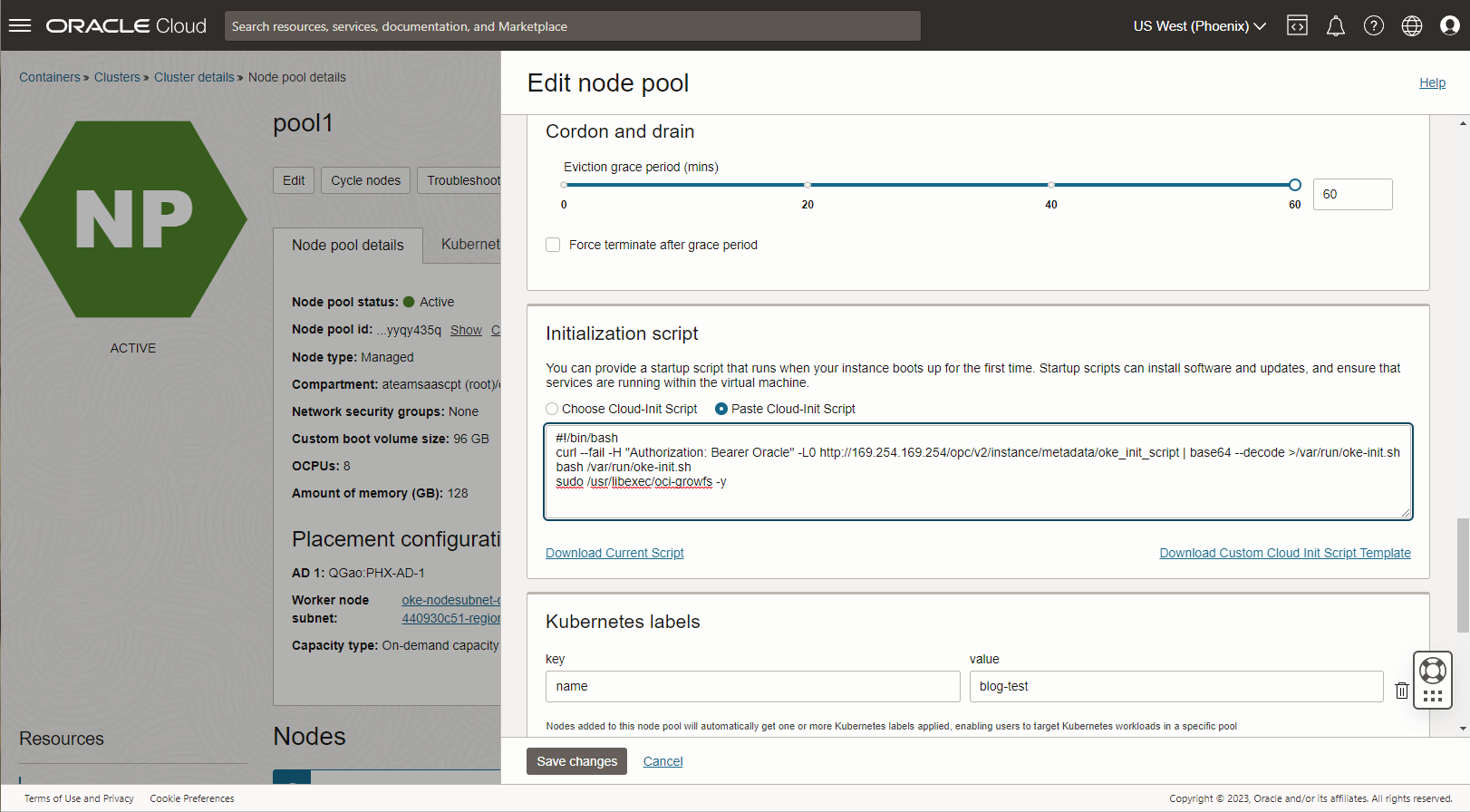
If the nodes are already running before you set the updated init script, simply cycle the nodes to get new ones to run the init script. If you don’t want to use the init script to run oci-growfs, insert it manually to run prior to kubelet initialization.
Summary
If you deploy a container image that is too large for the nodes in your kubernetes cluster, pod creation will fail resulting in retries and a trail of failed pods.
❯ kubectl get pods
NAMESPACE     NAME                                   READY   STATUS                   RESTARTS      AGE
default       sagemath-app-6c4fdfd5bf-2mgs4          0/1     ContainerCreating        0             4m6s
default       sagemath-app-6c4fdfd5bf-ksxtv          0/1     ContainerStatusUnknown   0             29m
default       sagemath-app-6c4fdfd5bf-mmcwj          0/1     ContainerStatusUnknown   0             37m
default       sagemath-app-6c4fdfd5bf-n878r          0/1     ContainerStatusUnknown   0             16m
default       sagemath-app-6c4fdfd5bf-v99k9          0/1     ContainerStatusUnknown   1             21m
default       sagemath-app-6c4fdfd5bf-zq7cm          0/1     ContainerStatusUnknown   1             18m
Looking at the pod creation events you will see no spaceleft on device, pull failure and eviction events.
❯ kubectl describe pod sagemath-app-6c4fdfd5bf-mmcwj

.

.

Events:
  Type     Reason     Age    From               Message
  ----     ------     ----   ----               -------
  Normal   Scheduled  10m    default-scheduler  Successfully assigned default/sagemath-app-6c4fdfd5bf-mmcwj to 10.0.10.247
  Normal   Pulling    10m    kubelet            Pulling image "phx.ocir.io/idprle0k7dv3/sagemath:latest"
  Warning  Evicted    2m58s  kubelet            The node was low on resource: ephemeral-storage. Threshold quantity: 5710482044, available: 4532648Ki.
  Warning  Failed     2m58s  kubelet            Failed to pull image "phx.ocir.io/idprle0k7dv3/sagemath:latest": rpc error: code = Unknown desc = writing blob: adding layer with blob "sha256:4671ce5f602c876ce11a7472b64165fcf748bbb9309ca9480f9cc6595c5305ea": processing tar file(write /home/sage/sage/local/var/lib/sage/venv-python3.10/lib/python3.10/site-packages/scipy/optimize/_highs/_highs_wrapper.cpython-310-x86_64-linux-gnu.so: no space left on device): exit status 1
  Warning  Failed     2m58s  kubelet            Error: ErrImagePull
Although large container images are not typical in a microservice architecture, there may be situations where a very large container is the best solution. It is possible to size nodes for large pods in OKE.