
In Part 3 of this blog series, we explored how to enrich OCI Flow Logs to gain deeper insights into your network traffic. In this post, we will take it a step further by using that enriched data to better understand your traffic patterns and enhance your network security.
Using Enriched Data to Analyze Traffic
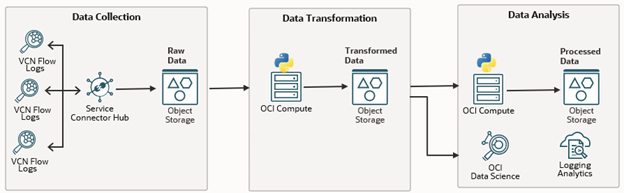
After following the steps from Part 3, your enriched flow logs will be stored in the enriched-flow-logs Object Storage bucket. To process this data and extract a condensed version of the ports accessed, I have created a script that focuses on Ingress traffic (traffic entering your network).
Run the script below to analyze the data. It will generate two files for each subnet in the final_results Object Storage bucket:
- subnet_ocid.json: This file lists all the ports accessed in the subnet, along with the number of times each port was accessed.
- details_subnet_ocid.json: This file provides a deeper breakdown, showing the traffic by destination address, indicating which destination IP addresses run on which ports. This can help you identify any anomalies or unusual activity on your network.
import json
import oci
import itertools
config = oci.config.from_file("~/.oci/config")
object_storage_client = oci.object_storage.ObjectStorageClient(config)
namespace = "oci_name_space"  # OCI Object Storage namespace
bucket_name = "enriched-flow-logs"  # Bucket name containing JSON files
data_dict = {}
objects = object_storage_client.list_objects(namespace, bucket_name).data.objects
for obj in objects:
    if obj.name.endswith('.json'):
        try:
            file_stream = object_storage_client.get_object(namespace, bucket_name, obj.name).data.raw
            data = json.load(file_stream)
            for item in data:
                if item.get('traffic_direction') == 'ingress':
                    vnicsubnetocid = item['oracle']['vnicsubnetocid']
                    subnet_name = item['oracle'].get('vnicsubnetname', f"subnet_{vnicsubnetocid}")
                    protocol_name = item['protocolName']
                    destination_port = item['destinationPort']
                    internal_or_external_source = item['internal_or_external_source']
                    source_address = item['sourceAddress']
                    destination_address = item.get('destinationAddress')
                    if protocol_name in ['TCP', 'UDP']:
                        if vnicsubnetocid not in data_dict:
                            data_dict[vnicsubnetocid] = {
                                'subnet_name': subnet_name,
                                'TCP_Internal': {'ports': set(), 'port_counts': {}, 'records': {}},
                                'TCP_External': {'ports': set(), 'port_counts': {}, 'records': {}},
                                'UDP_Internal': {'ports': set(), 'port_counts': {}, 'records': {}},
                                'UDP_External': {'ports': set(), 'port_counts': {}, 'records': {}},
                                'destination_records': {}  # For destination_address and destination_port only
                            }
                        key = (source_address, destination_address, destination_port)
                        if internal_or_external_source == 'internal':
                            protocol_key = f'{protocol_name}_Internal'
                        else:
                            protocol_key = f'{protocol_name}_External'

                        data_dict[vnicsubnetocid][protocol_key]['ports'].add(destination_port)
                        data_dict[vnicsubnetocid][protocol_key]['port_counts'][destination_port] = \
                            data_dict[vnicsubnetocid][protocol_key]['port_counts'].get(destination_port, 0) + 1
                        data_dict[vnicsubnetocid][protocol_key]['records'][key] = \
                            data_dict[vnicsubnetocid][protocol_key]['records'].get(key, 0) + 1
                        dest_key = (destination_address, destination_port)
                        data_dict[vnicsubnetocid]['destination_records'][dest_key] = \
                            data_dict[vnicsubnetocid]['destination_records'].get(dest_key, 0) + 1
        except json.JSONDecodeError as e:
            print(f"Error decoding JSON file {obj.name}: {e}")
            continue

for vnicsubnetocid, data in data_dict.items():
    subnet_name = data['subnet_name']
    output_data = {
        "vnicsubnetocid": vnicsubnetocid,  # Add vnicsubnetocid at the top
        "subnet_name": subnet_name,
        "TCP_Internal": {},
        "TCP_External": {},
        "UDP_Internal": {},
        "UDP_External": {}
    }

    for protocol in ['TCP_Internal', 'TCP_External', 'UDP_Internal', 'UDP_External']:
        ports = sorted(data[protocol]['ports'])
        ranges = []
        for k, g in itertools.groupby(enumerate(ports), key=lambda x: x[0] - x[1]):
            group = list(map(lambda x: x[1], g))
            if len(group) > 1:
                ranges.append(f"{group[0]}-{group[-1]}")
            else:
                ranges.append(str(group[0]))
        port_counts = sorted(
            [{"port": port, "count": count} for port, count in data[protocol]['port_counts'].items()],
            key=lambda x: x['count'],
            reverse=True
        )
        output_data[protocol] = {
            'port_ranges': ','.join(ranges),
            'port_counts': port_counts
        }
    filename = f"{subnet_name}.json"
    object_storage_client.put_object(namespace, "final_results", filename, json.dumps(output_data).encode('utf-8'))
    detailed_output_data = {
        "vnicsubnetocid": vnicsubnetocid,
        "subnet_name": subnet_name,
        "detailed_records": []
    }
    sorted_dest_records = sorted(
        [{"destination_address": addr, "destination_port": port, "count": count}
         for (addr, port), count in data['destination_records'].items()],
        key=lambda x: x['count'],
        reverse=True
    )
    detailed_output_data['detailed_records'] = sorted_dest_records
    details_filename = f"details_{subnet_name}.json"
    object_storage_client.put_object(namespace, "final_results", details_filename, json.dumps(detailed_output_data).encode('utf-8'))
Example Output
In the subnet_ocid1.subnet.oc1.iad.aaaaxxxxx.json file, you will find a summary like this:
{
   "vnicsubnetocid":"ocid1.subnet.oc1.iad. aaaaxxxxx",
   "subnet_name":"details_subnet_ocid1.subnet.oc1.iad. aaaaxxxxx",
   "TCP_Internal":{
      "port_ranges":"",
      "port_counts":[

      ]
   },
   "TCP_External":{
      "port_ranges":"22,49668,49676-49677,50558",
      "port_counts":[
         {
            "port":50558,
            "count":179
         },
         {
            "port":49668,
            "count":159
         },
         {
            "port":49676,
            "count":48
         },
         {
            "port":49677,
            "count":40
         },
         {
            "port":22,
            "count":12
         }
      ]
   },
   "UDP_Internal":{
      "port_ranges":"",
      "port_counts":[

      ]
   },
   "UDP_External":{
      "port_ranges":"123",
      "port_counts":[
         {
            "port":123,
            "count":1
         }
      ]
   }
}
- TCP_Internal – This section contains information about internal (east-west) TCP traffic.
- TCP_External – This section contains details about external (north-south) TCP traffic.
- UDP_Internal – This section contains details about internal (east-west) UDP traffic.
- UDP_External – This section contains information about external (north-south) UDP traffic.
In the details_subnet_ocid1.subnet.oc1.iad. aaaaxxxxx.json file, you will see a detailed breakdown like this:
{
   "vnicsubnetocid":"ocid1.subnet.oc1.iad. aaaaxxxxx",
   "subnet_name":"subnet_ocid1.subnet.oc1.iad. aaaaxxxxx",
   "detailed_records":[
      {
         "destination_address":"10.0.5.42",
         "destination_port":50558,
         "count":179
      },
      {
         "destination_address":"10.0.5.43",
         "destination_port":49668,
         "count":111
      },
      {
         "destination_address":"10.0.5.42",
         "destination_port":49668,
         "count":48
      },
      {
         "destination_address":"10.0.5.42",
         "destination_port":22,
         "count":12
      },
      {
         "destination_address":"10.0.5.42",
         "destination_port":49676,
         "count":48
      },
      {
         "destination_address":"10.0.5.42",
         "destination_port":49677,
         "count":40
      }
   ]
}
Updating Security Lists
Using this new information, you can now optimize your security lists. We recommend removing any outdated rules from the security lists associated with each subnet and creating new rules based on the data from these logs. This ensures your network is protected against unused or potentially risky open ports.
Note: Before making any changes, take a screenshot of your current security lists and notify the relevant teams about the updates. This way, everyone is on the same page and you have a backup reference in case you need to revert.
Visualizing Traffic Patterns
Once you have updated your security lists, its time to visualize the traffic patterns. OCI Log Analytics can help you track and see these patterns more clearly. For more details on setting up a Log Analytics dashboard, check out this blog post.