
Customers have different options when it comes to Domain Name System (DNS) for the various Oracle AI Database@AWS deployments. This blog will examine the option for customers to use custom DNS and discuss a couple common scenarios and associated architectures.
Custom DNS Explained
Before we go into the details around custom DNS for Oracle AI Database@AWS, we need to first understand the default DNS option.
Default DNS
With the default DNS option, the resources that are provisioned will use the oraclevcn.com DNS domain and will be fully managed by Oracle. With this option DNS zones will be created in Oracle DNS for the deployment and ‘A’ records for the resources will be created in this Oracle DNS zone. The default DNS option is available for Exadata Database and Autonomous AI Database services.
Custom DNS
For Oracle Exadata Database Service customers that do not want to use the default oraclevcn.com domain for the resources, we have a Custom DNS option. With custom DNS customers can specify any domain name of their choosing, such as oradbaws.customer.com, to be used for the resources and similar to the default DNS option this also will be fully managed by Oracle. With custom DNS option, the customer will select Custom domain name in the Create ODB Network provisioning page. The Private View and Private Zone for that domain name will be automatically created in OCI DNS and ‘A’ records for the resources will be automatically created in this zone. NOTE: The custom DNS option is only available for Oracle Exadata Database Service. Oracle Autonomous AI Database only supports the default domain option.
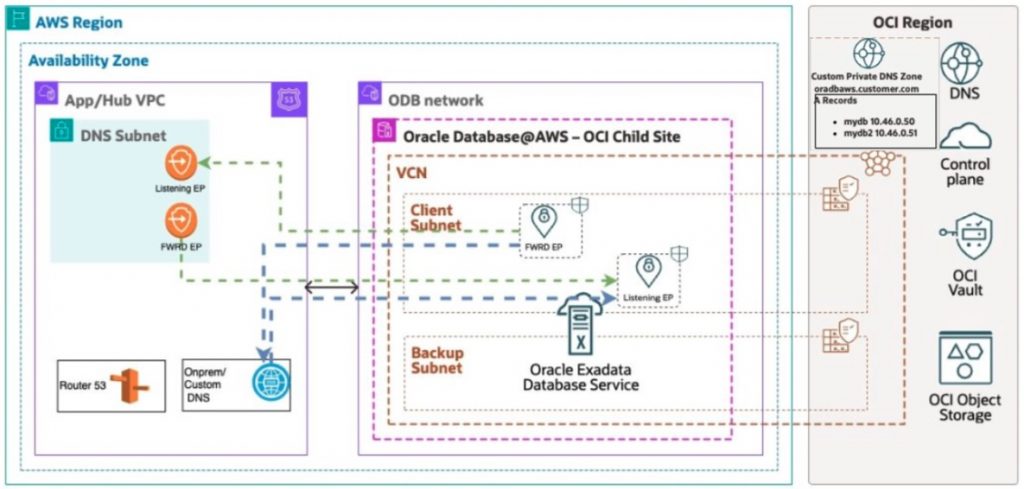
DNS Forwarding From OCI to AWS or On-premise (OCI –> AWS)
When a database instance needs to reach AWS or on-premise resources by FQDN, the associated VCN and ODB Network must be configured to forward DNS queries for those domains. During ODB Network provisioning, OCI automatically creates the required DNS forwarding endpoint. After provisioning is complete, you must manually create the forwarding rules in the OCI console. These rules direct DNS queries for the relevant AWS or on-premise domains to the appropriate DNS listener endpoint in AWS or in your on-premise environment.
The high level steps for creating the forwarding rules are below:
- Go to the OCI console
- Go to Networking –> Virtual Cloud Networks
- Select the correct compartment and select the Database@AWS Virtual Cloud Network
- Click on the DNS Resolver
- Click on Rules
- Click Manage rules
- Click on Add rule
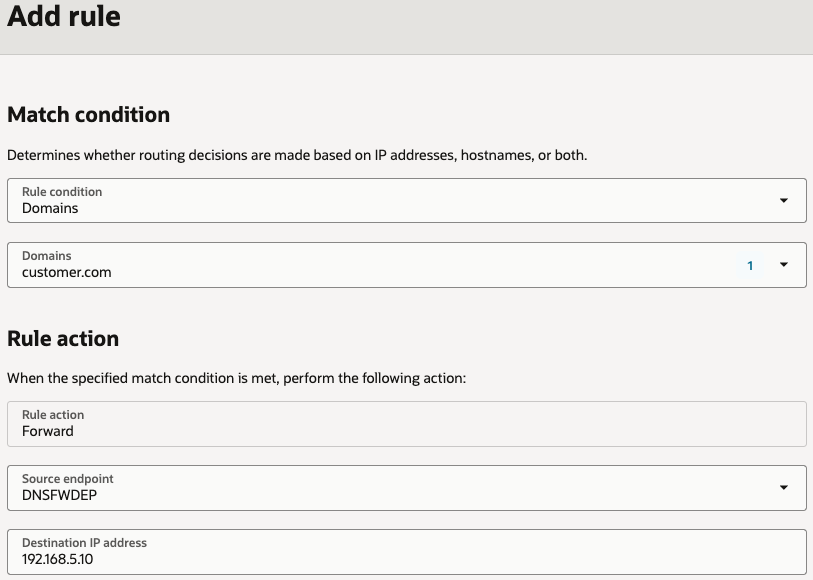
- Enter the details on your forwarding rule
- Rule Condition is Domains
- Add your Domains you want to forward, e.g. customer.com
- Select your DNS Forwarding endpoint as the source endpoint
- Enter the AWS or on-premise Listening endpoint IP in the Destination IP address field
- Click Add rule
DNS Forwarding from AWS or On-premise to OCI (AWS –> OCI)
In the event that a resource in AWS needs to originate traffic destined to the FQDN of the Database instance, the VCN and ODB Network need a DNS Listening endpoint. Creation of this DNS Listening endpoint is done automatically in the ODB Network provisioning and you can find this DNS Listening IP address in the ODB Network Summary page after it’s provisioned. Customers would then forward the custom DNS domain, oradbaws.customer.com in our example, on their AWS or on-premise DNS to the DNS Listening endpoint IP.
More Information
DNS for Oracle AI Database@AWS Documentation