
Prerequisite: Oracle AI Database@AWS – FAQ – Networking configuration
Back in May 2026, the custom NSG for Oracle AI Database@AWS was added. In this blog I will give a complete explanation of this new feature since sometimes it is causing confusion when it should be used.
Let’s recall how the built-in security for Oracle AI Database@AWS is working. After the ODB Network finishes the configuration the shadow OCI VCN containing the associated subnets (Client and Backup for Exadata and Client for ADB), Client subnet route table and NSGs are also created. We will look specifically at the NSGs that are automatically updated by the automation when a new peer CIDR is added.
The two NSGs are listed as:
- EXA_1521_ADJUSTABLE_NSG
- ADB_1521_2484_ADJUSTABLE_NSG
EXA_1521_ADJUSTABLE_NSG is used for Exadata Database and ADB_1521_2484_ADJUSTABLE_NSG for Autonomous AI Database.
These two NSGs automatically created are very important because each NSG is updated with a number of security entries (at the moment of this writing), details below:
- EXA_1521_ADJUSTABLE_NSG is updated with four security entries, three ingress and one egress:
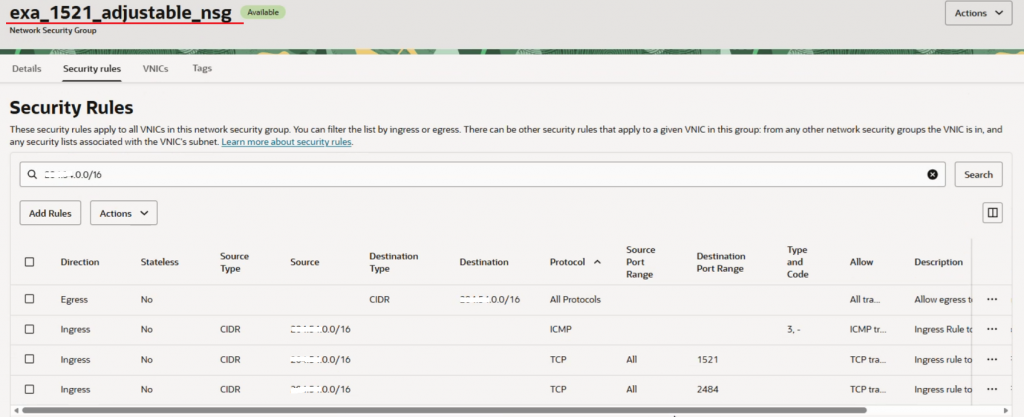
- ADB_1521_2484_ADJUSTABLE_NSG is updated with six security entries, five ingress and one egress:

Even if only Exadata Clusters are deployed, both NSGs above will be populated with the respective number of security entries. The same is true for using only ADB.
The NSG has a default limit of 120 security rules ingress+egress. Doing a simple math, with the default NSG configuration we can accommodate 120 / 6 = 20 peered CIDRs. In some case our customers are requesting to add more than 20 peered CIDRs and a limit increase for the NSG to support more than 120 security entries is to be raised.
Note: Since both NSGs will be configured no matter if Exadata or ADB are used, we will take into consideration the NSG with the highest number of security entries per CIDR range added. Our reference would be ADB_1521_2484_ADJUSTABLE_NSG.
With the launch of custom NSGs for Oracle AI Database@AWS some clarification is needed.
We may think that if we detach the default NSGs created by automation (the two NSGs listed above) and attach a custom created NSG, then the default NSGs will not be used at all, it will stop being populated when a new peer CIDR is added for ODB peering and we will not face the limit of the number of security entries. All because now we are just using a custom NSG that we fully control to add just the entries that we require. Here is the confusion.
The reality is a little bit different. For using a custom NSG to granular control which traffic to allow (this is actually the single scope of using a custom NSG) we need to detach (without deleting) the default NSG and attach the custom NSG. Even if we have detached the default NSGs, these NSGs are still populated with four/six security entries when a new peer CIDR is added and we will still be limited to 20 peered CIDRs.
That being said, adding a custom NSG will not make the default one to not be populated by the automation and we can still have the limit issue.
The solution each and every time when you need to add more than 20 peered CIDRs is to raise a ticket for a limit increase and not use a custom NSG. We can use the custom NSG for having a more granular security entries or to simplify by creating generic entries like 10.0.0.0/8 on port 1521 and not to resolve the limit related to the number of security entries supported by an NSG.
I do hope that this blog clarifies the usage of custom NSG for Oracle AI Database@AWS.