
Customers have different options when it comes to Domain Name System (DNS) for the various Oracle AI Database@Azure deployments. This blog will examine the option for customers to use custom DNS and discuss a couple common scenarios and associated architectures.
Custom DNS Explained
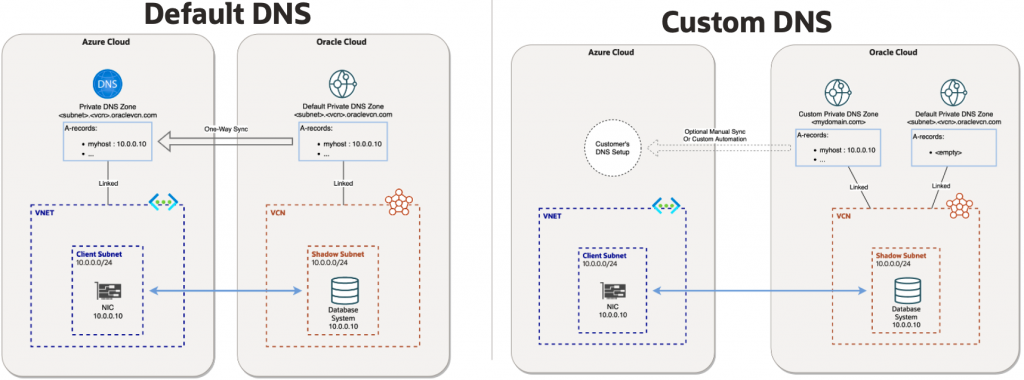
Before we go into the details around custom DNS for Oracle AI Database@Azure, we need to first understand the default DNS option, sometimes referred to fully managed DNS.
Default DNS (Fully Managed)
With the default DNS option, the resources that are provisioned will use the oraclevcn.com DNS domain and will be fully managed by Oracle. With this option DNS zones will be created in both Oracle DNS and in Azure Private DNS for the deployment. ‘A’ records for the resources will be created in the Oracle DNS zone and those will automatically be replicated as ‘A’ records in the Azure Private DNS zone. The default DNS option is available for Exadata Database, Autonomous AI Database, Exascale Database, and Base Database services.
Custom DNS
For customers that do not want to use the default oraclevcn.com domain for the resources, we have a Custom DNS option. With custom DNS customers can specify any domain name of their choosing, such as oradbazure.customer.com, to be used for the resources. With custom DNS option, the customer will need to create the private view and private zone for the custom domain in OCI DNS before the deployment of the Virtual Machine (VM) cluster. Once the private view and private zone is completed in OCI DNS, it will become available as an option in the ‘Use custom DNS’ drop down box when provisioning the VM cluster in the Azure console. Once selected in the VM cluster provisioning process, ‘A’ records for the resources will be created in the custom zone in Oracle DNS automatically. With custom DNS those ‘A’ records will not be automatically replicated to a zone in Azure Private DNS like default DNS does, customers would need to manually create or replicate those records into Azure Private DNS, or setup DNS forwarding and listening using a centralized DNS Hub using Network Anchors as outlined below. Custom DNS option is only available for the Exadata Database service.
Custom DNS Limitations
- Exadata hostname prefix has a maximum of 23 characters, must start with a letter, alphanumeric and hyphens only, and cannot be localhost
- Exadata cluster name has a maximum of 11 characters, alphabetic start, letters/numbers/hyphens only
- Exadata host and domain URL has a maximum of 112 characters total for the combined hostname prefix and domain name. Domain name does not support hyphens.
- Custom domain has a maximum of 4 total domains, not including the hostname, for example <subdomain2>.<subdomain1>.<domain>.<com>
Scenario #1 – Single ExaData VM Cluster With Custom DNS
The below diagram illustrates a very basic scenario with just a single Exadata infrustrucure and VM cluster and using custom DNS domain oradbazure.customer.com and typically we see this setup with customers doing Proof of Concepts (POC).
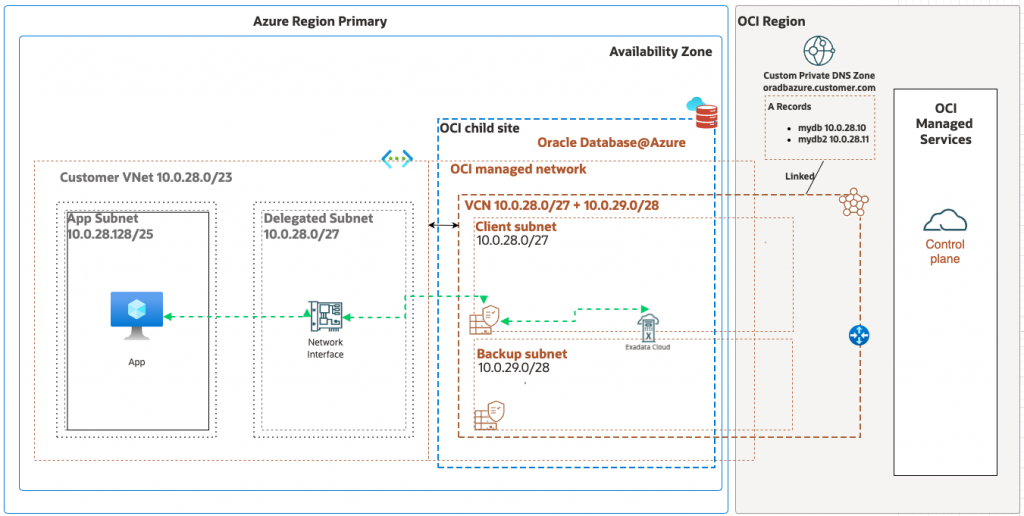
The high level steps to accomplish this is below and more details can be found in our custom DNS documentation.
- Create Private View and Private Zone in OCI DNS for
oradbazure.customer.com - Provision the VM Cluster in Azure portal and select the private view created in step 1 after selecting ‘Use custom DNS’ box
DNS Resolution of Azure or On-premise FQDNs from OCI (OCI –> Azure)
Since this scenario does not use any DNS forwarding or listening endpoints, customers must create a new Private Zone in OCI DNS and relevant ‘A’ records for each Fully Qualified Domain Name (FQDN) the VM cluster needs to resolve. This Private Zone can be created in the same Private View that was created for step 1 above for oradbazure.customer.com. For example, customers would create a Private Zone for customer.com with ‘A’ records for <host_1>.customer.com, <host_2>.customer.com, etc. to enable the VM cluster to resolve those FQDNs.
DNS Resolution of OCI FQDNs from Azure or On-premise (Azure –> OCI)
After the VM Cluster is provisioned, DNS ‘A’ records will automatically be created in the oradbazure.customer.com Private Zone in OCI DNS for the deployment. In order for the customer to be able to resolve those FQDNs from on-premise or Azure DNS, those ‘A’ records must be manually created/replicated to Azure Private DNS or on-premise DNS servers.
Scenario #2 – Multiple Database@Azure Environments With Custom DNS Using Network Anchor as DNS Hub
The below diagram illustrates a more scalable and robust Custom DNS solution for Database@Azure.
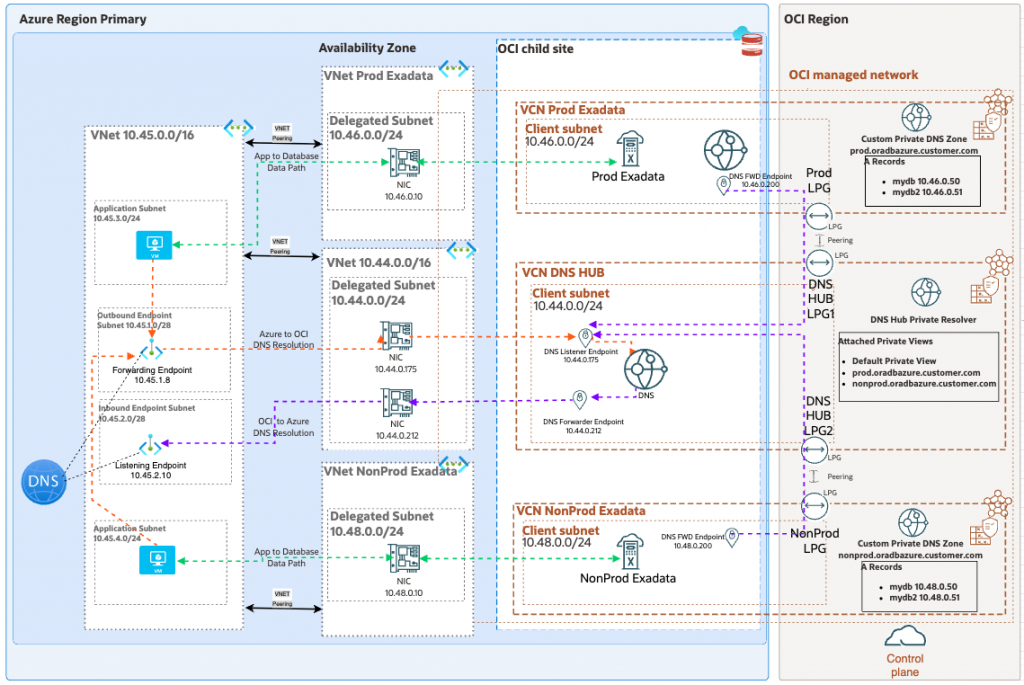
OCI Components
- Two Exadata environments, one for Prod and the other for NonProd each in their own Virtual Cloud Network (VCN)
- Custom Private Views and Private Zones in OCI DNS for each environment
- Centralized DNS Hub VCN using Network Anchor with DNS Listener and Forwarding endpoints
- Local Peering Gateways (LPG) for peering the two Exadata VCNs to the Central DNS Hub VCN
- DNS Forwarding endpoints in the Exadata VCNs
- VCN Route Tables
- Network Security Groups (NSG) for the DNS Forwarding Endpoints
Azure Components
- Two Exadata VNets with delegated subnets, one for Prod and the other for NonPod
- VNet with delegated subnet for DNS Hub using Network Anchor
- Azure Private DNS Forwarding and Listening Endpoints
Network Anchor
This solution leverages the Network Anchor feature within Oracle Database@Azure product. The Network Anchor is a networking bridge between Azure and OCI that also enables the option for customers to use DNS Fowarding and Listening endpoints to seamlessly enable DNS resolution in either direction.
Network Anchor is not supported with the VCN and VNet with delegated subnet that is provisioned for Autonomous Database@Azure or Exadata Database@Azure which is why customer’s cannot create the DNS Forwarding and Listening endpoints directly in those VCNs. In order for Autonomous and Exadata customers to take advantage of Network Anchor for DNS endpoints, they must provision a separate VNet with delegated subnet to be used as a centralized DNS hub for the endpoints.
LPG
LPGs are Oracle VCN peering gateways that provide a 1:1 peering between VCNs for routing traffic. LPGs are required for this design to allow Inbound DNS (OCI –> Azure) resolution. Traffic originating from the Database instance running in OCI destined to Azure requires DNS resolution of Azure DNS names. Since the VCN is for Exadata Database@Azure it does not support Network Anchor and the ability to directly Forward those DNS queries to Azure Private DNS. Instead, we must forward those DNS queries to the DNS Listener in the centralized hub VCN and we require LPG peering between the Exadata VCN and the centralized DNS hub VCN. Since the LPG is 1:1 peering, in our scenario we need a set of LPGs between Prod VCN and DNS hub VCN, and another set of LPGs between NonProd VCN and DNS hub VCN.
DNS Forwarding from OCI to Azure or On-premise (OCI –> Azure)
In the event that the Database instances need to originate traffic destined to FQDN in Azure, the Exadata VCNs need Forwarding endpoints with Forwarding rules that point the Azure domains to the DNS Listener in the DNS Hub VCN. In our scenario, the forwarding rule in the Exadata VCNs would be *.customer.com forward to 10.44.0.175. Similarly, the DNS Hub VCN needs a Forwarding endpoint with forwarding rules that point the Azure domains to the DNS Listener inside Azure network. In our scenario, the forwarding rule in the DNS Hub VCN would be *.customer.com forward to 10.45.2.10. Since the DNS Hub VCN is a Network Anchor VCN, the DNS Forwarding endpoint is linked to the NIC in Azure VNet delegated subnet allowing the query to reach the Azure network for resolution.
DNS Forwarding from Azure or On-premise to OCI (Azure –> OCI)
In the event that a resource in Azure needs to originate traffic destined to the FQDN of the Database instance, the DNS Hub VCN needs a Listening endpoint. Azure DNS servers will need forwarding rules for *.prod.oradbazure.customer.com and *nonprod.oradbazure.customer.com forwarding to 10.44.0.175. By default, the DNS resolver in the DNS Hub VCN will only know about it’s own DNS Private Views and Private Zones. In order for the DNS Listener in the DNS Hub VCN to be able to successful resolve queries for *.prod.oradbazure.customer.com and *nonprod.oradbazure.customer.com, customers must attach the Prod and NonProd Private Views to the DNS Hub VCN Resolver.
More Information
DNS Resolution with Network Anchors in the Oracle Database at Azure