

This blog is part of the blog series Extending Oracle Fusion Cloud Applications using Oracle APEX. In this blog post we will cover a Human Capital Management (HCM) use case, retrieve data from Oracle Fusion Cloud Applications, display it on Oracle APEX pages and facilitate new data creation using POST operation.
Business requirement
A customer has implemented Oracle Fusion Human Resources and Payroll, but not Fusion Time and Labor. They require a simple solution to quickly view and upload hours worked for a small group of part-time employees who do not have access to the core Fusion application.
Local supervisors will:
- Collate these hours weekly.
- Enter the data into the application for payroll processing.
- View only the employees they are responsible for.
- See control totals for verification.
Prerequisites
- Access to Oracle Fusion.
- Access to Oracle APEX environment.
- Complete the steps mentioned in the Extending Oracle Fusion Cloud Applications using Oracle APEX – Authentication blog.
- Complete the steps mentioned in the Extending Oracle Fusion Cloud Applications using Oracle APEX – Authorization blog.
- Complete the steps mentioned in the Extending Oracle Fusion Cloud Applications using Oracle APEX – SaaS Data blog.
- Complete the steps mentioned in the Extending Oracle Fusion Cloud Applications using Oracle APEX – HCM Use Case 1 blog.
High level steps
- Login to the APEX environment.
- Create a new Fusion Integrated APEX application or use the APEX application created in the Authentication blog.
- Update REST data source/s.
- Create Oracle APEX page/s.
Execution flow
- User (Manager) logs into the Fusion Integrated APEX Extension application.
- When the page is loading, the below details are fetched (if not fetched already):
- Manager details (e.g Manager Person Number) using the REST Data Source HCM_SELF_DETAILS and stored in APEX_COLLECTION named MGR_DS.
- Manager Reportees details using the REST Data Source HCM_WORKER_DETAILS and stored in APEX_COLLECTION named MGR_REPORTS_DS.
- Assignments details of all the Manager Reportees and stored in APEX_COLLECTION named MGR_REPORTS_ASSIGNMENTS_DS.
- The above information is stored in Oracle APEX Application Item and Collections, so that it can be extracted once per session and reused throughout the session in multiple pages where it is required.
- Manager selects an effective date and enters the details of the Element entries for one or more reportees.
- Manager verifies the entered details, control totals and Saves the data.
- The data is sent to Oracle Fusion and also saved in DB table for future reference.
- Verify the extension data with the data in Oracle Fusion for testing.
Detailed steps
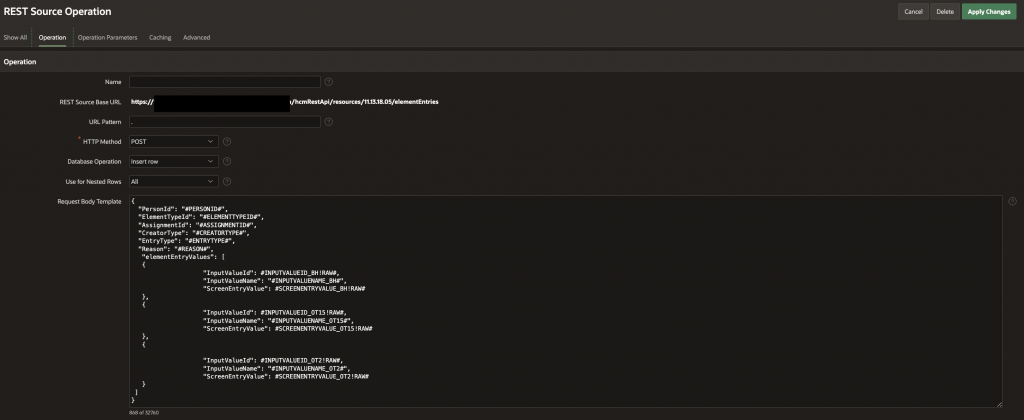
REST Data Source HCM Element Entries – POST operation Request Body Template
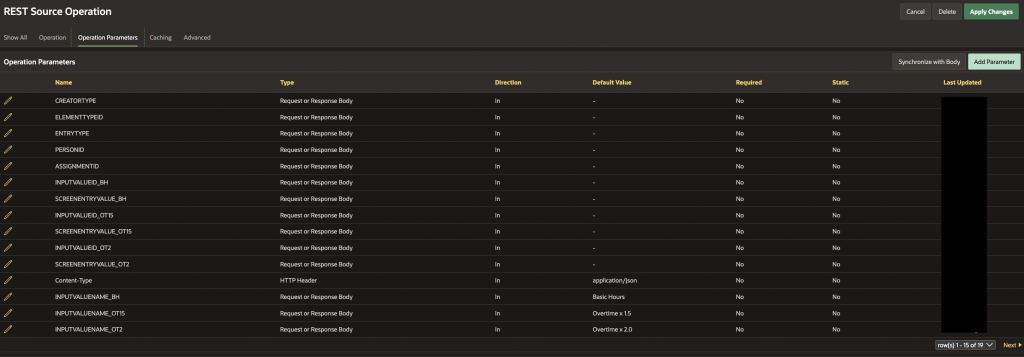
REST Data Source HCM Element Entries – POST operation parameters

Create Oracle APEX page/s: Create an Oracle APEX page with the below details:
Create a Static content region named Element Entry Details (Replace XX with the page number).
Create a Sub region of type Static content region named Batch Entry (Replace XX with the page number) and add the below page items.
| Field Name | Type | Details | Additional Information |
| PXX_EFFECTIVE_AS_OF_DATE | Date Picker | Label: Effective As-Of Date | The effective as of date for the element entry. |
| PXX_PAY_ELEMENT | Display Only | Label: Pay Element | The Pay element which is used. |
| PXX_CTRL_TOT_STD_HRS | Number Field | Label: Control Hours: Standard Hours | Control total for Standard hours. |
| PXX_CTRL_TOT_15_HRS | Number Field | Label: Time and a Half Hours | Control total for Time and a Half hours. |
| PXX_CTRL_TOT_2_HRS | Number Field | Label: Double Hours | Control total for Double hours. |
| PXX_BATCH_ID | Hidden | The batch_id is used to group the element entries submitted from the extension. | |
| PXX_MGR_PERSON_NUMBER | Hidden | Manager Person Number | |
| PXX_SAVE_IG | Button | Label: Save Element Entries | |
| TOTAL_VARIANCE | Dynamic Content | Source Language: PL/SQL | Below sample code for reference. |
TOTAL_VARIANCE Dynamic Content PL/SQL Function Body returning a CLOB Sample code
-- Sample reference code
declare
    l_result clob := '';
ln_tot_hrs_std varchar2(500);
ln_tot_hrs_15 varchar2(500);
ln_tot_hrs_2 varchar2(500);
ln_var_hrs_std varchar2(500);
ln_var_hrs_15 varchar2(500);
ln_var_hrs_2 varchar2(500);
begin
select NVL(sum(hrs_std),0),NVL(sum(hrs_1_5),0),NVL(sum(hrs_2),0)
into ln_tot_hrs_std,ln_tot_hrs_15,ln_tot_hrs_2
from XX_MGR_REPORTS_DS_V;
IF to_number(:PXX_CTRL_TOT_STD_HRS-ln_tot_hrs_std) < 0 THEN
ln_var_hrs_std := '<td style="border:1px solid #ccc; padding:6px; text-align: right; color: red; font-weight: bold;">'||to_number(:PXX_CTRL_TOT_STD_HRS-ln_tot_hrs_std)||'</td>';
ELSE
ln_var_hrs_std := '<td style="border:1px solid #ccc; padding:6px; text-align: right; font-weight: bold;">'||to_number(:PXX_CTRL_TOT_STD_HRS-ln_tot_hrs_std)||'</td>';
END IF;
IF to_number(:PXX_CTRL_TOT_15_HRS-ln_tot_hrs_15) < 0 THEN
ln_var_hrs_15  := '<td style="border:1px solid #ccc; padding:6px; text-align: right; color: red; font-weight: bold;">'||to_number(:PXX_CTRL_TOT_15_HRS-ln_tot_hrs_15)  ||'</td>';
ELSE
ln_var_hrs_15  := '<td style="border:1px solid #ccc; padding:6px; text-align: right; font-weight: bold;">'||to_number(:PXX_CTRL_TOT_15_HRS-ln_tot_hrs_15)  ||'</td>';
END IF;
IF to_number(:PXX_CTRL_TOT_2_HRS-ln_tot_hrs_2) < 0 THEN
ln_var_hrs_2   := '<td style="border:1px solid #ccc; padding:6px; text-align: right; color: red; font-weight: bold;">'||to_number(:PXX_CTRL_TOT_2_HRS-ln_tot_hrs_2)    ||'</td>';
ELSE
ln_var_hrs_2   := '<td style="border:1px solid #ccc; padding:6px; text-align: right; font-weight: bold;">'||to_number(:PXX_CTRL_TOT_2_HRS-ln_tot_hrs_2)    ||'</td>';
END IF;

    l_result := '<table style="border-collapse:collapse; width:100%;">
<tr>
<td style="border:1px solid #ccc; padding:6px; text-align: right; font-weight: bold;"><b>Total</b></td>
<td style="border:1px solid #ccc; padding:6px; text-align: right; font-weight: bold;">'||ln_tot_hrs_std||'</td>
<td style="border:1px solid #ccc; padding:6px; text-align: right; font-weight: bold;">'||ln_tot_hrs_15||'</td>
<td style="border:1px solid #ccc; padding:6px; text-align: right; font-weight: bold;">'||ln_tot_hrs_2||'</td>
</tr>
<tr>
<td style="border:1px solid #ccc; padding:6px; text-align: right; font-weight: bold;">Variance</td>'
||ln_var_hrs_std
||ln_var_hrs_15
||ln_var_hrs_2||
'</tr>
</table>';
    return l_result;
end;
Create a Static content region named Element Entry Values (Replace XX with the page number).
Create a Sub region of type Interactive Grid (Edit Enabled Yes) named Employee OverTime (Replace XX with the page number) using the below details:
Interactive Grid Sample code
-- Sample reference code
SELECT
   mgr_rep.seq_id,
   mgr_rep.manager_person_number,
   mgr_rep.manager_display_name,
   mgr_rep.reportee_person_id,
   mgr_rep.reportee_person_number,
   mgr_rep.reportee_display_name,
   (
      SELECT
         rep_assign.assignment_id reportee_assignment_id
      FROM
         xx_mgr_reports_assignments_ds_v rep_assign
      WHERE
            rep_assign.reportee_person_id = mgr_rep.reportee_person_id
         AND rep_assign.wr_primary_flag = TRUE
         AND rep_assign.primary_assignment_flag = TRUE
         AND rep_assign.assign_primary_flag = TRUE
   )                           reportee_assignment,
   0                           hrs_std,
   0                           hrs_1_5,
   0                           hrs_2,
   CAST(NULL AS VARCHAR2(100)) reason
FROM
   xx_mgr_reports_ds_v mgr_rep
Dynamic Actions (DA)
| Dynamic Action Object / Event | Details | Additional Information |
| Pre-Rendering –> Before Regions | Name: Get Loggedin Manager Source: Location: Local Database Language: PL/SQL PL/SQL Code: sample code provided below. | This DA will be used to fetch the details of the logged in user/manager. We will use an Application item (MGR_PERSONNUMBER) to store the retrieved Manager details, so that it can be reused throughout the session across pages. |
| PXX_EFFECTIVE_AS_OF_DATE –> Change –> Items(s) | Name: When Effective Date Changed True Action: 1. Execute Server-side Code Language: PL/SQL PL/SQL Code: null; Items to Submit: PXX_EFFECTIVE_AS_OF_DATE | |
| PXX_CTRL_TOT_STD_HRS –> Change –> Items(s) | Name: CTRL_TOT_STD_HRS – Refresh Total_Variance True Action: 1. Refresh – Region – ..TOTAL_VARIANCE | This DA will refresh the Total Variance region when the value of Standard Hours is changed. |
| PXX_CTRL_TOT_15_HRS –> Change –> Items(s) | Name: CTRL_TOT_15_HRS – Refresh Total_Variance True Action: 1. Refresh – Region – ..TOTAL_VARIANCE | This DA will refresh the Total Variance region when the value of Time and a Half Hours is changed. |
| PXX_CTRL_TOT_2_HRS –> Change –> Items(s) | Name: CTRL_TOT_2_HRS – Refresh Total_Variance True Action: 1. Refresh – Region – ..TOTAL_VARIANCE | This DA will refresh the Total Variance region when the value of Double Hours is changed. |
| Employee OverTime (Interactive Grid) –> HRS_STD –> Change –> Column(s) | Name: HRS_STD – Refresh Total_Variance True Action: 1. Execute Server-side Code 2. Refresh – Region – ..TOTAL_VARIANCE | This DA will save the entered hours to the collection and refresh the Total Variance region. |
| Employee OverTime (Interactive Grid) –> HRS_1_5 –> Change –> Column(s) | Name: HRS_1_5 – Refresh Total_Variance True Action: 1. Execute Server-side Code 2. Refresh – Region – ..TOTAL_VARIANCE | This DA will save the entered hours to the collection and refresh the Total Variance region. |
| Employee OverTime (Interactive Grid) –> HRS_2 –> Change –> Column(s) | Name: HRS_2 – Refresh Total_Variance True Action: 1. Execute Server-side Code 2. Refresh – Region – ..TOTAL_VARIANCE | This DA will save the entered hours to the collection and refresh the Total Variance region. |
PL/SQL code for Pre-Rendering –> Before Regions: Get Loggedin Manager
-- Sample reference code
declare
lv_mgr_person_id     varchar2(500);
lv_mgr_person_number varchar2(500);
lv_mgr_user_name     varchar2(500);
lv_mgr_display_name  varchar2(500);
lv_mgr_email_address varchar2(500);
begin
IF :MGR_PERSONNUMBER IS NULL THEN
xx_hcm_element_entry_extn_pkg.get_emp_details(:APP_USER,lv_mgr_person_id,lv_mgr_person_number,lv_mgr_user_name,lv_mgr_display_name,lv_mgr_email_address);
:MGR_PERSONNUMBER := lv_mgr_person_number;
ELSE
:PXX_MGR_PERSON_NUMBER := :MGR_PERSONNUMBER;
END IF;
select xx_element_entry_values_batch_id.nextval,to_char(SYSDATE,'DD-MON-YYYY')
into :PXX_BATCH_ID,:PXX_EFFECTIVE_AS_OF_DATE
from dual;
end;
Execute Server-side Code for 3 Interactive Grid columns (HRS_STD, HRS_1_5, HRS_2) is as below:
-- Sample reference code
xx_hcm_element_entry_extn_pkg.update_ee_collection(
    :SEQ_ID,
    :MANAGER_PERSON_NUMBER,
    :MANAGER_DISPLAY_NAME,
    :REPORTEE_PERSON_ID,
    :REPORTEE_PERSON_NUMBER,
    :REPORTEE_DISPLAY_NAME,
    :REPORTEE_ASSIGNMENT,
    :HRS_STD,
    :HRS_1_5,
    :HRS_2,
    :REASON
    );
--Items to Submit: SEQ_ID,MANAGER_PERSON_NUMBER,MANAGER_DISPLAY_NAME,REPORTEE_PERSON_ID,REPORTEE_PERSON_NUMBER,REPORTEE_DISPLAY_NAME,REPORTEE_ASSIGNMENT,HRS_STD,HRS_1_5,HRS_2,REASON
Create a process to save the Interactive Grid data:
| Field | Details |
| Name | Employee OverTime – Save Interactive Grid Data |
| Type | Execute Code |
| Execution Chain | None |
| Editable Region | Employee OverTime |
| Source | Location: Local Database Language: PL/SQL PL/SQL Code: sample code provided below. |
PL/SQL code to save Interactive Grid data
-- Sample reference code
xx_hcm_element_entry_extn_pkg.save_ee_to_saas (
      :PXX_BATCH_ID,
      :PXX_MGR_PERSON_NUMBER,
      :PXX_EFFECTIVE_AS_OF_DATE,
      :REPORTEE_PERSON_ID,
      :REPORTEE_ASSIGNMENT,
      :REASON,
      :HRS_STD,
      :HRS_1_5,
      :HRS_2
   );
Below is a sample reference screen which helps enter the Element Entry details of the reportees of a Manager.
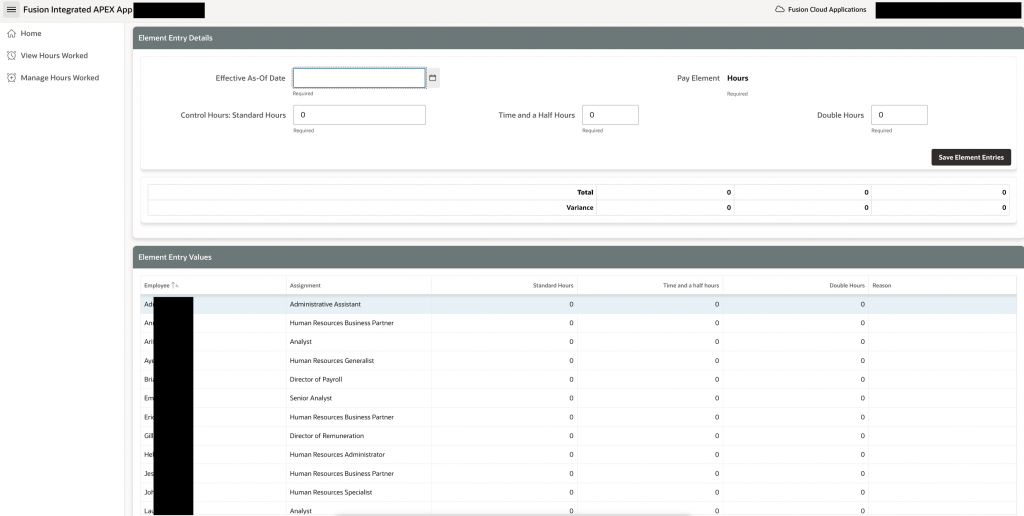
The views on the APEX_COLLECTION can be used to better interact with the data in the collection, as we can use column names to better represent the data, instead of the generic collection column names.
DB Objects sample code
| DB Object | Sample reference code | Additional Information |
| Sequence | — Sample reference code CREATE SEQUENCE “XX_ELEMENT_ENTRY_VALUES_BATCH_ID” MINVALUE 1 MAXVALUE 9999999999999999999999999999 INCREMENT BY 1 START WITH 1000 NOCACHE NOORDER NOCYCLE NOKEEP NOSCALE GLOBAL ; | This is a sequence for Batch Id. |
| Table | — Sample reference code CREATE TABLE xx_element_entry_values ( batch_id NUMBER, mgr_person_number VARCHAR2(500), effective_of VARCHAR2(500), person_id NUMBER, assignment_id NUMBER, element_type_id NUMBER, creator_type VARCHAR2(500), entry_type VARCHAR2(500), reason VARCHAR2(500), input_value_id_bh NUMBER, screen_entry_value_bh VARCHAR2(500), input_value_id_ot15 NUMBER, screen_entry_value_ot15 VARCHAR2(500), input_value_id_ot2 NUMBER, screen_entry_value_ot2 VARCHAR2(500), creation_date TIMESTAMP(6), http_status_code VARCHAR2(500), http_response CLOB, error_message VARCHAR2(32767) ); | This table can be used to store a copy of the data that was sent to Oracle Fusion by the extension. It will help with any tie-back or reconciliation activities. |
| View | — Sample reference code CREATE OR REPLACE FORCE EDITIONABLE VIEW “XX_MGR_DS_V” (“APEX_RESOURCE_KEY”, “PERSON_NUMBER”, “DISPLAY_NAME”, “USER_NAME”, “FIRST_NAME”, “LAST_NAME”, “MIDDLE_NAMES”) AS SELECT c001 apex_resource_key, c002 person_number, c003 display_name, c004 user_name, c005 first_name, c006 last_name, c007 middle_names FROM apex_collections WHERE collection_name = ‘MGR_DS’; | This view provides details of the logged in user. |
| View | — Sample reference code CREATE OR REPLACE FORCE EDITIONABLE VIEW “XX_MGR_REPORTS_DS_V” ( “SEQ_ID”, “MANAGER_PERSON_NUMBER”, “MANAGER_DISPLAY_NAME”, “REPORTEE_PERSON_ID”, “REPORTEE_PERSON_NUMBER”, “REPORTEE_DISPLAY_NAME”, “REPORTEE_ASSIGNMENT_ID”, “HRS_STD”, “HRS_1_5”, “HRS_2”, “REASON” ) AS SELECT seq_id, c001 manager_person_number, c002 manager_display_name, c003 reportee_person_id, c004 reportee_person_number, c005 reportee_display_name, c006 reportee_assignment_id, c011 hrs_std, c012 hrs_1_5, c013 hrs_2, c014 reason FROM apex_collections WHERE collection_name = ‘MGR_REPORTS_DS’; | This view provides reportee details of the logged in manager. |
| View | — Sample reference code CREATE OR REPLACE FORCE EDITIONABLE VIEW “XX_MGR_REPORTS_ASSIGNMENTS_DS_V” (“MANAGER_PERSON_NUMBER”, “MANAGER_DISPLAY_NAME”, “REPORTEE_PERSON_ID”, “REPORTEE_PERSON_NUMBER”, “WR_PERIOD_OF_SERVICE_ID”, “WR_PRIMARY_FLAG”, “ASSIGNMENT_ID”, “ASSIGNMENT_NUMBER”, “ASSIGNMENT_NAME”, “ASSIGNMENT_STATUS_TYPE”, “PRIMARY_ASSIGNMENT_FLAG”, “ASSIGN_PRIMARY_FLAG”) AS SELECT c001 manager_person_number, c002 manager_display_name, c003 reportee_person_id, c004 reportee_person_number, c005 wr_period_of_service_id, c006 wr_primary_flag, c007 assignment_id, c008 assignment_number, c009 assignment_name, c010 assignment_status_type, c011 primary_assignment_flag, c012 assign_primary_flag FROM apex_collections WHERE collection_name = ‘MGR_REPORTS_ASSIGNMENTS_DS’; | This view provides reportee assignment details of the logged in manager. |
Most of the PLSQL code is added to a DB Package and the same is called from required places in the Oracle APEX pages. This will help centralize the PLSQL code for better support, maintenance and enhancement activities.
PL/SQL Package sample code
-- Sample reference code
CREATE OR REPLACE PACKAGE xx_hcm_element_entry_extn_pkg
IS

-- Sample code for the other procedures is available in HCM Use Case 1 blog

   PROCEDURE update_ee_collection (
      p_seq_id                 VARCHAR2,
      p_manager_person_number  VARCHAR2,
      p_manager_display_name   VARCHAR2,
      p_reportee_person_id     VARCHAR2,
      p_reportee_person_number VARCHAR2,
      p_reportee_display_name  VARCHAR2,
      p_reportee_assignment_id VARCHAR2,
      p_hrs_std                VARCHAR2,
      p_hrs_1_5                VARCHAR2,
      p_hrs_2                  VARCHAR2,
      p_reason                 VARCHAR2
   );

   PROCEDURE save_ee_to_saas (
      p_batch_id             NUMBER,
      p_mgr_person_number    VARCHAR2,
      p_effective_as_of_date VARCHAR2,
      p_reportee_person_id   VARCHAR2,
      p_reportee_assignment  VARCHAR2,
      p_reason               VARCHAR2,
      p_hrs_std              VARCHAR2,
      p_hrs_1_5              VARCHAR2,
      p_hrs_2                VARCHAR2
   );

END xx_hcm_element_entry_extn_pkg;
-- Sample reference code
CREATE OR REPLACE PACKAGE BODY xx_hcm_element_entry_extn_pkg
IS
-- Sample code for the other procedures is available in HCM Use Case 1 blog
PROCEDURE update_ee_collection (
p_seq_id VARCHAR2,
p_manager_person_number VARCHAR2,
p_manager_display_name VARCHAR2,
p_reportee_person_id VARCHAR2,
p_reportee_person_number VARCHAR2,
p_reportee_display_name VARCHAR2,
p_reportee_assignment_id VARCHAR2,
p_hrs_std VARCHAR2,
p_hrs_1_5 VARCHAR2,
p_hrs_2 VARCHAR2,
p_reason VARCHAR2
) IS
BEGIN
apex_collection.update_member(
p_collection_name => 'MGR_REPORTS_DS',
p_seq => p_seq_id,
p_c001 => p_manager_person_number,
p_c002 => p_manager_display_name,
p_c003 => p_reportee_person_id,
p_c004 => p_reportee_person_number,
p_c005 => p_reportee_display_name,
p_c006 => p_reportee_assignment_id,
p_c011 => p_hrs_std,
p_c012 => p_hrs_1_5,
p_c013 => p_hrs_2,
p_c014 => p_reason
);
END update_ee_collection;
PROCEDURE save_ee_to_saas (
p_batch_id NUMBER,
p_mgr_person_number VARCHAR2,
p_effective_as_of_date VARCHAR2,
p_reportee_person_id VARCHAR2,
p_reportee_assignment VARCHAR2,
p_reason VARCHAR2,
p_hrs_std VARCHAR2,
p_hrs_1_5 VARCHAR2,
p_hrs_2 VARCHAR2
) IS
l_params apex_exec.t_parameters;
lv_element_type_id VARCHAR2(500);
lv_input_value_id_bh VARCHAR2(500);
lv_input_value_id__ot15 VARCHAR2(500);
lv_input_value_id_ot2 VARCHAR2(500);
lv_creator_type VARCHAR2(500) := 'F';
lv_entry_type VARCHAR2(500) := 'E';
lv_err_msg VARCHAR2(32767);
lv_http_status_code VARCHAR2(500);
lc_http_response CLOB;
BEGIN
BEGIN
SELECT
elementtypeid
INTO lv_element_type_id
FROM
payroll_input_values_ref
WHERE
ROWNUM = 1;
SELECT
inputvalueid
INTO lv_input_value_id_bh
FROM
payroll_input_values_ref
WHERE
inputvaluename = 'Basic Hours'
AND ROWNUM = 1;
SELECT
inputvalueid
INTO lv_input_value_id__ot15
FROM
payroll_input_values_ref
WHERE
inputvaluename = 'Overtime x 1.5'
AND ROWNUM = 1;
SELECT
inputvalueid
INTO lv_input_value_id_ot2
FROM
payroll_input_values_ref
WHERE
inputvaluename = 'Overtime x 2.0'
AND ROWNUM = 1;
apex_exec.add_parameter(l_params, 'Effective-Of','RangeStartDate='|| to_char(TO_DATE(p_effective_as_of_date, 'DD-MON-YYYY'), 'YYYY-MM-DD'));
apex_exec.add_parameter(l_params, 'PERSONID', p_reportee_person_id);
apex_exec.add_parameter(l_params, 'ELEMENTTYPEID', lv_element_type_id);
apex_exec.add_parameter(l_params, 'ASSIGNMENTID', p_reportee_assignment);
apex_exec.add_parameter(l_params, 'CREATORTYPE', lv_creator_type);
apex_exec.add_parameter(l_params, 'ENTRYTYPE', lv_entry_type);
apex_exec.add_parameter(l_params, 'INPUTVALUEID_BH', lv_input_value_id_bh);
apex_exec.add_parameter(l_params, 'SCREENENTRYVALUE_BH', p_hrs_std);
apex_exec.add_parameter(l_params, 'INPUTVALUEID_OT15', lv_input_value_id__ot15);
apex_exec.add_parameter(l_params, 'SCREENENTRYVALUE_OT15', p_hrs_1_5);
apex_exec.add_parameter(l_params, 'INPUTVALUEID_OT2', lv_input_value_id_ot2);
apex_exec.add_parameter(l_params, 'SCREENENTRYVALUE_OT2', p_hrs_2);
apex_exec.add_parameter(l_params, 'REASON', p_reason);
apex_exec.execute_rest_source(
p_static_id => 'HCM_ELEMENT_ENTRIES',
p_operation => 'POST',
p_parameters => l_params
);
lv_http_status_code := apex_exec.get_parameter_varchar2(l_params, 'http-status-code');
lc_http_response := apex_exec.get_parameter_clob(l_params, 'RESPONSE');
EXCEPTION
WHEN OTHERS THEN
lv_err_msg := sqlcode
|| ' -- '
|| sqlerrm;
lv_http_status_code := apex_exec.get_parameter_varchar2(l_params, 'http-status-code');
lc_http_response := apex_exec.get_parameter_clob(l_params, 'RESPONSE');
END;
INSERT INTO xx_element_entry_values VALUES ( p_batch_id,
p_mgr_person_number,
p_effective_as_of_date,
p_reportee_person_id,
p_reportee_assignment,
lv_element_type_id,
lv_creator_type,
lv_entry_type,
p_reason,
lv_input_value_id_bh,
p_hrs_std,
lv_input_value_id__ot15,
p_hrs_1_5,
lv_input_value_id_ot2,
p_hrs_2,
sysdate,
lv_http_status_code,
lc_http_response,
lv_err_msg );
END save_ee_to_saas;
END xx_hcm_element_entry_extn_pkg;