

Hi! In this blog entry, we will talk about a network architecture for the Oracle GoldenGate service, mainly how to connect it to an Oracle Exadata VM Cluster deployed in Microsoft Azure.
Oracle Exadata Database@Azure
Before we dive into GoldenGate, let’s discuss the architecture of Oracle Exadata deployed on Oracle Database@Azure. The official documentation and this blog post can give you more details, but a quick summary would be:
- In Microsoft Azure, a Virtual Network subnet is delegated to the Oracle deployment. This subnet will hold the Exadata VM Cluster.
- For the delegated subnet in Azure, through automation, a Virtual Cloud Network with relevant subcomponents (subnets, route tables, etc) is built in Oracle Cloud.
- Any Exadata VM Cluster deployed by the service can be reached on either of the two clouds, through the networking constructs of each cloud.
Let’s look at a diagram of a standard Exadata deployment:
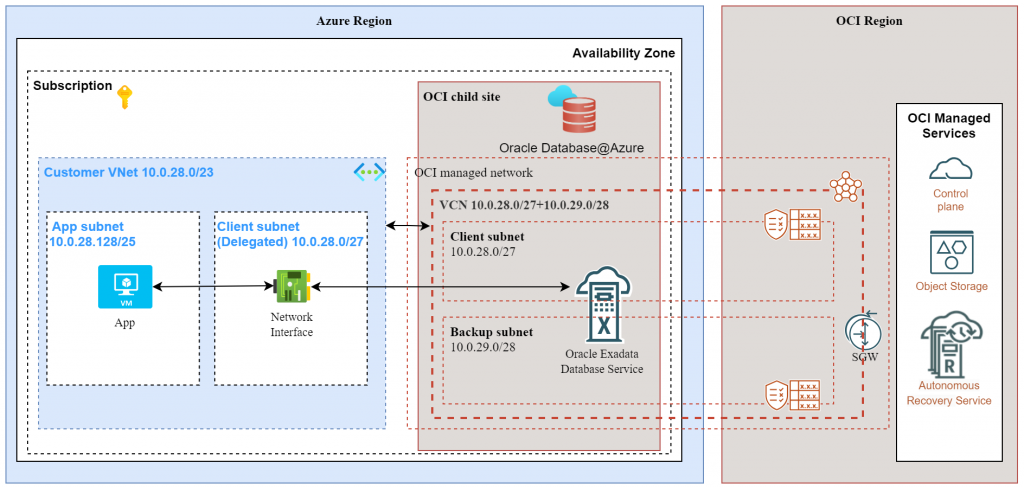
Let’s explore how we can connect to this Exadata database with the OCI GoldenGate service.
Oracle GoldenGate service
When considering the networking side of the service, there are a few details which are explained in this blog post. The summary is:
- The GG deployment requires an Oracle Cloud VCN Subnet as a target.
- The GG deployment will create endpoints in the target subnet which will be used to connect to the defined target databases.
Considering that we are discussing connecting a GoldenGate deployment to an Oracle DB@Azure deployment, we need to talk about Oracle Cloud subscriptions and the GoldenGate service.
Standard Oracle Cloud Subscription
You can deploy the Oracle GoldenGate service as part of a standard Oracle Cloud Universal Credits Subscription. If you choose this type, the GG service will live entirely inside Oracle Cloud and will be able to connect to the Exadata deployment in Azure over 2 paths:
- A path over customer-managed links to Azure – this means you will have to build the networking that allows the GG service to reach into Microsoft Azure. The links would typically be FastConnect-ExpressRoute going over a Partner network or direct with the use of the Interconnect service.
- A path over Oracle-managed links – because the Exadata product network is deployed on both Cloud Service Providers, you have the option to simply peer to that network on the Oracle side with normal networking constructs, like Local Peering Gateways.
A simple diagram for this would be:
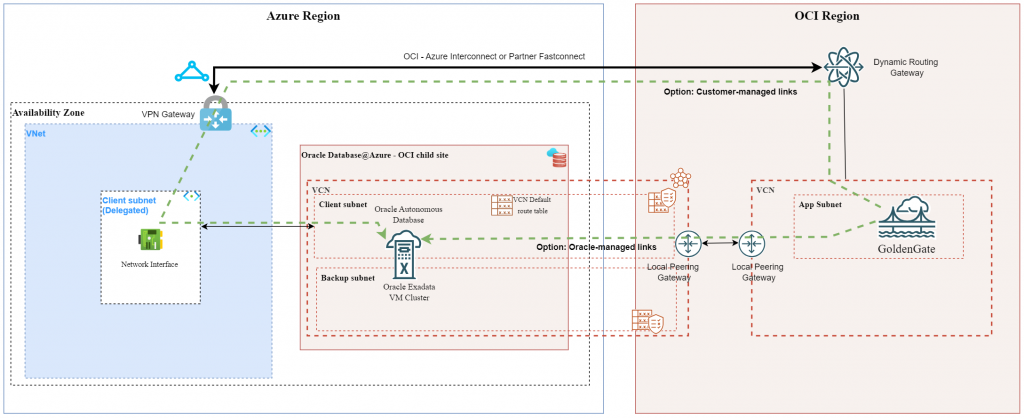
Note: this architecture will work for any Multicloud deployment, not only DB@Azure. The same concepts can be used for DB@AWS or DB@GCP.
Oracle Multicloud Subscription
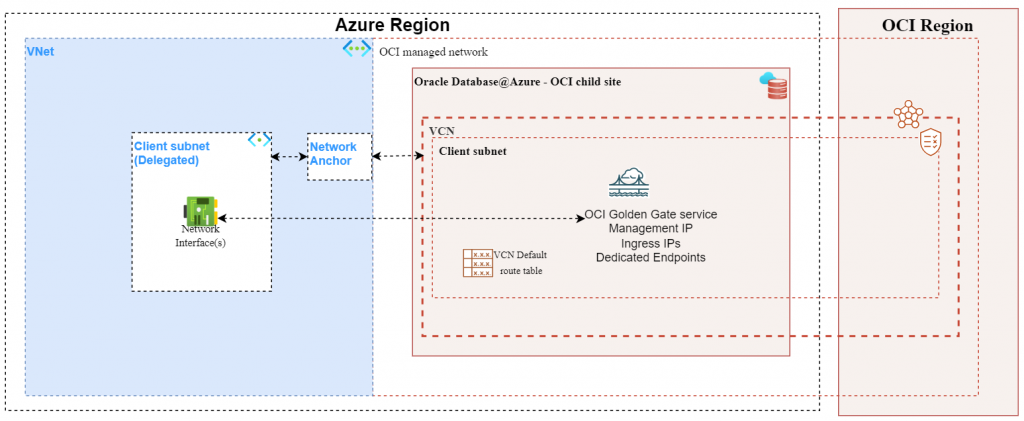
In supported Azure regions you can deploy the Oracle GG service through a Multicloud subscription. If you choose this option, there are some details related to networking:
- The networking on which the GG service will be deployed will be created from Microsoft Azure, through the Network Anchor construct.
- When deploying a Network Anchor in Microsoft Azure, a “shadow” Virtual Cloud Network is created in the OCI linked region and the GG service gets deployed in that VCN.
- Any IP related to the GoldenGate service (management, shared endpoint ingress IPs, dedicated endpoint ingress IPs) will be reachable on both the Oracle network and the Azure network, through the delegated subnet.
A simple diagram showing a standard multicloud deployment would be:
The next thing to talk about is connecting the GoldenGate service to an Exadata VM cluster. For this, there are some details:
- An Exadata deployment will need an Azure VNET delegated subnet which will create a Shadow VCN on the Oracle Cloud side.
- A GoldenGate deployment will need a different Azure VNET with a delegated subnet (different VNET and different subnet) and will also need a Network Anchor construct. This will also create a different Shadow VCN on the Oracle Cloud side.
- Because of the two points above, the network of the two products will be different so we need to build additional networking components if we want them to communicate.
- Because the network is available on both Cloud providers, we can create the connectivity between them on either CSP.
Let’s see a diagram of the setup:
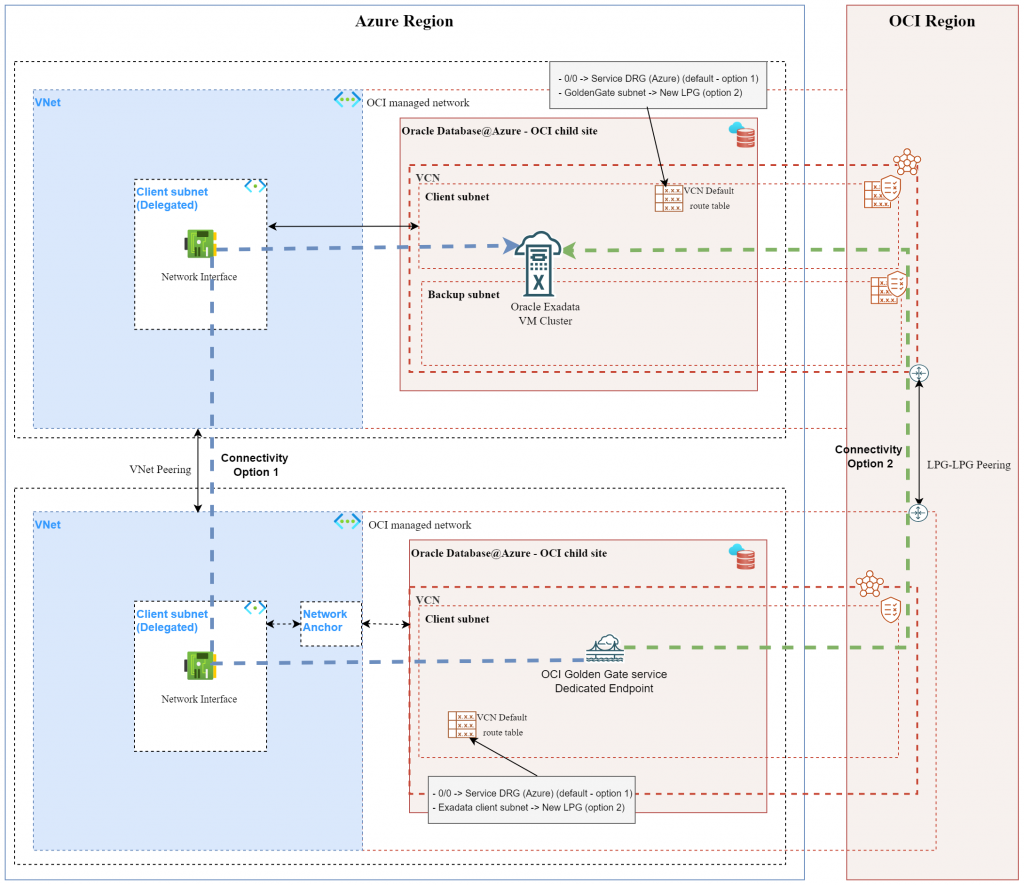
High-level steps to implement the above architecture:
- Exadata VM cluster is considered already deployed in an Azure Delegated VNET Subnet.
- Choose a different VNET than the Exadata VNET and create a new subnet there that you delegate to the Oracle service.
- Follow the procedure in this blog post to create:
- A Resource Anchor
- A Network Anchor
- A GoldenGate deployment
- On the OCI side, under the GoldenGate menu, create a new connection for Oracle Exadata in Azure. Make sure you select the correct options:
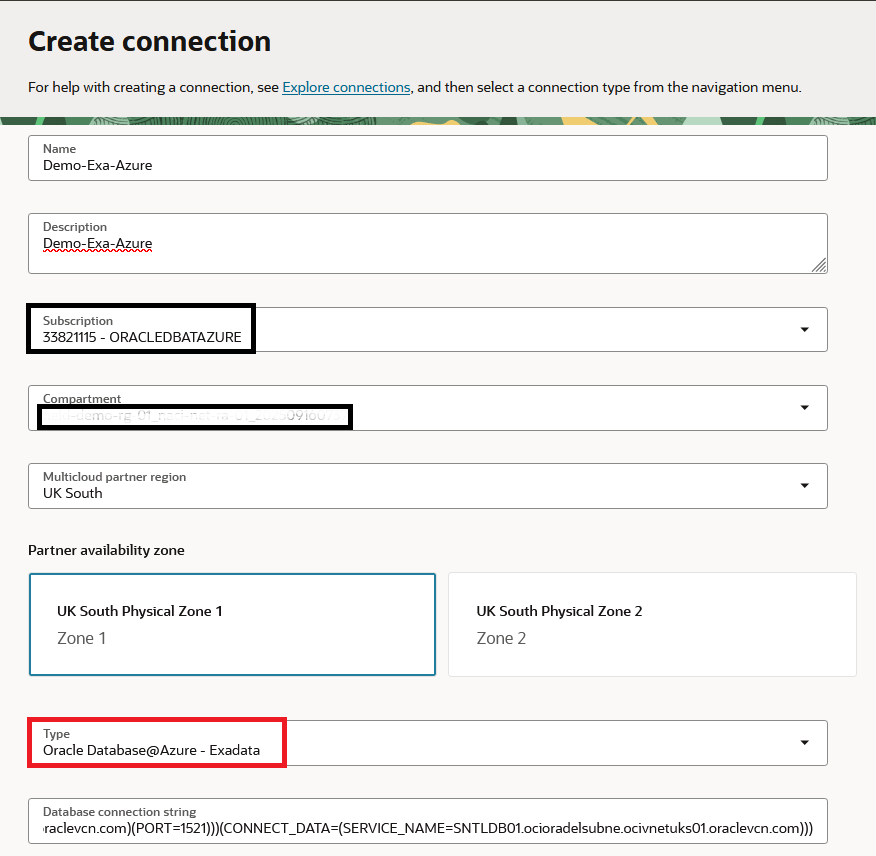
Note, for the connection string to Exadata it’s always recommended to use the SCAN DNS name:
(DESCRIPTION=(CONNECT_TIMEOUT=5)(TRANSPORT_CONNECT_TIMEOUT=3)(RETRY_COUNT=3)(ADDRESS_LIST=(LOAD_BALANCE=on)(ADDRESS=(PROTOCOL=TCP)(HOST=enc-akv-7mz9q-scan.ocioradelsubne.ocivnetuks01.oraclevcn.com)(PORT=1521)))(CONNECT_DATA=(SERVICE_NAME=SNTLDB01.ocioradelsubne.ocivnetuks01.oraclevcn.com)))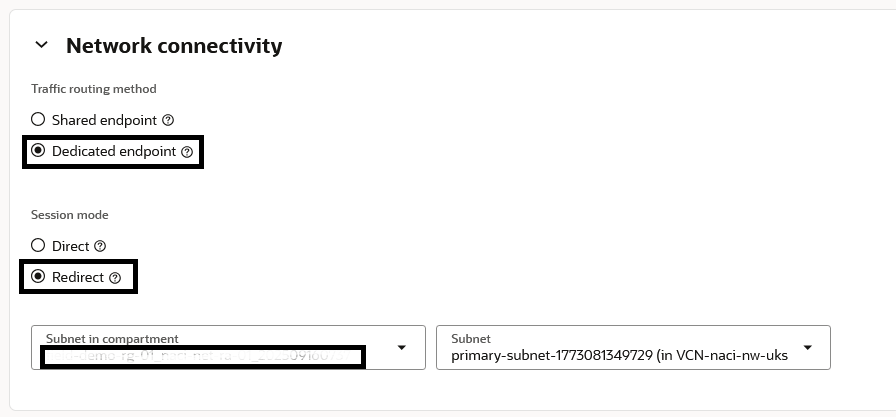
5. Assign the Connection to the Deployment.
6. In the GoldenGate Shadow VCN create a new NSG under “Security” and create relevant security entries that allow GG to connect to the EXA (ex: Allow Egress rule to Exadata client subnet on port 1521). Assign that NSG to the Deployment and to the Connection by going to the menu of each construct.
7. Create peering between the Exadata network and the GoldenGate network. As discussed, you can use either of the two CSPs.
- If you choose the Azure side, you only need to create VNET Peering between the two VNETs and nothing else.
- If you choose the Oracle side, you need to:
- Create one Local Peering Gateway in each Shadow VCN and peer them together.
- In the Default Route table of each VCN put a route for the other side with next hop the LPG.
8. The GoldenGate deployment must be able to perform DNS resolution for the Exadata SCAN name. The easiest way to achieve this is to go on the OCI side, the Shadow VCN of the GoldenGate deployment, DNS Resolver, Associated Private Views and put the Exadata Private View there.
If all steps were performed correctly you can return to the GG Deployment menu, select the Connection to Exadata and press “Test”. If the test works you can now move to configuration inside GoldenGate.
One final note, you can use the same steps presented here for connections from GoldenGate to an Oracle Autonomous Database deployed in Azure.
And that’s it! I hope this helps you.