
- The CIS compliance checking script is not impacted. Users should continue using it to determine tenancy compliance with the CIS OCI Foundations Benchmark.
- Users looking for a deployment experience similar to CIS Landing Zone should now use OCI Core Landing Zone, where the same features are available. OCI Core Landing Zone evolves CIS Landing Zone and complies with CIS OCI Foundations Benchmark.
- Users looking for a deployment experience based on fully declarable and customizable templates should use the Operating Entities Landing Zone or the OCI Landing Zones Modules in the OCI Landing Zones GitHub organization.
>p>
Updates
- July 2021: Landing Zone V2 released.
Introduction
Customers often ask us how they can automate the process of creating a secure Oracle Cloud Infrastructure (OCI) tenancy. In response to this, we created a Center for Internet Security (CIS) Landing Zone Quick Start template. This template enables OCI customers to quickly implement the CIS OCI Foundations Benchmark and overall OCI best practices within their tenancy. CIS recently released version 1.1 of the OCI Foundations Benchmark and the template provides a reference implementation for those recommendations.
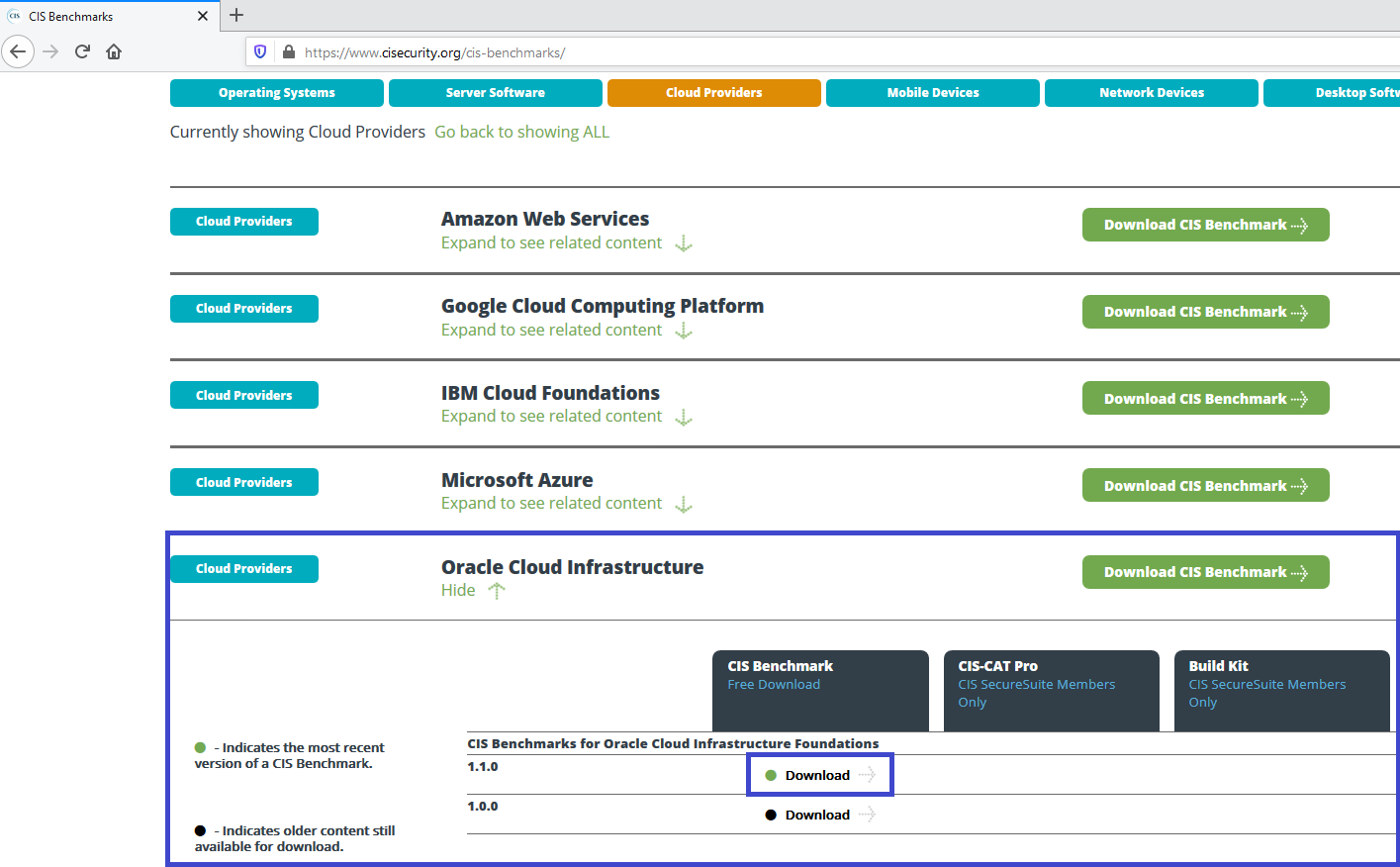
For obtaining the CIS OCI Benchmark document, navigate to https://www.cisecurity.org/cis-benchmarks/, expand the Oracle Cloud Infrastructure section and click the Download link next to the version number, as indicated.
The Landing Zone uses multiple compartments, groups, and IAM policies to segregate access to resources based on job function. The resources within the template are configured to meet the CIS OCI Foundations Benchmark settings related to:
- IAM (Identity & Access Management)
- Networking
- Keys
- Cloud Guard
- Vulnerability Scanning
- Logging
- Events
- Notifications
- Object Storage
Deliverables
The template encloses two independent deliverables:
- An extensible reference implementation written in Terraform HCL (Hashicorp Language) that provisions fully functional resources in an OCI tenancy.
- An extensible Python script that performs compliance checks for the CIS OCI Foundations Benchmark recommendations in any existing tenancy (it does not matter if the tenancy was provisioned by the Landing Zone Terraform).
The code is available at https://github.com/oracle-quickstart/oci-cis-landingzone-quickstart and is provided as sample code, which has not been submitted for extensive testing. It should be used “as is”, altered or simply as an inspiration for your projects.
Architecture
It is important to note the CIS OCI Foundations Benchmark document does not prescribe a particular compartment or network architecture. It is all about security best practices that should be implemented along with an architecture. In order to show how to implement these best practices, the Landing Zone Terraform defines a basic architecture that could be used “as is” in many customer scenarios. Different architecture scenarios can be made “CIS compliant” by adding these best practices to an existing tenancy, but the methods of doing so depend on customers’ provisioning practices (ranging from simply using OCI Console to automation with Terraform) and are beyond the scope of this template.
The Landing Zone Terraform code deploys a standard three-tier network architecture within a single Virtual Cloud Network (VCN). The three tiers are divided into:
- One public subnet for load balancers and bastion servers;
- Two private subnets: one for the application tier and one for the database tier.
The tenancy resources are spread across four compartments:
- A network compartment: for all networking resources.
- A security compartment: for all logging, key management, and notifications resources and services.
- An application development compartment: for application development related services, including compute, storage, functions, streams, Kubernetes, API Gateway, etc.
- A database compartment: for database resources.
The compartment design reflects a basic functional structure observed across different organizations, where IT responsibilities are typically split among networking, security, application development and database admin teams. Each compartment is assigned an admin group, with enough permissions to perform its duties. The provided permissions lists are not exhaustive and are expected to be appended with new statements as new resources are brought into the Terraform template.
The diagram below shows the services and resources that are deployed:
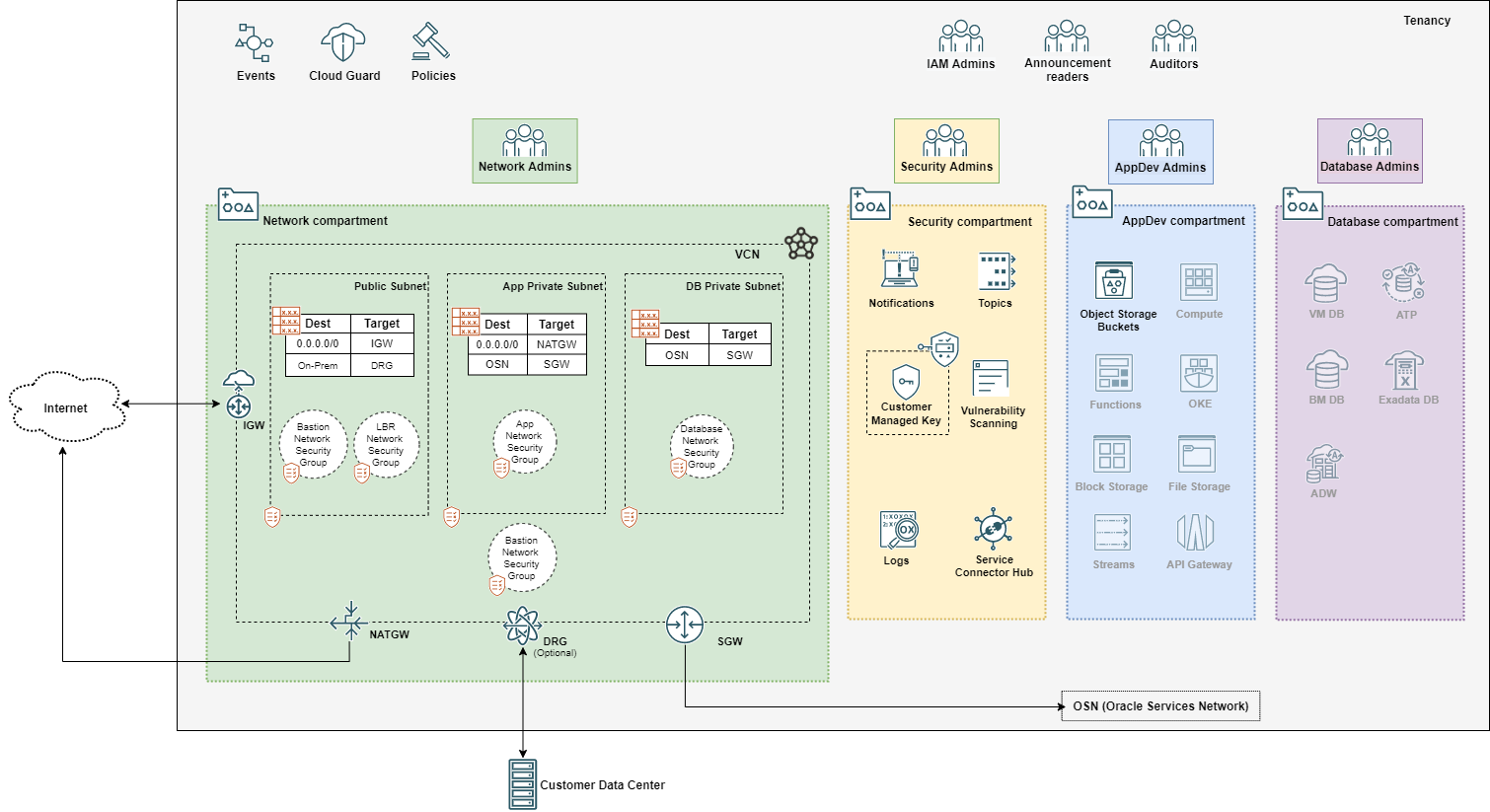
The greyed out icons in the AppDev and Database compartments indicate services not provisioned by the template.
Security Features
Landing Zone pre-configures the tenancy with the following security features:
- Segregation of duties, implemented through IAM policies coupled with groups and compartments design;
- Secured network architecture, with inbound and outbound interfaces properly secured via Network Security Groups;
- Network logging with VCN flow logs;
- Alerting on IAM and network changes with Events and Notifications;
- Strong security posture monitoring with Cloud Guard;
- Logging consolidation with Service Connector Hub;
- Automatic host scanning with Vulnerability Scanning Service;
Deployment
Detailed instructions for Terraform deployment and how to run the compliance checking script are available in the repository’s README.
Customizing the Terraform Configuration
The Terraform code has a single configuration root module and a few modules that actually perform the provisioning. We encourage any customization to follow this pattern as it enables consistent code reuse.
For bringing new resources into the Terraform configuration, like compartments or VCNs, you can simply reuse the existing modules and add extra module calls similar to the existing ones in the root module. Most modules accept a map of resource objects that are usually keyed by the resource name. For adding extra subnets to the existing VCN, for instance, simply add the extra subnet resources to the existing subnets map.
For more details, see the repository’s README.
Cost
As of the publishing time of this post, provisioning the resources in the template incurs no cost.
Feedback
To post feedback, submit feature ideas or report bugs, please use the Issues section of the GitHub repository.
Credits
This template has been jointly created by myself, Josh Hammer and Logan Kleier.