
This blog is part of the blog series Extending Oracle Fusion Cloud Applications using Oracle APEX. In this blog post we will cover the options to retrieve and use SaaS Data for Oracle Fusion Integrated Oracle APEX Extensions.
Prerequisites
- Access to Oracle Fusion.
- Access to Oracle APEX environment.
- Complete the steps mentioned in the Extending Oracle Fusion Cloud Applications using Oracle APEX – Authentication blog.
- Complete the steps mentioned in the Extending Oracle Fusion Cloud Applications using Oracle APEX – Authorization blog.
High level steps
- Login to the APEX environment.
- Create a new Fusion Integrated APEX application or use the APEX application created in the Authentication blog.
- Create REST data source/s.
- Get REST API data using REST Data source.
- Schedule REST API data extraction using REST Data source and Automations.
- Call REST Data source programmatically.
Detailed steps
Oracle APEX provides a declarative option to register REST API as REST Data Sources, which can then be used by multiple Oracle APEX Objects (Classic Reports, Interactive Reports, Interactive Grids, Charts, Shared LOV, Select Lists and etc).
We have the below 3 options to create REST data source to be used for Oracle Fusion APEX Extensions. While all 3 options can be used in the extensions with few differences, there are additional benefits of using the dedicated REST data source types provided to interact with Oracle Fusion. We can check the features of the below, map to our requirements and use accordingly.
| REST Data Source Type | Description | Additional Information |
| Oracle Cloud Applications (SaaS) REST Service | Denotes RESTful services provided by Oracle Cloud Applications (SaaS). Use this web service type to integrate Oracle SaaS REST Services into your Oracle APEX application. Oracle APEX supports pagination for these Services. | Dedicated REST data source type provided to interact with Oracle Fusion. |
Oracle Cloud Applications (BOSS) REST Service | Denotes a REST service used to build Oracle APEX apps that query, insert, update, and delete data from Business Object Spectra Service (BOSS) REST endpoints. | Dedicated REST data source type provided to interact with Oracle Fusion. |
| Simple HTTP | Denotes simple HTTP data feeds. Oracle APEX assumes that all data is returned with the first request and that the server does not support server-side filtering, ordering or other advanced REST service feature. All invocation details and parameters must be configured manually. | Generic REST data source type provided to interact with REST API. |
In order to create REST Data source (Design time), the Oracle APEX application needs to be run (Run time), as it uses the same credentials and fetches the required details of the REST API, else we get the Authentication failed error at the last step of the REST data source creation. Also It is recommended to run the APEX application using a user with elevated roles to perform this step.
Oracle Fusion data can be classified as below:
| Data Change frequency | REST Data Source Option | Additional Information |
| Less frequently | Manage Synchronization. | This option can be used for data which changes less frequently like Configuration data. This will help to optimize the resources for Extension data extraction. |
| More frequently | Use REST Data Source. Trigger programmatically. | REST Data sources can be used directly in APEX pages, regions and get the data on demand. In some cases where we have complex requirements, the REST Data source can be triggered programmatically. |
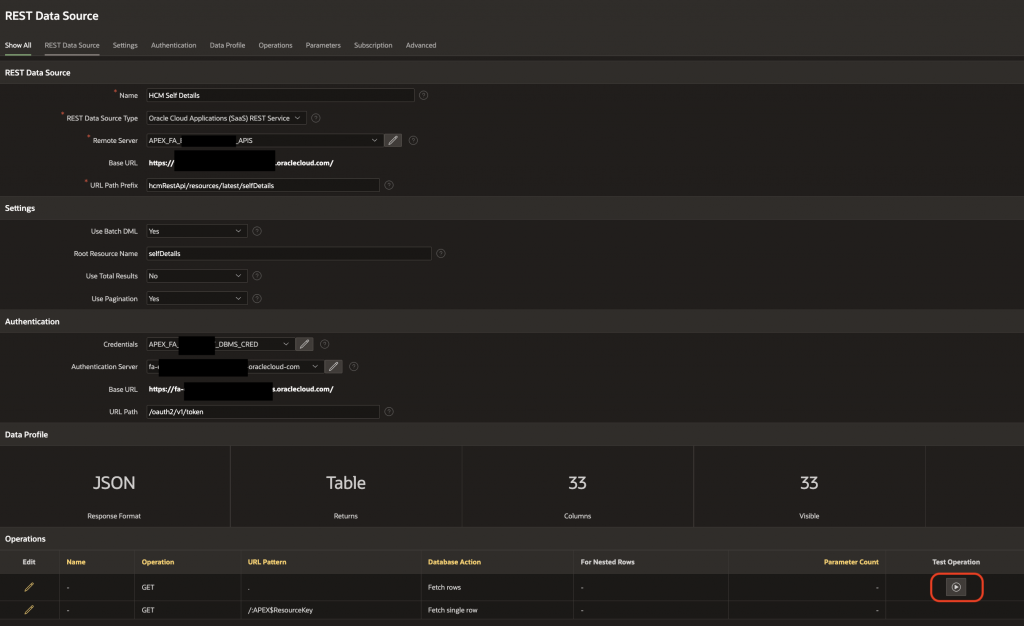
Create REST data source/s: Navigate to the Shared Components –> REST Data Sources and create the below REST Data Sources from scratch using the below details (Replace xxxx with the respective environment details):
**This REST data source was created during the Fusion Integrated APEX Application creation.
Field | **HCM Self Details | Payroll Input Values LOV | Additional Information |
| REST Data Source Type | Oracle Cloud Applications (SaaS) REST Service | Oracle Cloud Applications (SaaS) REST Service | Select this REST Data Source Type. |
| Name | HCM Self Details | HCM Payroll Input Values LOV | Use an appropriate name for the REST data source. |
| URL Endpoint | https://fa-xxxx-xxxx-xxxx.xx.xxx.oraclecloud.com/hcmRestApi/resources/latest/selfDetails | https://fa-xxxx-xxxx-xxxx.xx.xxx.oraclecloud.com/hcmRestApi/resources/latest/payrollInputValuesLOV | Use the endpoint of the REST API. |
| HTTPS Host Name | leave blank | leave blank | leave blank |
| Remote Server | APEX_FA_XXXX-XXXX_REST_APIS | APEX_FA_XXXX-XXXX_REST_APIS | This remote server was created during APEX Application creation. |
| Base URL | https://fa-xxxx-xxxx-xxxx.xx.xxx.oraclecloud.com/ | https://fa-xxxx-xxxx-xxxx.xx.xxx.oraclecloud.com/ | The Base URL of the Oracle Fusion environment. |
| Service URL Path | hcmRestApi/resources/latest/selfDetails | hcmRestApi/resources/latest/payrollInputValuesLOV | The URL path of the endpoint. |
| Use Batch DML | Yes | Yes | depends on the endpoint. |
| Use Total Results | No | No | depends on the endpoint. |
| Use Pagination | Yes | Yes | depends on the endpoint. |
| Authentication Required | Yes | Yes | Select as Yes. |
| Credentials | APEX_FA_XXXX-XXXX_DBMS_CRED | APEX_FA_XXXX-XXXX_DBMS_CRED | This credential was created during APEX Application creation. |
| OAuth Token URL | https://fa-xxxx-xxxx-xxxx.xx.xxx.oraclecloud.com/ | https://fa-xxxx-xxxx-xxxx.xx.xxx.oraclecloud.com/ | This gets defaulted when selecting the credential. |
| Static ID | HCM_SELF_DETAILS | HCM_PAYROLL_INPUT_VALUES_LOV | After the REST Data source is created, we need to open and check the static ID. This is used to interact with the REST Data source programmatically. |
Get REST API data using REST Data source: At this stage, we can run the APEX application to establish a valid session with Oracle Fusion, use the Test Operation for the REST Data source GET Operation and check the REST API response data.
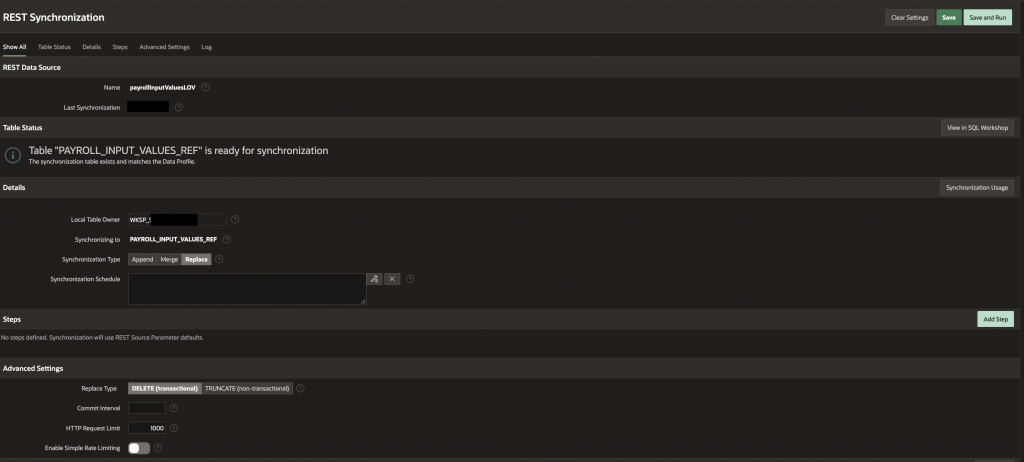
Schedule REST API data extraction using REST Data source and Automations: Navigate to the REST Data source HCM Payroll Input Values LOV and click on Manage Synchronization. This will enable to Sync (Append/Merge/Replace) the data from Oracle Fusion to the DB table using the REST Data source.
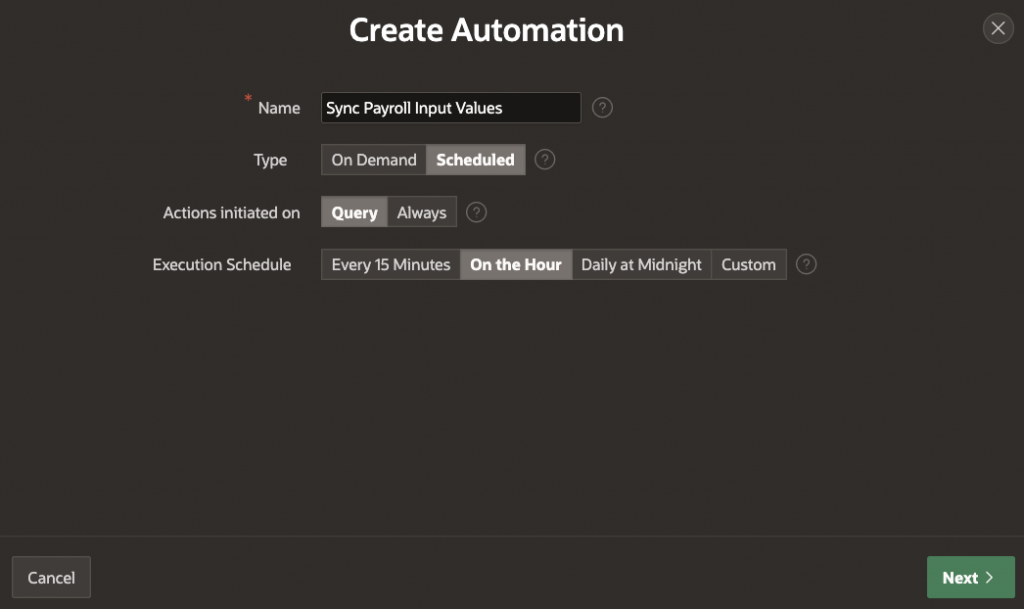
We can schedule the REST Data Source Synchronization using APEX Automations. Navigate to Shared Components –> Automations.
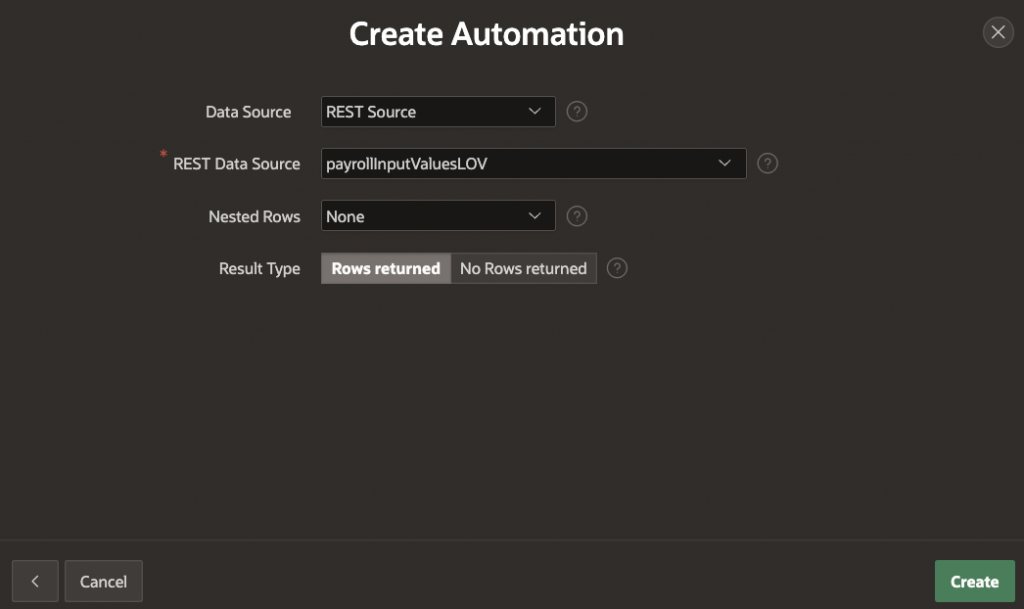
Call REST Data source programmatically: The REST Data source can be triggered programmatically using apex_exec.open_rest_source_query and apex_exec.execute_rest_source.
The sample code is available in the below blogs:
- Extending Oracle Fusion Cloud Applications using Oracle APEX – HCM Use Case 1
- Extending Oracle Fusion Cloud Applications using Oracle APEX – HCM Use Case 2
Table creation sample code
-- Sample reference code
-- This table will be used to store the required payroll input values.
CREATE TABLE xx_payroll_input_values_ref (
apex$resourcekey VARCHAR2(32767),
inputvalueid NUMBER,
effectivestartdate DATE,
effectiveenddate DATE,
inputvaluename VARCHAR2(80),
displaysequence NUMBER,
uom VARCHAR2(30),
reservedinputvalue VARCHAR2(30),
elementname VARCHAR2(80),
elementtypeid NUMBER,
elementeffectivestartdate DATE,
elementeffectiveenddate DATE,
legislativedatagroupname VARCHAR2(240),
legislationcode VARCHAR2(30),
legislativedatagroupid NUMBER,
apex$sync_step_static_id VARCHAR2(255),
apex$row_sync_timestamp TIMESTAMP(6) WITH TIME ZONE,
CONSTRAINT payroll_input_values_ref_pk PRIMARY KEY ( apex$resourcekey ) DISABLE
);
Conclusion
We can use the declarative Oracle APEX option REST Data Source to register the Oracle Fusion REST API and can reuse the same in multiple pages, regions, reports, Select List, LOV etc. Also as we are using REST API, it is recommended for low and medium volume data and not recommended to use it for high volume data extraction.
References
Oracle APEX REST Data Sources for Oracle Cloud SaaS Applications
Faster Extension Development with Oracle APEX and Fusion Apps REST Catalog