
Deploying multiple tenancies in Oracle Cloud Infrastructure (OCI) is a common pattern for organizations that need to support business-unit or subsidiary separation, mergers and acquisitions, distinct governance models, and separate billing or chargeback requirements.
These tenancies may still need to communicate with one another—for example, to provide access to shared services, integrate acquired companies or subsidiaries, connect with partners, or consume managed services—while remaining independently governed.
OCI provides three native options for establishing connectivity across tenancies:
1. Cross-Tenancy Virtual Cloud Network (VCN) Attachment to a Dynamic Routing Gateway (DRG)
2. Cross-Tenancy Local Peering using Local Peering Gateways (LPGs)
3. Cross-Tenancy Remote Peering using Dynamic Routing Gateways (DRGs)
From a routing perspective, these solutions work similarly to when deployed within a single tenancy, so this post does not cover routing configuration. Instead, it focuses on the IAM policies that must be configured across tenancies to grant the permissions required to establish these connections.
This post outlines the IAM policies required for each cross-tenancy connectivity scenario. It builds on the guidance in IAM Policies for Routing Between VCNs by validating the documented policies and providing updates where the existing guidance does not produce a functional cross-tenancy connection. Related OCI blogs are referenced at the end.
1. Cross-Tenancy VCN Attachment to a DRG
This option is typically used when one tenancy centrally manages network connectivity—for example, in a hub-and-spoke or a shared-services network—while another tenancy owns the VCN being connected. It allows the DRG-owning tenancy to extend connectivity to a separately governed VCN, including access to on-premises networks, other connected VCNs, or network virtual appliances, without transferring ownership of that VCN. The DRG and VCN must be in the same OCI region.
The following diagram illustrates a cross-tenancy DRG VCN attachment: a DRG in tenancy ABC attaches to a VCN in tenancy XYZ.
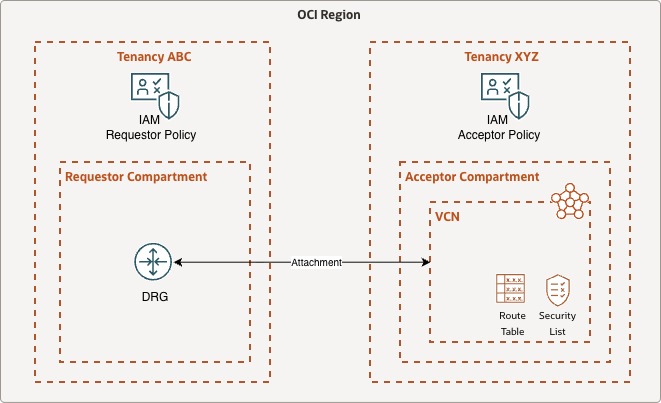
For clarity, the required IAM policies are divided into two parts:
- A requestor policy, configured in the tenancy that initiates the attachment request
- An acceptor policy, configured in the tenancy that accepts the attachment request
Because these policies grant cross-tenancy access, they must be attached to each tenancy root compartment.
Requestor Policy (Tenancy ABC)
Define tenancy acceptorVCN as <acceptor_tenancy_ocid>
Endorse group <requestor_domain>/<requestor_group> to manage drg in tenancy acceptorVCN
Endorse group <requestor_domain>/<requestor_group> to manage vcn in tenancy acceptorVCN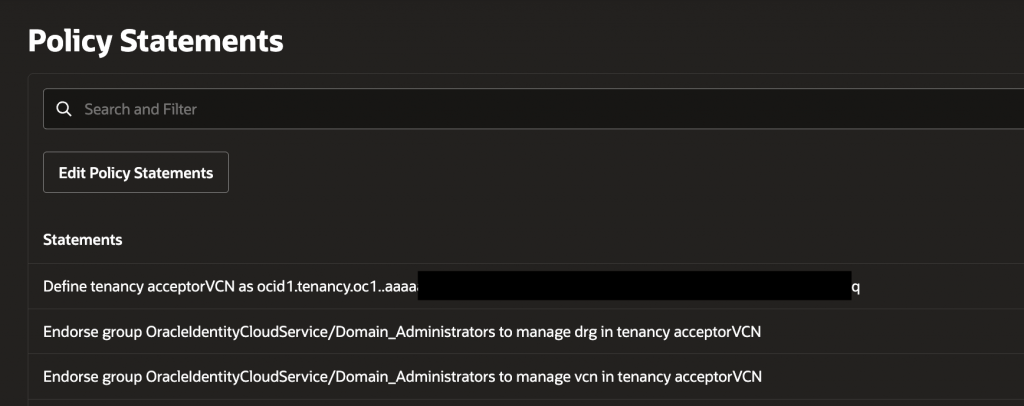
Acceptor Policy (Tenancy XYZ)
Define tenancy requestorDRG as <requestor_tenancy_ocid>
Define group drgAdmin as <requestor_group_ocid>
Admit group drgAdmin of tenancy requestorDRG to manage drg in compartment <acceptor_vcn_compartment>
Admit group drgAdmin of tenancy requestorDRG to manage vcn in compartment <acceptor_vcn_compartment>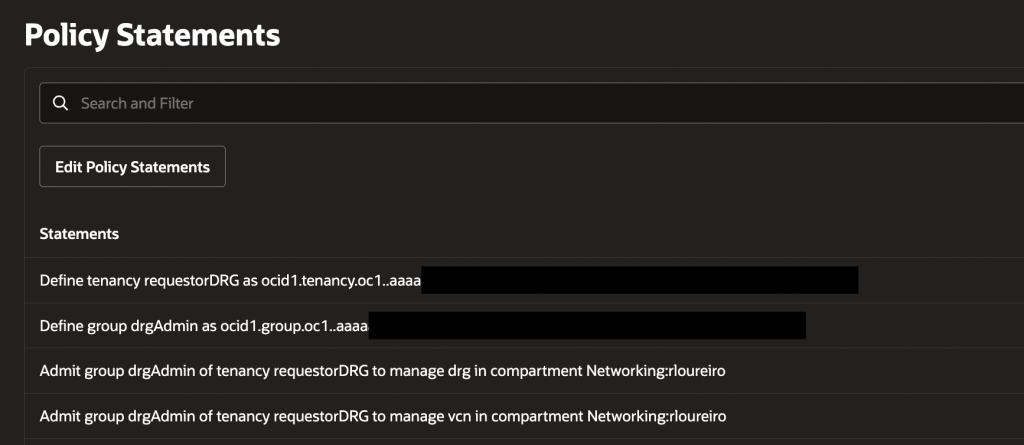
If either tenancy must be able to initiate an attachment to the other, configure the corresponding requestor and acceptor policies in both tenancies.
After configuring the IAM policies, create the cross-tenancy DRG VCN attachment.
In the OCI Console for the tenancy that contains the DRG, navigate to Networking, Dynamic Routing Gateway, and select the DRG. Under Attachments, navigate to Cross-tenancy attachments, then select Create cross-tenancy attachment.
Enter a name for the attachment, provide the VCN OCID, and select Create.
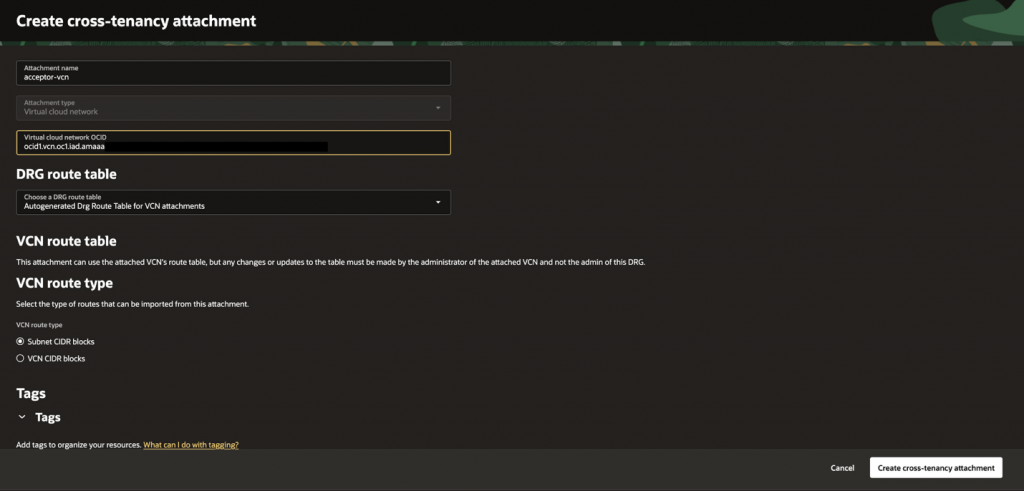
When the operation completes, the cross-tenancy attachment transitions to the Attached state.
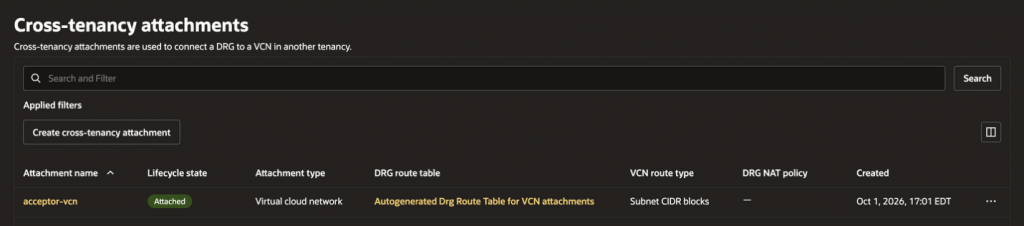
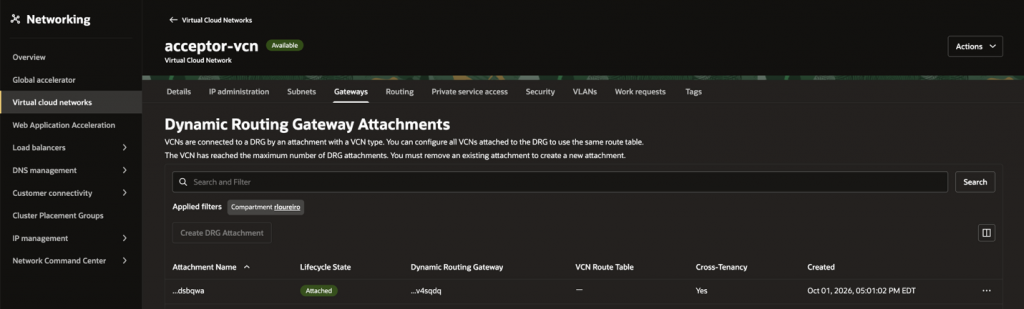
You can also view the attachment from the VCN tenancy. In the OCI Console, navigate to Networking, Virtual Cloud Networks, and select the VCN. Under Gateways, navigate to Dynamic Routing Gateway Attachments.
2. Cross-Tenancy Local Peering using LPGs
This option is typically used when two VCNs in different tenancies, but within the same OCI region, require direct private connectivity. It is well suited for straightforward point-to-point connections, such as shared-services, subsidiary environments, or partner integrations, while allowing each tenancy to retain independent ownership and governance of its VCN.
In the following diagram, an LPG in tenancy ABC establishes a local peering connection with an LPG in tenancy XYZ.
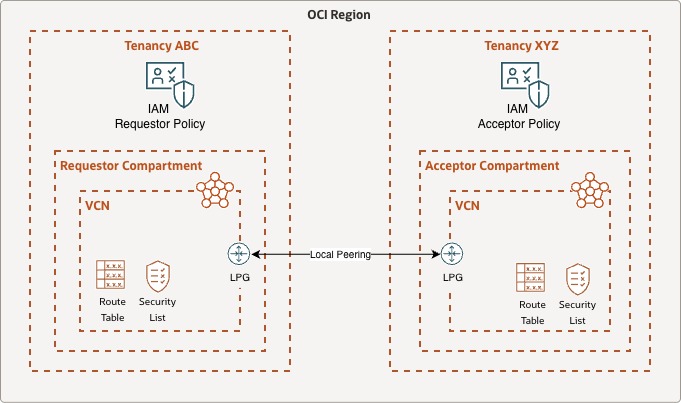
The required IAM policies are divided into requestor and acceptor policies. Attach both policies at the tenancy root compartment.
Requestor Policy (Tenancy ABC)
Define tenancy Acceptor as <acceptor_tenancy_ocid>
Allow group <requestor_domain>/<requestor_group> to manage local-peering-from in compartment <requestor_lpg_compartment>
Endorse group <requestor_domain>/<requestor_group> to manage local-peering-to in tenancy Acceptor
Endorse group <requestor_domain>/<requestor_group> to associate local-peering-gateways in compartment <requestor_lpg_compartment> with local-peering-gateways in tenancy Acceptor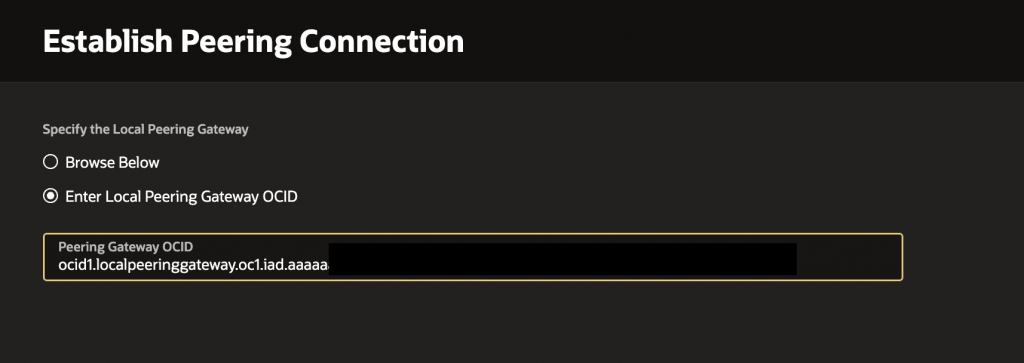
Acceptor Policy (Tenancy XYZ)
Define tenancy Requestor as <requestor_tenancy_ocid>
Define group requestorGrp as <requestor_group_ocid>
Admit group requestorGrp of tenancy Requestor to manage local-peering-to in compartment <acceptor_lpg_compartment>
Admit group requestorGrp of tenancy Requestor to associate local-peering-gateways in tenancy Requestor with local-peering-gateways in compartment <acceptor_lpg_compartment>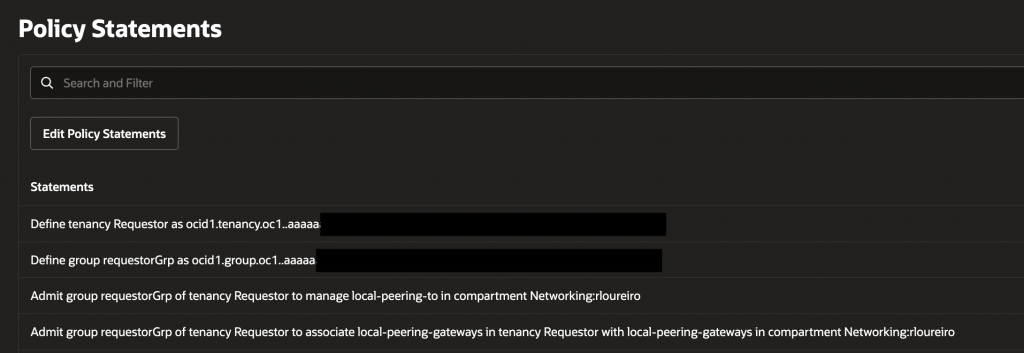
After configuring the IAM policies, establish the local peering connection.
In the OCI Console for the tenancy that contains the requestor LPG, navigate to Networking, Virtual Cloud Networks, and select the VCN. Under Gateways, navigate to Local Peering Gateways, then select the LPG. Select Establish Peering Connection, enter the acceptor LPG OCID, and select Establish Peering Connection.
When the operation completes, the peering status transitions to Peered.
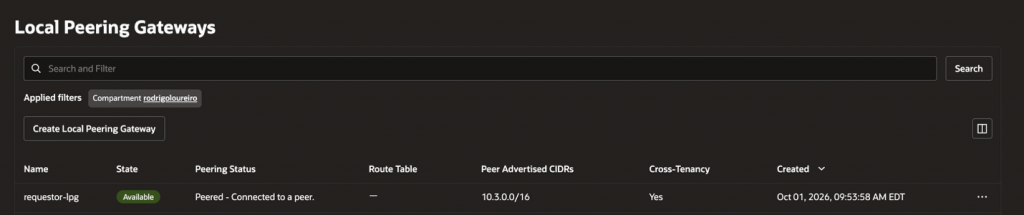
You can also view the peering status from the tenancy that contains the acceptor LPG.
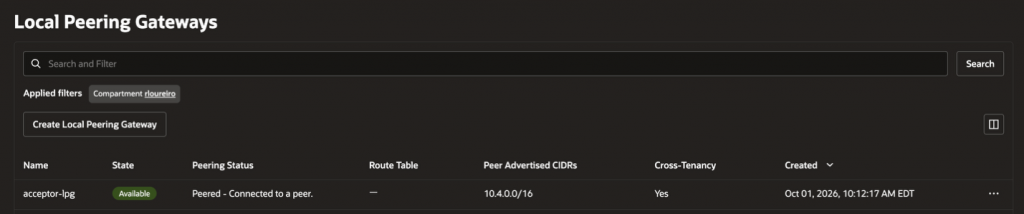
3. Cross-Tenancy Remote Peering using DRGs
This option is typically used when VCNs in different tenancies require private connectivity through different DRGs, including across OCI regions. It is well suited for distributed or multi-region architectures, such as disaster recovery, regional application deployments, and cross-tenancy shared services, while allowing each tenancy to retain independent ownership and governance of its network resources.
In the following diagram, a remote peering connection is established between RPCs on DRGs in tenancy ABC and tenancy XYZ. The DRGs can be in the same or different OCI regions.
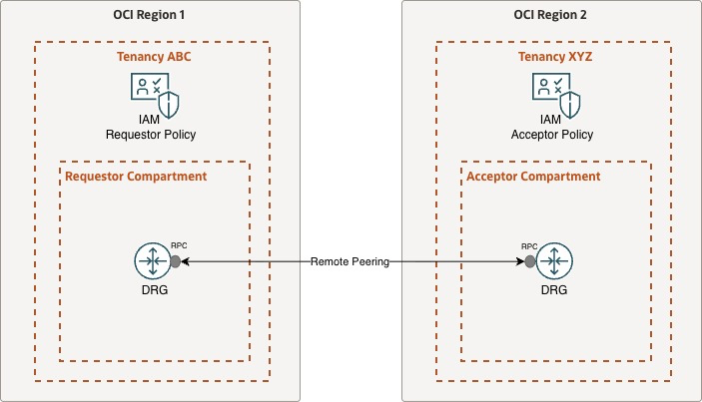
As in the previous scenarios, the required IAM policies are divided into requestor and acceptor policies and are attached at the tenancy root compartment.
Requestor Policy (Tenancy ABC)
Define tenancy Acceptor as <acceptor_tenancy_ocid>
Allow group <requestor_domain>/<requestor_group> to manage remote-peering-from in compartment <requestor_rpc_compartment>
Endorse group <requestor_domain>/<requestor_group> to manage remote-peering-to in tenancy Acceptor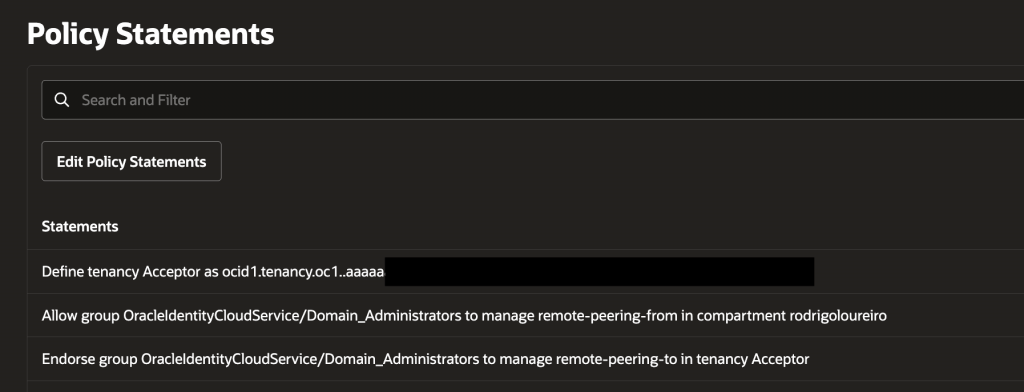
Acceptor Policy (Tenancy XYZ)
Define group requestorGrp as <requestor_group_ocid>
Define tenancy Requestor as <requestor_tenancy_ocid>
Admit group requestorGrp of tenancy Requestor to manage remote-peering-to in compartment <acceptor_rpc_compartment>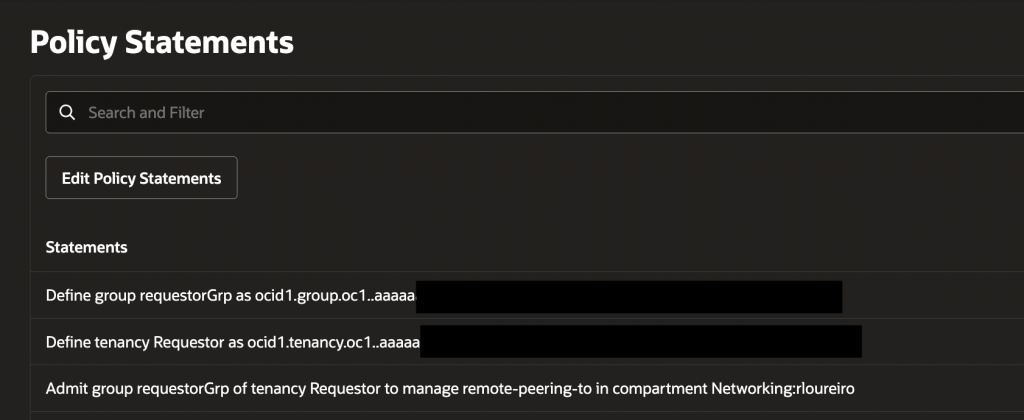
After configuring the IAM policies, establish the remote peering connection between the requestor and acceptor RPCs.
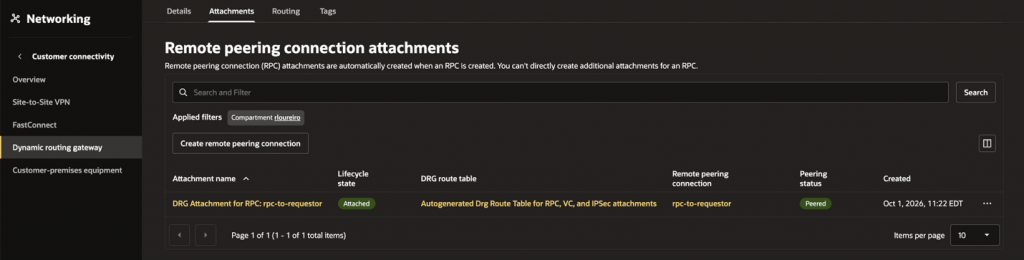
Open the OCI Console in the tenancy containing the requestor DRG. Navigate to Networking, Dynamic Routing Gateway and select the DRG. Under Attachments, navigate to Remote Peering Connection Attachments. Select the requestor RPC, then select Establish Connection.
Select the acceptor region, enter the OCID of the acceptor RPC, and select Establish Connection.
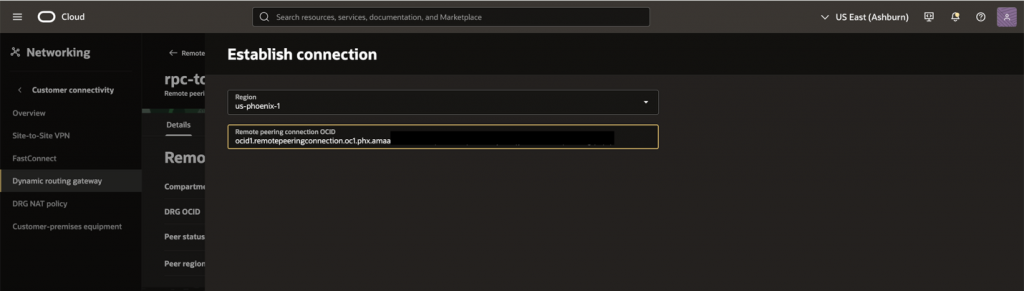
When the operation completes, the RPC state transitions to Peered.
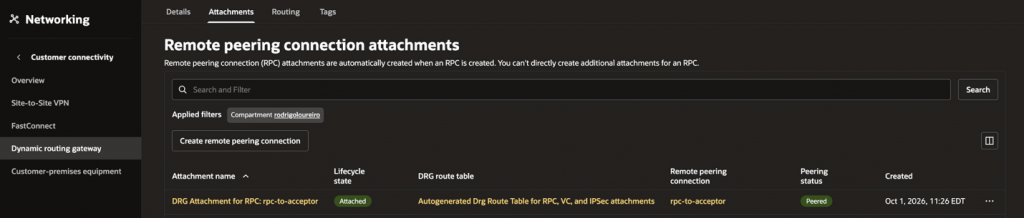
You can also view the peering status from the tenancy that contains the acceptor DRG.
Final Thoughts
OCI provides several native options for connecting resources across tenancies: cross-tenancy DRG VCN attachments, local peering using LPGs, and remote peering using DRGs. The right option depends primarily on the location of the connected VCNs and the connectivity model required.
Although the routing configuration follows familiar single-tenancy patterns, cross-tenancy connectivity requires explicit IAM agreement from both tenancies. Carefully define the requestor and acceptor roles, scope permissions to the required resources and compartments, and attach cross-tenancy policies at the tenancy root compartment.
By applying these IAM policies correctly, organizations can enable private connectivity for shared services, subsidiary integration, acquisitions, and partner environments while preserving independent tenancy administration and governance.
Related Resources
– OCI network architectures for multiple tenancies