
Introduction
In this blog, we examine the advanced network topologies supported by Oracle Database@Azure. We highlight the key design considerations, benefits, and trade-offs of each approach to help you select the topology that best aligns with your application and connectivity requirements. Detailed implementation procedures are outside the scope of this blog.
For an overview of basic network topologies, refer to the blog here:
Oracle Database@Azure: Basic Connectivity
Before diving in, it’s recommended to review the following blogs to build a solid understanding of the underlying networking concepts for this offering:
Networking Fundamentals for Oracle Database@Azure
Oracle Database@Azure DNS options
DNS resolution with Network Anchors in the Oracle Database at Azure
Agenda:
- On-premises connectivity
- Global connectivity between regions over Azure backbone
- Cross-AZ connectivity for disaster recovery over OCI backbone
- Cross-region connectivity for disaster recovery over OCI backbone
On-premises connectivity
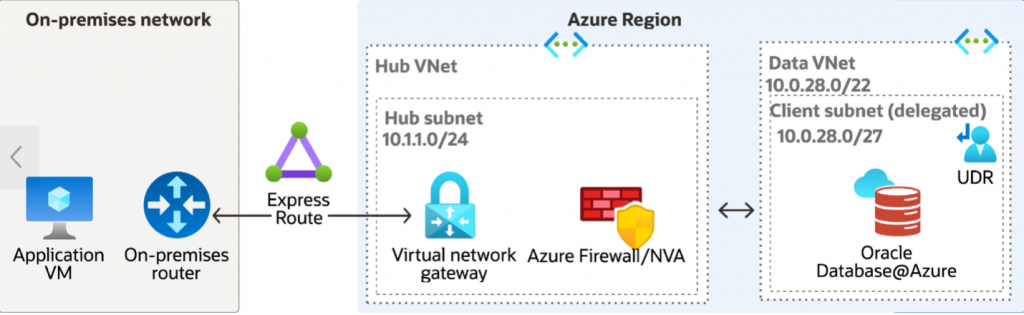
Oracle Database@Azure is deployed in a dedicated virtual network (VNet), while the applications remain on premises. A Virtual Network Gateway in the dedicated hub VNet enables secure connectivity between the on-premises environment and Oracle Database@Azure. Depending on business and security requirements, the hub VNet can also include Azure Firewall or a network virtual appliance (NVA). This topology is designed for hybrid deployment scenarios where on-premises applications require private, controlled, and reliable network access to Oracle Database@Azure.
Routing:
- The on-premises network is connected to the hub VNet using either Site-to-Site (S2S) VPN or ExpressRoute.
- The Virtual Network Gateway in the hub VNet propagates on-premises routes to connected networks, enabling route exchange across the topology.
- The Oracle Database@Azure VNet is connected to the hub VNet through direct VNet peering.
- When a network virtual appliance (NVA) is deployed, a user-defined route (UDR) must be configured in the Oracle Database@Azure VNet to direct traffic destined for on-premises CIDR ranges to the NVA’s private IP address.
For more details on UDR required for this topology, please refer to ‘UDR requirements for routing traffic to Oracle Database@Azure’ section here:
UDR requirements for routing traffic to Oracle Database@Azure
Use cases:
- Migrating databases and application data from on-premises environments to Oracle Database@Azure.
- Supporting disaster recovery (DR) architectures where Oracle Database@Azure serves as the DR site for on-premises workloads, or where the on-premises environment serves as the DR site for workloads running on Oracle Database@Azure.
- Enables direct management connectivity from on-premises environments, allowing database administrators and developers to securely connect to and manage Oracle Database@Azure instances.
Advantages:
- Centralized management of network security policies and controls.
- Secure, private connectivity between Oracle Database@Azure and on-premises environments.
Trade-offs:
- Increased routing complexity due to the configuration and management of the Virtual Network Gateway for VPN or ExpressRoute connectivity, along with user-defined routes (UDRs) when custom traffic forwarding is required.
- Higher deployment and operational costs associated with Virtual Network Gateways, VPN or ExpressRoute connectivity, and data transfer charges.
Global connectivity between regions over Azure backbone
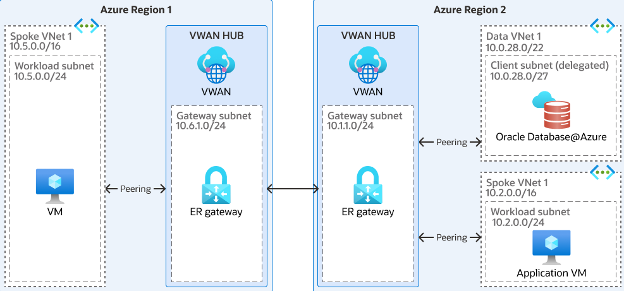
This topology enables cross-region connectivity for Oracle Database@Azure over the Azure backbone network. An Azure Virtual WAN (vWAN) hub is deployed in each region that requires connectivity, and the hubs are interconnected to provide regional transit. Firewall services can be deployed within the hubs to enforce centralized security policies, enable traffic inspection, and maintain consistent network controls across regions.
Routing:
- Each VNet, including the Oracle Database@Azure VNet, is attached to the corresponding regional Azure Virtual WAN (vWAN) hub.
- Inter-regional traffic is carried over the Azure backbone, enabling private and efficient cross-region communication.
Use cases:
- Well suited for Oracle Database@Azure regional disaster recovery (DR) and high availability (HA) architectures that require cross-region connectivity.
- Appropriate for distributed application deployments in which application tiers span multiple regions and require access to the database.
Advantages:
- Scalable cross-region connectivity over the Azure backbone, enabling private and efficient communication between regional deployments.
- Improved network segmentation through regional hub-based design, allowing greater isolation and control of traffic flows.
Trade-offs:
- Higher costs due to cross-region data transfer, VNet peering, and the deployment of firewall or network virtual appliance (NVA) services.
- Increased network latency because traffic must traverse across regions.
- Greater routing and operational complexity, particularly in environments with multiple hubs, peerings, and centralized security controls.
Cross-AZ connectivity for disaster recovery over OCI backbone
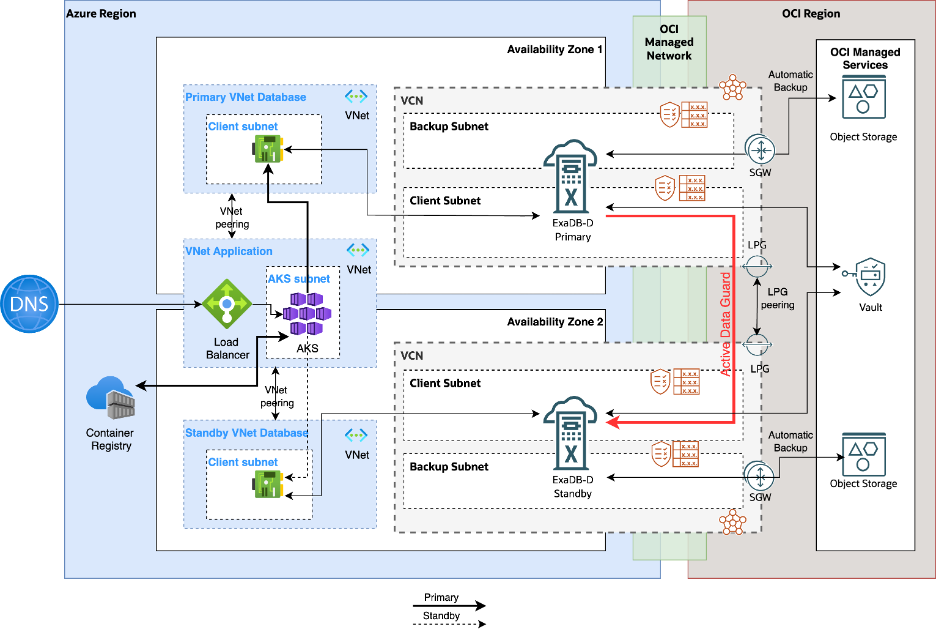
This topology supports a single-region, cross-Availability Zone (AZ) disaster recovery architecture for Oracle Database@Azure by using the Oracle backbone for database synchronization and failover readiness. In this design, the primary and secondary Oracle Database@Azure databases are deployed in separate AZs to provide high availability and fault isolation within the same region. The application tier resides in a dedicated VNet, which is directly peered with both the primary and secondary Oracle Database@Azure VNets to enable database connectivity. Oracle Data Guard or Active Data Guard is used to replicate data between the primary and standby databases, ensuring synchronization and supporting high availability.
Routing:
As part of the automated provisioning process, separate shadow VCNs are created in OCI for the primary and secondary delegated subnets in Azure. The Dynamic Routing Gateways (DRGs) associated with these VCNs are managed by Oracle and are not accessible for customer-managed connectivity or other custom networking purposes. In addition, because a VCN can be attached to only one DRG at a time, connectivity between the primary and secondary VCNs must be established by using Local Peering Gateways (LPGs). Overview of the configuration steps:
- Create Local Peering Gateways (LPGs) in each of the primary and secondary VCN
- Peer the LPGs together
- Update the route tables of the client subnets to point the traffic towards the other VCN to the respective LPG created in that VCN
Advantages:
This option offers a lower-cost connectivity model for single-region, cross-AZ disaster recovery. Because OCI does not charge for same region data transfer or Local Peering Gateway (LPG) connectivity, it can be more cost-effective.
Trade-offs:
As a single-region DR architecture, this topology does not provide protection against regional failures. A region-wide outage can impact both the primary and secondary deployments, making this option less robust than a cross-region DR strategy.
Cross-region connectivity for disaster recovery over OCI backbone
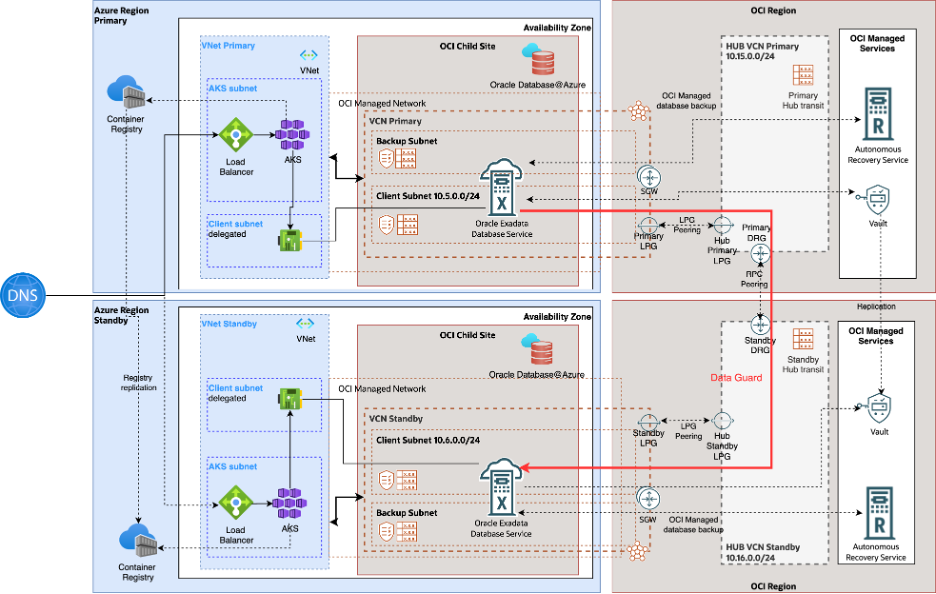
This topology supports the cross-region disaster recovery scenario for Oracle Database@Azure using Oracle backbone. In this topology, primary and secondary databases for Oracle Database@Azure are deployed in different regions for high availability. Applications reside in their own dedicated VNets and are replicated in both the regions. Application VNets are peered to the Oracle Database@Azure VNets in the respective regions. Data guard or active data guard is used to sync up the primary and standby databases to achieve high availability.
Routing:
As part of automated provisioning, separate shadow VCNs are created in OCI in the designated primary and secondary regions, corresponding to the primary and standby delegated subnets in Azure. The Dynamic Routing Gateways (DRGs) associated with the shadow VCNs are managed by Oracle and are not available for customer-managed connectivity or other custom networking purposes. Unlike the single-region topology, Local Peering Gateways (LPGs) alone cannot be used to connect these VCNs because LPGs support peering only within the same OCI region. To enable cross-region connectivity, additional networking components such as transit VCNs, customer-managed DRGs, and Remote Peering Connections (RPCs) must be deployed. Overview of the configuration steps:
- Provision a transit VCN in each region.
- Provision a transit DRG in each region and attach the transit VCN to it.
- Create the required LPGs across the participating VCNs.
- Peer each shadow VCN with its regional transit VCN through LPGs.
- Configure RPC between the transit DRGs in the two regions.
- Update the LPG route tables to forward remote-region VCN CIDRs to the local DRG.
- Update the client subnet route tables to forward remote-region VCN CIDRs to the local LPG.
For detailed step-by-step guidance on implementing this topology, refer to the documentation here:
Advantages:
- This option provides a cost-efficient connectivity model for cross-region disaster recovery. OCI does not charge for Dynamic Routing Gateways (DRGs) or Local Peering Gateways (LPGs), and cross-region data transfer charges are minimal, applying only after the first 10 TB per month.
- It delivers the highest level of resilience by supporting regional failover, helping maintain service continuity in the event of a region-wide outage.
Trade-offs:
This approach introduces additional design complexity because it requires provisioning extra OCI networking components, such as transit VCNs, DRGs, LPGs, and Remote Peering Connections (RPCs), along with the associated route table configuration.
NOTE:
For topologies 3 and 4, additional networking resources must be provisioned in OCI. Before implementation, verify that the tenancy has sufficient service limits for the required resources. If the available limits are insufficient, submit a support service request (SR) to have them increased.
Conclusion
This blog reviewed several frequently used advanced network topologies for Oracle Database@Azure and outlined the use cases, advantages, and trade-offs associated with each. However, these topologies are not the only options available. Because customer requirements differ, some deployments may require a custom connectivity architecture designed to meet specific business and technical needs.