
Introduction
Application monitoring is critical for business continuity: it provides deeper insights on application performance, status, and security events. It also helps in user adoption of deployed SaaS Applications – as it provides insight how frequently applications are used.
Few examples of application monitoring include –
- List of users who are logging in and from where?
- Who created reports?
- How are reports performing?
- Long running ESS jobs, executed & scheduled jobs details.
- How many active/inactive users?
- Track any transactional change – who did & what was changes done?
- Security changes – user lost access or gained unexpected access & who did that?
Below diagrams depicts Fusion cloud applications audit & monitoring capabilities.
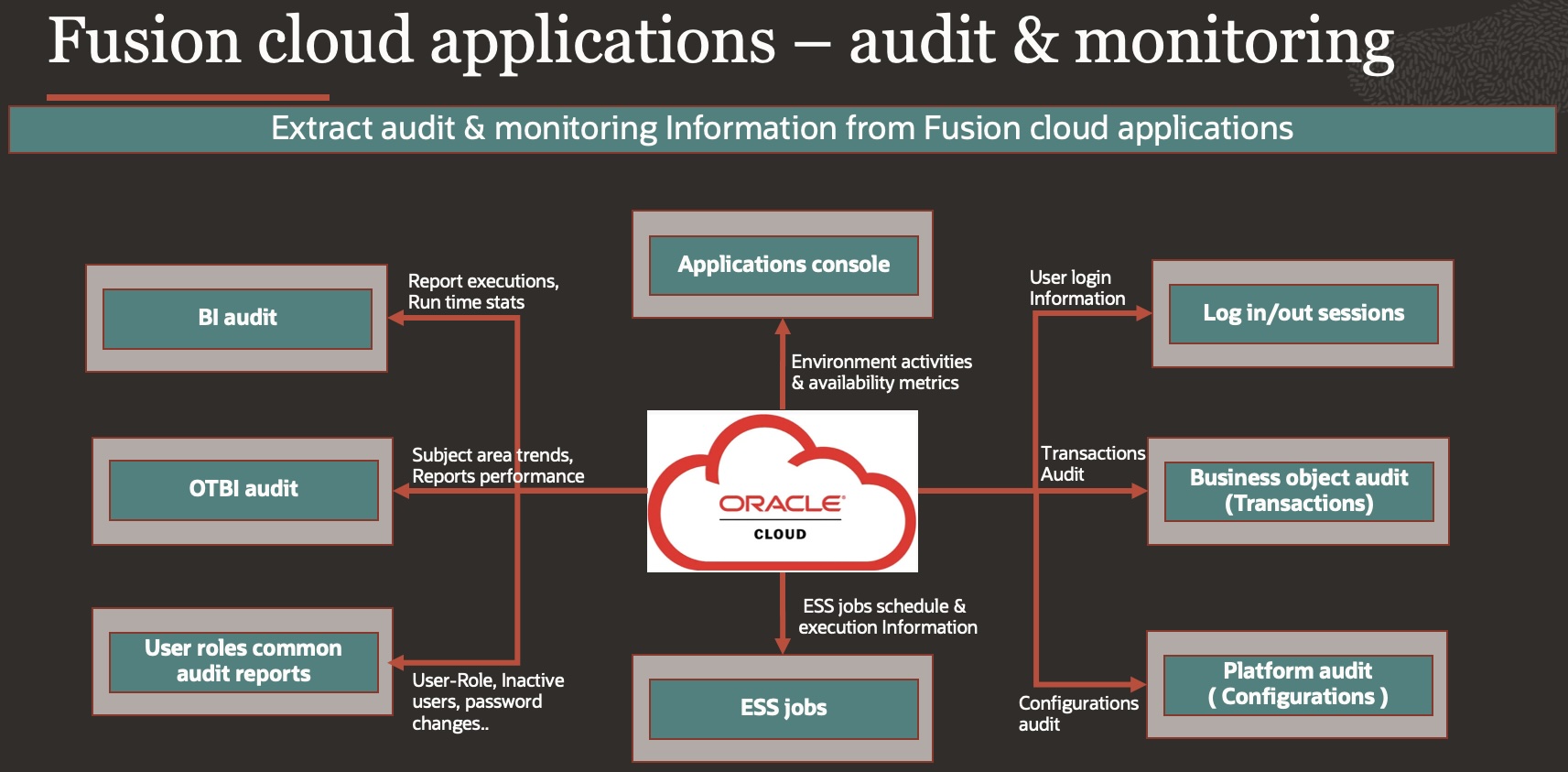
Earlier we have covered how fusion cloud application provides monitoring data – Five key Fusion Cloud Applications monitoring features for better user adoption & further provided information over audit aspects with Integrating a SIEM solution – Integrating a SIEM solution with Oracle Cloud Applications using audits
In this blog we will provide a matrix detailing various extraction methods that you can use to extract audit & monitoring data from Fusion cloud applications into a security information and event management (SIEM) tool.
Details:
We will go in details for below audit areas along with retention information so that you can plan your integrations schedule to get data from Fusion cloud applications on timely basis. Transactions, security related & performance data can be extracted on daily basis, wherein configurations data can be extracted weekly, however it depends upon requirement & use case.
| Audit Areas | Retention |
| BI Audit | A retention period of 90 days has been set for BI Publisher Audit data in Fusion SaaS environment |
| OTBI Audit | Six months of OTBI execution data is available in 20D, Data older than six months is purged weekly. |
| Fusion Applications UserRoles Common Audit Reports | There is no retention period for Audit data as there is no purging done from audit code. However, audit tables are purged during the P2T/Data masking process. |
| Fusion Business Object Audit | There is no retention period for Audit data as there is no purging done from audit code. However, audit tables are purged during the P2T/Data masking process. |
| Fusion Platform Audit | There is no retention period for Audit data as there is no purging done from audit code. However, audit tables are purged during the P2T/Data masking process. |
| Fusion Sessions Information | Pre IAM upgrade – Fusion Login- logout data is stored for past 7 days only. To maintain an audit history, it is recommended to invoke and store the Audit REST API output on a weekly basis. Post IAM Upgrade – Session information is stored in OCI Audit available for 1 year |
| ESS Jobs Information | Retention period is 60 days (Any records in which sysdate – Process end date > 60 will be purged) The physical purge is run monthly on all environments, the 1st weekend on Stage environments and 3rd weekends on Production environments. |
| Cloud Console | As of now 3 Months. * May change later, log SR to get latest update. |
Audit Matrix
Below matrix provides details of audit Area – what kind of information can be extracted using possible extraction methods, MOS Notes and reference documents are provided for individual audit information.
| Audit Area | Document | Description | Extraction Methods | ||
| 1 | BI Audit | ||||
| a | Audit reports | How To Configure And Use Audit In BI Publisher For Fusion SaaS Cloud Customers? (Doc ID 2059102.1) | The following 6 reports are available as sample Reports built using Audit Data: Audit Reports a. Audit Data for Report Execution b. Audit Data for Catalog Object Updates Usage Reports a. Hourly Concurrency b. Report Execution-Time Metrics c. Report Performance by Report Type d. Runtime Statistics | BIP Reports | |
| b | Track delete , archive and unarchive events In BI | Fusion Applications – How to Track Delete , Archive and Unarchive Events In BI (Doc ID 2930706.1) | Following are the list of “Event Type” – BI Analysis Accessed BI Dashboard Accessed BI Catalog Object Created BI Catalog Object Deleted BI Catalog Object Updated BI Catalog Object ACL Set | Audit Reports/API | |
| 2 | OTBI audit | ||||
| a | Audit reports | How To Configure And Use Audit For Usage and Performance In OTBI For Fusion SaaS Cloud Customers (Doc ID 2731495.1) | Two OTBI Usage Subject Areas available in 20D • OTBI User Subject Area • OTBI Performance Subject Area OTBI Usage Real Time: Monitors OTBI usage, including user, analysis and dashboard, and subject area usage trends. OTBI Performance Real Time: Monitors usage trends and OTBI analysis execution time, execution errors, and database physical SQL execution statistics. Create BIP Reports based on OTBI/Analysis,over that BIP reports ESS Jobs can be created & Scheduled. Note – Excel output download limit is 25K for CSV – 75K Fusion OTBI – How To Export More Than 65000 Records From OTBI (Doc ID 2247962.1) | BIP Reports | |
| 3 | User roles rommon rudit reports | ||||
| a | User details system extract report | Reports and Analytics work area : Shared Folders > Human Capital Management > Workforce Management > Human Resources Dashboard. | The Oracle BI Publisher User Details System Extract Report includes details of selected Oracle Fusion Applications user accounts | BIP Reports | |
| b | Person user Information reports | Reports and Analytics work area : Shared Folders > Human Capital Management > Workforce Management > Human Resources Dashboard | This topic describes the Person User Dashboard and Person User Information Oracle Business Intelligence Publisher reports. Use these reports to extract the history of a specified Oracle Fusion Cloud HCM user | BIP Reports | |
| d | View role Information using security dashboard | Reports and Analytics work area : Shared Folders > Security > Transaction Analysis Samples > Security Dashboard | As an IT Security Manager, you can use the Security Dashboard to get a snapshot of the security roles and how those roles are provisioned in the Oracle Cloud Applications. | BIP Reports | |
| e | LDAP request Information reports | Reports and Analytics work area : Shared Folders > Human Capital Management > Workforce Management > Human Resources Dashboard. | This topic describes the LDAP Request Dashboard and LDAP Request Information reports. Use these reports to extract information about the status of LDAP requests | BIP Reports | |
| f | Inactive users report | ESS Job – Inactive Users Report | Scheduling the Import User Login History process to run daily is a prerequisite to get a valid report about inactive users. | ERP Integration Service | |
| g | User and role access audit report | ESS Job – User and Role Access Audit Report | The User and Role Access Audit Report provides details of the function and data security privileges granted to specified users or roles. This information is equivalent to the information that you can see for a user or role on the Security Console. | ERP Integration Service | |
| h | User role membership report | ESS JOB – User Role Membership Report | The User Role Membership Report lists role memberships for specified users. | ERP Integration Service | |
| i | User and role access audit report | ESS JOB – User and Role Access Audit Report | The User and Role Access Audit Report provides details of the function and data security privileges granted to specified users or roles. This information is equivalent to the information that you can see for a user or role on the Security Console. | ERP Integration Service | |
| j | User password changes audit report | ESS Job – User Password Changes Audit Report | This report identifies users whose passwords were changed in a specified period. You must have the ASE_USER_PASSWORD_CHANGES_AUDIT_REPORT_PRIV function security privilege to run this report. The predefined IT Security Manager job role has this privilege by default | ERP Integration Service | |
| k | View locked users and unlock users | ESS Job – Locked Users | A user gets locked in the application on entering incorrect password for multiple times. The locked users report provides the list of locked users for both these scenarios. | ERP Integration Service | |
| l | User adoption Report | Security Reports in Fusion Application (Doc ID 2210883.1) | 1.Sign in to the application as a sales administrator. 2.Go to the Setup and Maintenance work area 3.Search for the Manage Administrator Profile Values task and go to the task page. 4.On the Manage Administrator Profile Values page, search for the profile option code FND_TRACK_USER_ACTIVITY. 5.Set the site level profile value to Enabled. 6.Click Save and Close. Then, write your query to generate a BI report For example, to query the number of logins by month per user select user_name, to_char(active_date, ‘MON’) month, count(*) active_days from fnd_session_user_activity group by user_name, to_char(active_date, ‘MON’) Fusion Applications BI Publisher : How Can I Use BI Publisher to Run SQL Against the Fusion Applications Database ? (Doc ID 1910762.1) | BIP Reports | |
| 4 | Fusion business object audit [ Transactions ] | ||||
| Common fusion application audit configurations | Enabling Audit Functionality in Fusion Applications | ||||
| a | Audit oracle HCM cloud | Auditable Oracle HCM Cloud Business Objects | 1.Setting Up Audit and Audit Reports in Fusion Application ? (Doc ID 1917679.1) – How to setup Audit Reports for Human Capital Management https://support.oracle.com/epmos/faces/DocumentDisplay?id=1917679.1 2.Sample Audit Report for Human Capital Management Cloud https://community.oracle.com/customerconnect/discussion/46163/sample-audit-report-for-human-capital-management-cloud For a complete list of Business Objects available by product, go to the application using the path Setup and Maintenance> Search > Manage Audit Policies> and selecting the product. | Audit Reports/API | |
| b | Audit Oracle ERP cloud | Audit Configuration for Business Object Attributes | 1.How to get a full list of business object types for Enterprise Resource Planning? Get An Audit Report – List Of BusinessObjectType (Doc ID 2666968.1) https://support.oracle.com/epmos/faces/DocumentDisplay?id=2666968.1 2.What Business Object Attributes Are Available to Audit Within Accounts Receivables Module and How to Perform an Audit Trail? (Doc ID 2638225.1) https://support.oracle.com/epmos/faces/DocumentDisplay?id=2638225.1 3.Auditing Payables Business Objects https://docs.oracle.com/en/cloud/saas/financials/23d/faipp/auditing-payables-business-objects.html For a complete list of Business Objects available by product, go to the application using the path Setup and Maintenance> Search > Manage Audit Policies> and selecting the product. | Audit Reports/API | |
| c | Audit Oracle SCM cloud | Business Objects with Auditing allowed in SCM | For a complete list of Business Objects available by product, go to the application using the path Setup and Maintenance> Search > Manage Audit Policies> and selecting the product. | Audit Reports/API | |
| d | Audit Oracle Sales cloud | Auditable sales Business Objects | For a complete list of Business Objects available by product, go to the application using the path Setup and Maintenance> Search > Manage Audit Policies> and selecting the product. | Audit Reports/API | |
| e | HCM Sensitive Data Audit | Sensitive data in the HCM | Using OTBI Analysis – Workforce Management – Sensitive Data Access Audit Real Time, You Track and report details of access to sensitive data from Oracle HCM Cloud page. The subject area has some key information available for reporting as below: Viewed Person Details – Details of the person whose data has been accessed Viewer Person Details – Details of the person whose has accessed sensitive data Viewed Page Name Viewed Sensitive Data Viewed Date and time Viewer IP address, Browser, Operating system, etc.. https://docs.oracle.com/en/cloud/saas/human-resources/24d/faohb/Workforce-Management–Sensitive-Data-Access-Audit–SA-100.html Create BIP Reports based on OTBI/Analysis,over that BIP reports ESS Jobs can be created & Scheduled. Note – Excel output download limit is 25K for CSV – 75K Fusion OTBI – How To Export More Than 65000 Records From OTBI (Doc ID 2247962.1) | BIP Reports | |
| 5 | Fusion platform audit [Configurations] | ||||
| a | Audit Events for Oracle applications cloud middleware | Doc ID 2114143.1 | This document provides information about the types of audit events and associated attributes, including which category each event belongs to Oracle Enterprise Scheduling Service (ESS), SOA, Sandbox, Platform Security | Audit Reports/API | |
| b | Fusion application roles audit | Doc ID 2175861.1 | How to Audit Security Customization (Role Creation, Role Modification, Role Membership, Entitlement/ Privilege Changes) in Fusion Application | Audit Reports/API | |
| c | Fusion application BPM approval rules audits | Doc ID 2053746.1 | How do administrators audit changes to SOA (Service Oriented Architecture) such as approval rules in Fusion Applications? | Audit Reports/API | |
| d | How to audit the changes made to the framework Audit Policies? | Doc ID 2723316.1 | As an alternative , run this query in BI Publisher which shows what attributes, belonging to which objects are enabled for audit on your Fusion environment. select VIEW_OBJECT, VIEW_ATTRIBUTE, AUDIT_SWITCH from fusion.fnd_audit_attributes where ENABLED_FLAG=’Y’ order by 1; Fusion Applications BI Publisher : How Can I Use BI Publisher to Run SQL Against the Fusion Applications Database ? (Doc ID 1910762.1) https://support.oracle.com/epmos/faces/DocumentDisplay?id=1910762.1 | BIP Reports | |
| 6 | Fusion sessions Information | ||||
| a | Fusion Applications login, log out Information | Pre IAM upgrade Doc ID 2661308.1 Post IAM upgrade KB181606 – How to generate login/logout audit report for Oracle Fusion Cloud Application using OCI Audit? | Audit REST API – Track the last seven days of User Sign In and Sign Out activity 1.Get total count of audit events: 2.Get audit event details | To maintain an audit history it is recommended to invoke and store the Audit REST API output on a weekly basis. Note – This does NOT trace login through REST APIs and WebServices Calls. Note – This API is subject to change post Identity Migration upgrade Refer – Methods and ways to extract Session Information using OCI Audit and Integrate into external systems | |
| 7 | ESS Jobs | ||||
| a | Sample SQL Queries for monitoring enterprise scheduler service (ESS) | Doc ID 2820161.1 | 1.Get ESS Jobs Summary. 2.Show All ESS Schedules 3.Scheduled Jobs that Ended 4.Count of ESS Jobs Submitted in the Last 24 Hours 5.ESS Jobs Submitted in the Last 30 Days 6.ESS Jobs that May Block Other Jobs from Running 7.ESS Jobs that Require Review 8.High Frequency ESS Schedules 9.Check Ready Jobs 10.Average Completion Run Time of Jobs in the Last Hour 11.Duplicate ESS Jobs in Running Mode 12.Jobs Completed in the Last Hour with Success Message 13.ESS Jobs Running or Cancelling More than 24 Hours 14.ESS Jobs Failed Due to BIP There is no seeded report, create your own report in BIP (BI Publisher) Fusion Applications BI Publisher : How Can I Use BI Publisher to Run SQL Against the Fusion Applications Database ? (Doc ID 1910762.1) https://support.oracle.com/epmos/faces/DocumentDisplay?id=1910762.1 | BIP Reports Refer – Beyond Monitoring : AI-Driven Fusion ESS Job Health & Risk Observatory – Operational Intelligence for ESS Jobs with OCI Log Analytics | |
| b | How to obtain a report that will provide information about what process is scheduled? | Query the following table for information – FUSION_ORA_ESS.REQUEST_HISTORY Doc ID 2430380.1 Related Information – 1.What are all different ESS statuses and their meaning? Doc ID 1992235.1 https://support.oracle.com/epmos/faces/DocumentDisplay?id=1992235.1 2.How to View the Output of an ESS Jobs Submitted By Another User Based on Role? Doc ID 1992235.1 https://support.oracle.com/epmos/faces/DocumentDisplay?id=1992235.1 | 1. Find all the schedules SELECT x.REQUESTID,x.NAME,x.DEFINITION,x.SCHEDULESTATE, x.LASTSCHEDULEINSTANCEID FROM FUSION_ORA_ESS.REQUEST_HISTORY x where x.parentrequestid = -1 and x.REQUESTTYPE=2 and x.state = 1 2. Find all the schedules for a specific ESS job. SELECT x.REQUESTID,x.NAME,x.DEFINITION,x.SCHEDULESTATE, x.LASTSCHEDULEINSTANCEID FROM FUSION_ORA_ESS.REQUEST_HISTORY x where x.definition = ‘JobDefinition://oracle/apps/ess/search/OracleSearchCrawler’ and x.parentrequestid = -1 and x.REQUESTTYPE=2 There is no seeded report, create your own report in BIP (BI Publisher) Fusion Applications BI Publisher : How Can I Use BI Publisher to Run SQL Against the Fusion Applications Database ? (Doc ID 1910762.1) https://support.oracle.com/epmos/faces/DocumentDisplay?id=1910762.1 | BIP Reports | |
| c | How can I see the parameters details for one ESS job? | select * from FUSION_ORA_ESS.request_property where requestid=ESS_REQ_ID; | There is no seeded report, create your own report in BIP (BI Publisher) Fusion Applications BI Publisher : How Can I Use BI Publisher to Run SQL Against the Fusion Applications Database ? (Doc ID 1910762.1) https://support.oracle.com/epmos/faces/DocumentDisplay?id=1910762.1 | BIP Reports | |
| 9 | Cloud console monitoring | ||||
| a | Cloud Portal > Applications Console | Monitor Oracle Cloud Account. | REST API to retrieve console data >List Refresh Activities >List Scheduled Activities >List fusion Environments >List data masking Activities >Availability Metrics | Environment Activities & Availability Metrics – |
Extraction Methods
BIP Report
Using BIP Report as ESS Job – Asynchronous mode – Recommended
This mode enables you to schedule a job to be executed at specific intervals not subject to timeout restrictions
Creating an Oracle Enterprise Scheduler (ESS) Job –
You register the Oracle Business Intelligence Publisher report as an Oracle Enterprise Scheduler (ESS) Job to run an integration in asynchronous mode. This mode enables you to schedule a job to be executed at specific intervals not subject to timeout restrictions –
There are two delivery options –
a. Deliver to UCM – Using the Oracle ERP Cloud Adapter and SOAP Adapter
- Create a BIP report to schedule/execute and configure the report so that the report response is deposited to UCM.
- Create a custom ESS job, then execute the BIP report
- Create an Oracle ERP Cloud Adapter invoke connection using the Erp Integration Service and choose the exportBulkData operation. Ensure that the jobName is set to the custom ESS job created in step 2. jobOptions are set with EnableEvent=Y. This enables an event when the job is completed.
- Create an Oracle ERP Cloud Adapter trigger connection to subscribe to the ExportBulkDataEvent. This provides a documentId in the event payload that is deposited in UCM.
- Create a SOAP Adapter invoke using the UCM web service (GenericSoapService) and GET_FILE command in the operation to get the BIP report response as an attachment.
b. Deliver to FTP: (Using BI Report Delivery Option)
- Configure the BI report to place the report response in FTP.
- Create a custom ESS job in Oracle Fusion Applications to execute the BIP report.
- Submit the ESS job using the ESS web service. See Implement Oracle Enterprise Scheduler Web Service Calls.
- Get the response from FTP as an attachment once the job completes and the callback is received.
Using BIP Report Services – Synchronous Mode
Calling BI report services synchronously with the SOAP Adapter is used only for short-running and/or small size reports, which are not frequently executed.
ExternalReportWSSService: runReport method
Audit Report/API
Since fusion release 7, Oracle introduced an auditing function, which allow customer to use task Manage Audit Policies to turn on audit logging for changes made in fusion application and provided an interface (Navigator -> Tools: Audit Report) to view the audit log entries.
For a complete list of Business Objects available by product, go to the application using the path Setup and Maintenance> Search > Manage Audit Policies> and selecting the product.
Audit data can be extracted by below methods –
1. Using Standard ESS Job ‘Generate Audit Report’ to run the Audit Report. (Asynchronous mode)
- Create an Oracle ERP Cloud Adapter invoke connection using the Erp Integration Service and choose the exportBulkData operation. Ensure that the jobName is set to the standard ESS job – ‘Generate Audit Report’. jobOptions are set with EnableEvent=Y. This enables an event when the job is completed.
- Create an Oracle ERP Cloud Adapter trigger connection to subscribe to the ExportBulkDataEvent. This provides a documentId in the event payload that is deposited in UCM.
- Create a SOAP Adapter invoke using the UCM web service (GenericSoapService) and GET_FILE command in the operation to get the BIP report response as an attachment.
2. Using Audit REST API’s – (Synchronous Mode)
- Audit Setup REST Endpoints
- Audit Report REST Endpoints
- Documentation And Samples For Audit REST API ? (Doc ID 2867069.1)
- What Roles Are Needed For A User To Call Audit Webservices? (Doc ID 2425053.1)
Sample Payloads
Audit Setup
End Point – /fscmRestApi/fndAuditRESTService/audittrail/get-auditsetup
Operation – POST
Below query will provide quick list of applications
SELECT DISTINCT webapp FROM FUSION.FND_AUDIT_WEBAPP_AM ORDER BY webappPass Application Name to get Business objects details,below example is for hcmCore
{"application" : "hcmCore"}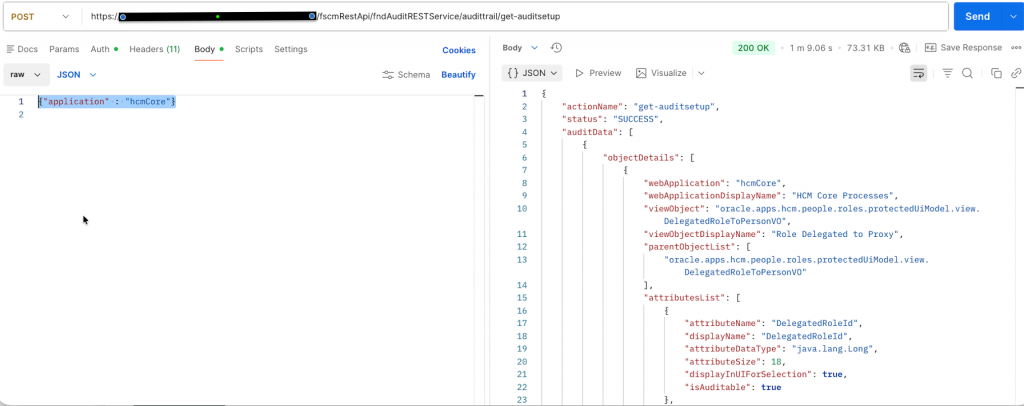
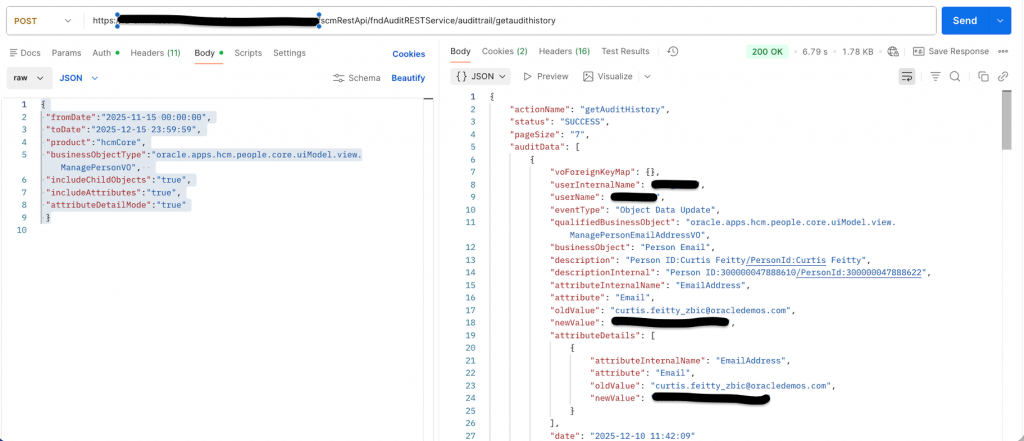
Audit Report
End Point – /fscmRestApi/fndAuditRESTService/audittrail/getaudithistory
Operation – POST
Fusion business object audit [ Transactions ]
Change product to Applications > Business Object on which you have enabled Audit
{
 "fromDate":"2025-11-15 00:00:00",
 "toDate":"2025-12-15 23:59:59",
 "product":"hcmCore",
"businessObjectType":"oracle.apps.hcm.people.core.uiModel.view.ManagePersonVO",
 "includeChildObjects":"true",
 "includeAttributes":"true",
 "attributeDetailMode":"true"
 }
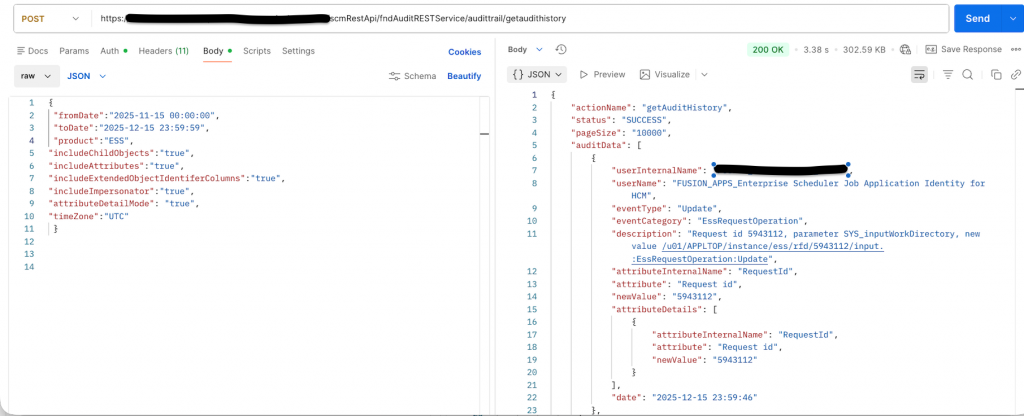
Fusion platform audit [ Configurations ]
We don’t need to pass business object here, change product to Platform audit you have enabled, below example is for ESS, other options can be OPSS (Platform Security – Policy store for fusion ), MDS (Fusion Metadata/Sandbox), SOA (Approval configuration) or ADF (ADF Page definition/Taskflow changes)
{
 "fromDate":"2025-11-15 00:00:00",
 "toDate":"2025-12-15 23:59:59",
 "product":"ESS",
"includeChildObjects":"true",
"includeAttributes":"true",
"includeExtendedObjectIdentiferColumns":"true",
"includeImpersonator":"true",
"attributeDetailMode": "true",
"timeZone":"UTC"
 }
Audit Performance Considerations
Oracle Fusion Audit captures changes only for attributes whose values are modified during a transaction. Enabling audit for a large number of attributes does not automatically generate audit records for every audited attribute unless those attributes are actually update
Audit information is stored in dedicated audit tables and is primarily intended for compliance tracking, monitoring, and reporting purposes. In general, enabling audit does not significantly impact standard transactional UI performance. However, bulk operations such as FBDI loads, mass updates, HDL imports, integrations, or high-volume API transactions on heavily audited business objects may increase transaction processing time and batch execution duration.
As a best practice, audit should be enabled selectively for:
- Key business attributes
- Regulatory or compliance-relevant fields
- Sensitive configuration or security-related data
- Critical financial or operational transactions
A focused audit strategy helps balance compliance requirements with optimal application performance and manageable audit data growth.
Conclusion
We hope with this blog you have better understanding of how various Audit data can be extracted from Fusion Applications after which Integration needs to be built to extract data using mechanisms detailed above and feed into SIEM tools as per use case requirements.
Note: Always refer to the latest documentation
References:
- Five key Fusion Cloud Applications monitoring features for better user adoption
- Integrating a SIEM solution with Oracle Cloud Applications using audits
- Monitoring scheduled processes in Fusion Cloud Applications
- MOS Note – Audit Frequently Asked Questions (FAQ) (Doc ID 2723316.1)
- MOS Note – ESS Frequently Asked Questions (FAQ) (Doc ID 2723272.1)
- Cloud Console Monitoring